Abandoned cart WhatsApp message templates: 10 examples to copy
10 ready-to-copy abandoned cart WhatsApp templates in the format Meta reviews, with timing, cost per country and the mistakes that get a template rejected.
An abandoned cart WhatsApp message is a short template sent to a shopper who left your checkout: their first name, your store name, a button that reopens the saved cart and a way to opt out. Meta treats it as a marketing template, so you need the customer's opt-in to marketing on WhatsApp and Meta's approval of the template before the first send. Send the first reminder about 30 minutes after the checkout is abandoned, one follow-up the next day if they still have not ordered, then stop.
Below are 10 templates written in the format Meta reviews (category, language, body with variables, footer, buttons), with sample values and a note on why each one passes. For the strategy behind them, see our guide to WhatsApp abandoned cart recovery on Shopify.
How a WhatsApp cart template is built
Before WhatsApp lets you send it, a cart message has to become a template: a category, a language code, numbered variables with sample values, and buttons. Meta reviews each piece.
Category: always marketing
Meta sorts every template into one of three categories: marketing, utility or authentication. The category sets the price of each message and who you may send it to.
A cart reminder is marketing. Meta's template categorization guide files it under "retargeting" and uses a cart reminder as its example: "You left {{items}} in your cart! Don't worry, we saved them. Checkout now below." The same page says retargeting messages "are marketing even if requested by users".
Some guides suggest a plain reminder without a discount can pass as utility. Utility covers an order, account or transaction that already exists, and an abandoned checkout has not become one. Since 9 April 2025, a template submitted as utility that Meta judges to be marketing is approved as marketing. Templates already approved as utility can also be switched to marketing later, after one day's notice.
Submit every cart template as marketing from the start. It saves a review round and keeps your account clear of category warnings.
Variables, buttons and the opt-out line
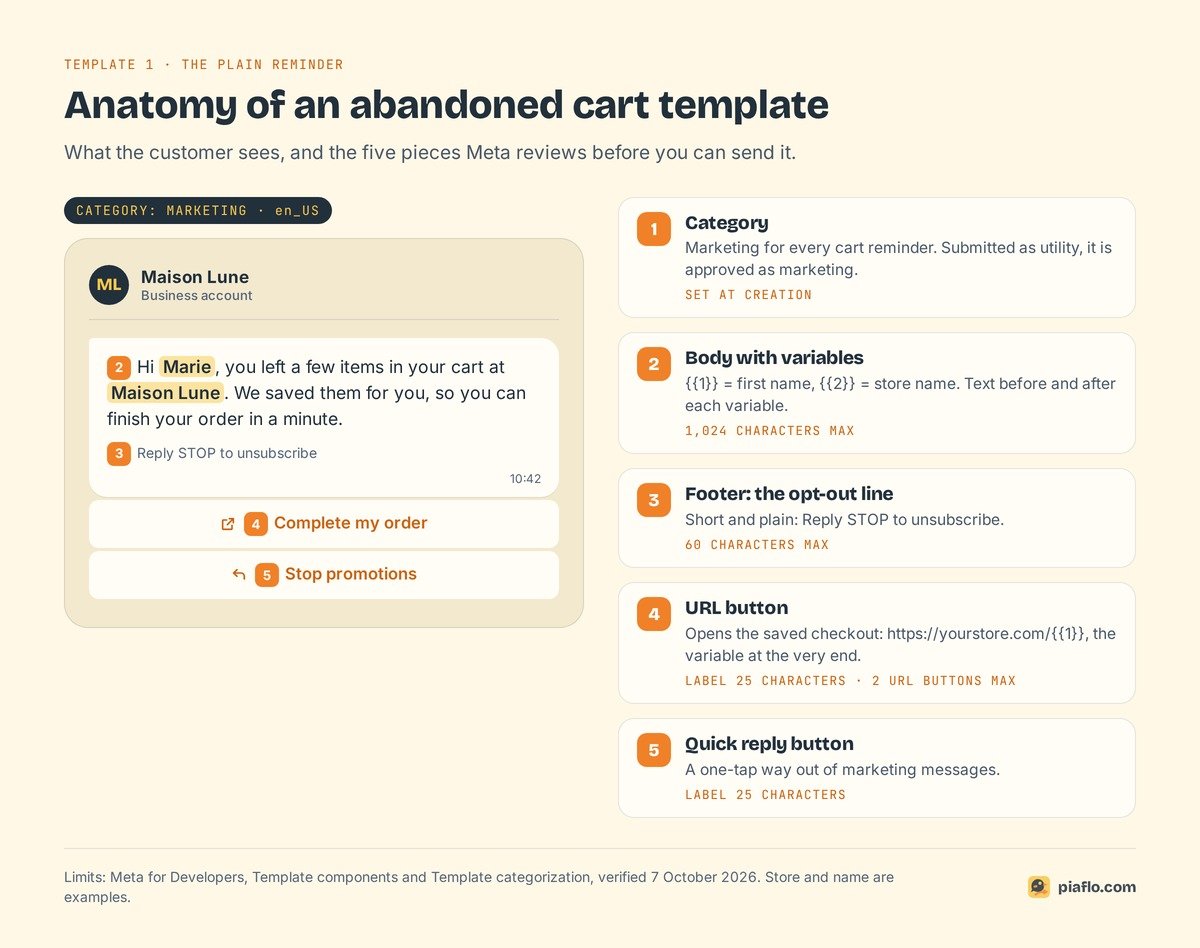
A cart template has four parts:
| Part | What it holds in a cart reminder | Meta limit |
|---|---|---|
| Body | The message, with variables {{1}}, {{2}}... for first name, store, product |
1,024 characters |
| Footer | The opt-out line, for example "Reply STOP to unsubscribe" | 60 characters |
| URL button | "Complete my order", opening the saved checkout | 2 per template, label 25 characters, 1 variable at the end of the URL |
| Quick reply or copy code button | "Stop promotions", or the discount code | Quick reply label 25 characters, code 20 characters, 1 copy code button per template |
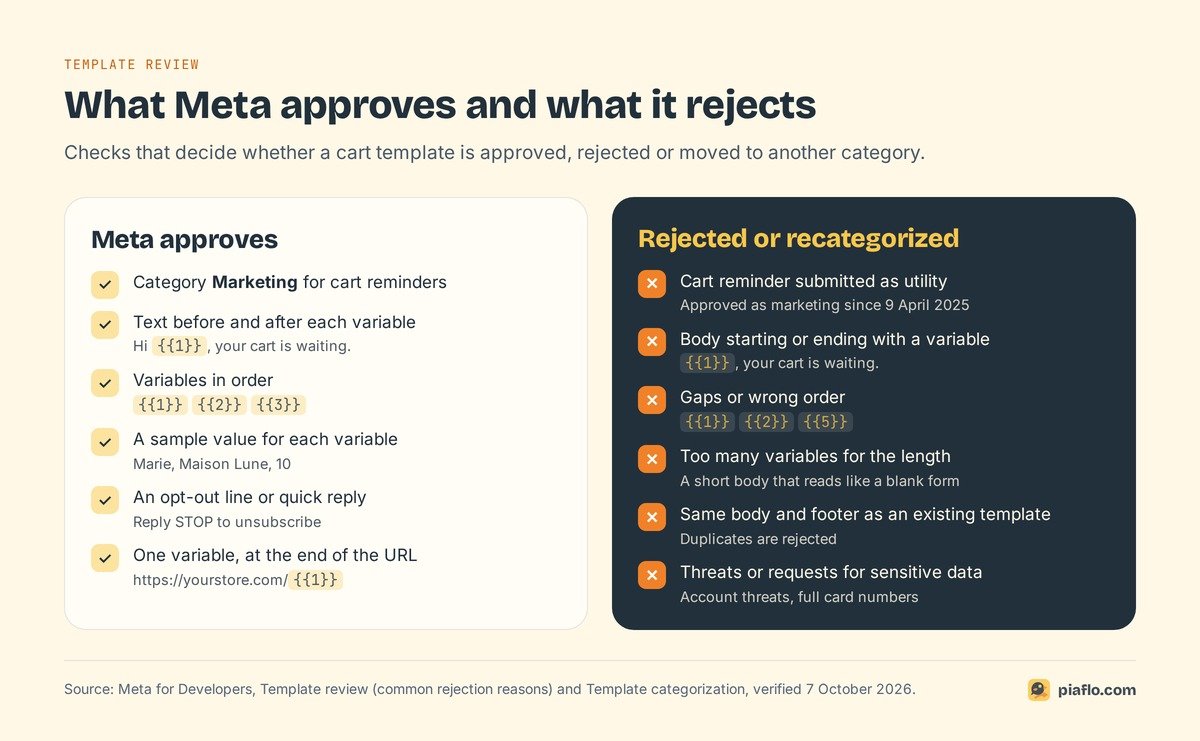
Three rules catch most first submissions:
- Variables are numbered in order (
{{1}},{{2}},{{3}}) and each one needs a sample value, such as "Marie" for the first name. - The body cannot start or end with a variable. "{{1}}, your cart is waiting" is rejected; "Hi {{1}}, your cart is waiting" passes.
- The recovery link goes in the button. Only the end of the URL is variable:
https://yourstore.com/{{1}}, where{{1}}is the rest of the checkout recovery path.
Meta names the quick reply button as the common way to opt out of marketing. Give customers that exit in the message, and honor STOP at once.
First reminder templates (send after about 30 minutes)
The first message has one job: remind. Keep the discount for later. Pick one of these three, or test two against each other.
1. The plain reminder
Name: cart_reminder_1
Category: Marketing
Language: en_US
Body: Hi {{1}}, you left a few items in your cart at {{2}}. We saved them for you, so you can finish your order in a minute.
Footer: Reply STOP to unsubscribe
Button 1 (URL): Complete my order | https://yourstore.com/{{1}}
Button 2 (Quick reply): Stop promotions
Samples: {{1}} = Marie, {{2}} = Maison Lune
Why it passes: two variables with text on both sides and no promise you cannot keep. Use it when orders hold one or two products.
2. The reminder with the product name
Name: cart_reminder_product
Category: Marketing
Language: en_US
Body: Hi {{1}}, your {{2}} is still waiting in your cart at {{3}}. Tap below to pick up where you left off. Your details are already filled in.
Footer: Reply STOP to unsubscribe
Button 1 (URL): Complete my order | https://yourstore.com/{{1}}
Button 2 (Quick reply): Stop promotions
Samples: {{1}} = Marie, {{2}} = linen shirt, {{3}} = Maison Lune
Naming the product helps when customers compare stores. Keep {{2}} short ("linen shirt"), and use template 7 when product titles run long.
3. The reminder that offers help
Name: cart_reminder_help
Category: Marketing
Language: en_US
Body: Hi {{1}}, we noticed you did not finish your order at {{2}}. If something stopped you (sizing, delivery, payment), reply to this message and our team will help.
Footer: Reply STOP to unsubscribe
Button 1 (URL): Complete my order | https://yourstore.com/{{1}}
Button 2 (Quick reply): I have a question
Button 3 (Quick reply): Stop promotions
Samples: {{1}} = Marie, {{2}} = Maison Lune
When the customer replies, a 24-hour customer service window opens and your team can answer with normal messages. It suits higher-priced products, where hesitation is often a question. Someone has to read the replies.
Follow-up templates (send the next day)
The follow-up goes the next day, only to shoppers who have not ordered, with a reason to come back: reassurance, free shipping or a one-time code. Pick one.
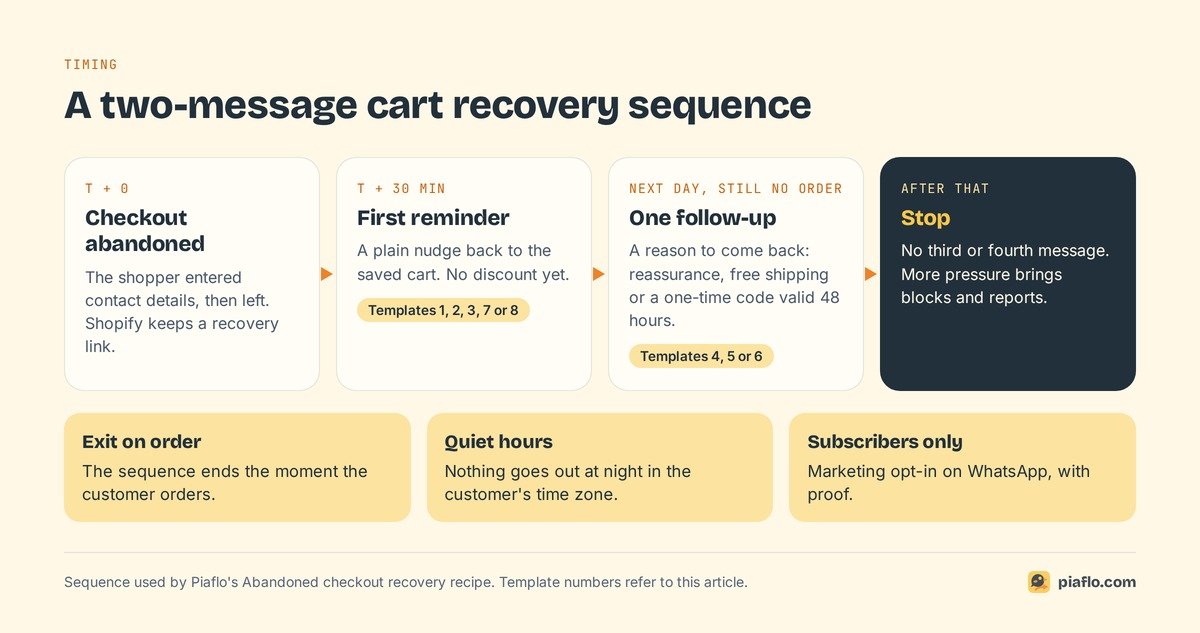
4. Follow-up without a discount
Name: cart_followup_reassure
Category: Marketing
Language: en_US
Body: Still thinking it over, {{1}}? Your cart at {{2}} is saved. Delivery takes {{3}} and returns are free within {{4}} days, so you can order and decide at home.
Footer: Reply STOP to unsubscribe
Button 1 (URL): Complete my order | https://yourstore.com/{{1}}
Button 2 (Quick reply): Stop promotions
Samples: {{1}} = Marie, {{2}} = Maison Lune, {{3}} = 2 to 4 days, {{4}} = 30
Use it when margins cannot carry a discount, or to avoid teaching customers that leaving a cart earns a code. Write only what is true: if returns are not free, put your real policy in the second sentence.
5. Follow-up with a one-time code
Name: cart_followup_code
Category: Marketing
Language: en_US
Body: Hi {{1}}, here is {{2}}% off the items in your cart at {{3}}, valid for 48 hours. Tap Copy code, then complete your order below.
Footer: One-time code. Reply STOP to unsubscribe
Button 1 (Copy code): example PIAF-7KQ2
Button 2 (URL): Complete my order | https://yourstore.com/{{1}}
Button 3 (Quick reply): Stop promotions
Samples: {{1}} = Marie, {{2}} = 10, {{3}} = Maison Lune
The copy code button puts the code on the clipboard in one tap (one per template, 20 characters max). Generate a unique code per checkout so it cannot spread to coupon sites, set the 48-hour expiry on the code in Shopify, and keep the % sign in the text, outside the variable.
6. Follow-up with a free shipping nudge
Name: cart_followup_shipping
Category: Marketing
Language: en_US
Body: Good news, {{1}}: the order waiting in your cart at {{2}} ships for free. Complete it before {{3}} and it leaves our warehouse the next working day.
Footer: Reply STOP to unsubscribe
Button 1 (URL): Complete my order | https://yourstore.com/{{1}}
Button 2 (Quick reply): Stop promotions
Samples: {{1}} = Marie, {{2}} = Maison Lune, {{3}} = Friday 3 pm
It answers the shipping cost question without touching the product price. Send it only to carts that qualify, and only if your dispatch promise holds.
Templates for specific carts and markets
7. Multi-product cart
Name: cart_reminder_multi
Category: Marketing
Language: en_US
Body: Hi {{1}}, your cart at {{2}} still holds {{3}} items, including {{4}}. Everything is saved: tap below to review your cart and check out.
Footer: Reply STOP to unsubscribe
Button 1 (URL): Review my cart | https://yourstore.com/{{1}}
Button 2 (Quick reply): Stop promotions
Samples: {{1}} = Marie, {{2}} = Maison Lune, {{3}} = 3, {{4}} = the linen shirt
Name the first item, give the count and let the checkout page show the rest. "Review my cart" suits a customer who may want to remove something.
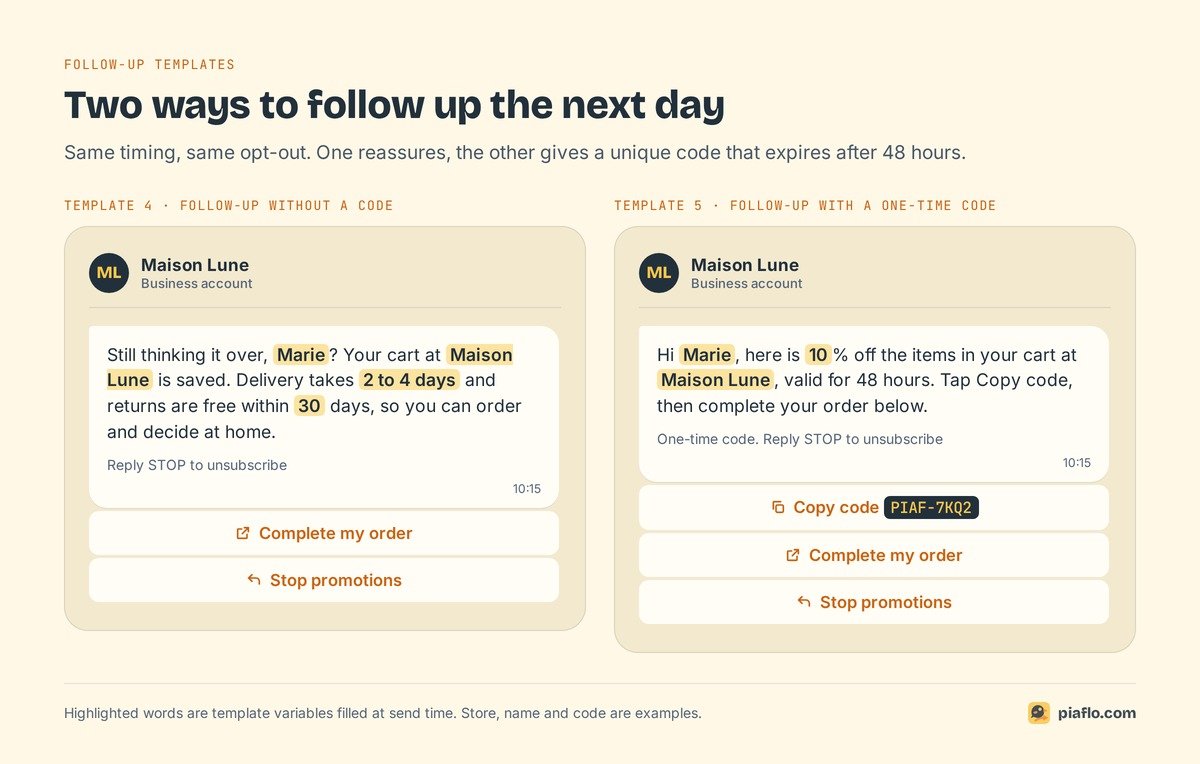
8. Cash on delivery cart
Name: cart_reminder_cod
Category: Marketing
Language: en_IN
Body: Hi {{1}}, your order at {{2}} is one step away. You can pay cash on delivery, so there is nothing to pay now. Tap below to confirm your address and finish your order.
Footer: Reply STOP to unsubscribe
Button 1 (URL): Finish my order | https://yourstore.com/{{1}}
Button 2 (Quick reply): Stop promotions
Samples: {{1}} = Rahul, {{2}} = Maison Lune
In cash on delivery markets (India, Morocco, the Gulf), saying up front that nothing is paid now removes a common worry at the payment step. Pick the market's language code (en_IN, en_AE, or fr_MA for French in Morocco). Once the order is placed, the next message is a confirmation, which is a utility template: see how to confirm cash on delivery orders on WhatsApp.
9. First reminder in French
Name: cart_reminder_1
Category: Marketing
Language: fr
Body: Bonjour {{1}}, vous avez laissé des articles dans votre panier chez {{2}}. Nous les avons gardés pour vous : vous pouvez finaliser votre commande en une minute.
Footer: Répondez STOP pour vous désabonner
Button 1 (URL): Finaliser ma commande | https://yourstore.com/{{1}}
Button 2 (Quick reply): Stop promos
Samples: {{1}} = Marie, {{2}} = Maison Lune
Same name as template 1, different language code: one template name can carry several languages, chosen at send time. Meta translates nothing and reviews each language separately, so have a native speaker check the French.
10. Follow-up with a code in French
Name: cart_followup_code
Category: Marketing
Language: fr
Body: Bonjour {{1}}, voici {{2}} % de réduction sur votre panier chez {{3}}, valable 48 heures. Copiez le code, puis finalisez votre commande ci-dessous.
Footer: Code à usage unique. Répondez STOP pour vous désabonner
Button 1 (Copy code): exemple PIAF-7KQ2
Button 2 (URL): Finaliser ma commande | https://yourstore.com/{{1}}
Button 3 (Quick reply): Stop promos
Samples: {{1}} = Marie, {{2}} = 10, {{3}} = Maison Lune
This footer is 55 characters, close to Meta's limit of 60. French runs longer than English, so count before you submit.
What Meta approves and what it rejects
Meta reviews each template with automated checks and human review. A decision takes up to 24 hours according to Meta's template review page, and simple templates often clear in minutes. A rejected template can be edited and resubmitted, or appealed with sample values.
Category mistakes
- Cart reminder submitted as utility. It comes back approved as marketing. You lose a review round and the pricing you planned on.
- An order update with a promo inside. A shipping notice that adds "10% off your next order" is mixed content, which Meta classifies as marketing. Keep cart reminders and order updates in separate templates.
- A template that says almost nothing. A body of only "{{1}}" or "Congratulations!" is classed as marketing because its purpose is unclear.
Formatting mistakes
From Meta's list of common rejection reasons:
- A variable at the very start or very end of the body.
- Variables out of order or with gaps:
{{1}},{{2}},{{5}}. - Too many variables for the length of the text.
- Broken braces (
{1}or{{1}) or special characters such as#,$or%in a variable. - A body and footer identical to a template you already have. Change the wording for each variant.
Content Meta refuses
- Threats: "Complete your order or we will close your account" counts as threatening content.
- Requests for sensitive data, such as a full card number.
- Products or wording that break the WhatsApp Commerce Policy.
Urgency is left to you: write "only 2 left" only when it is true. Customers who feel tricked block and report, which lowers your number's quality.
Timing, frequency and cost
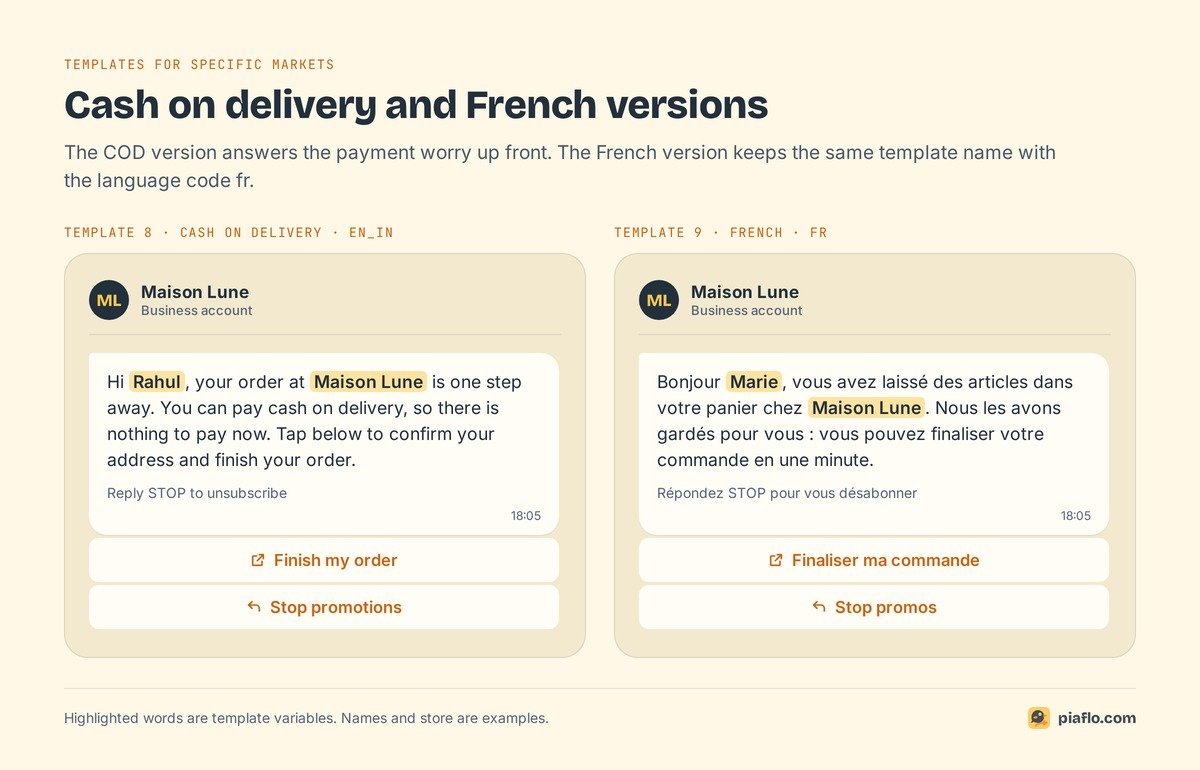
A two-message sequence
A sensible default, and the one Piaflo's recipe uses:
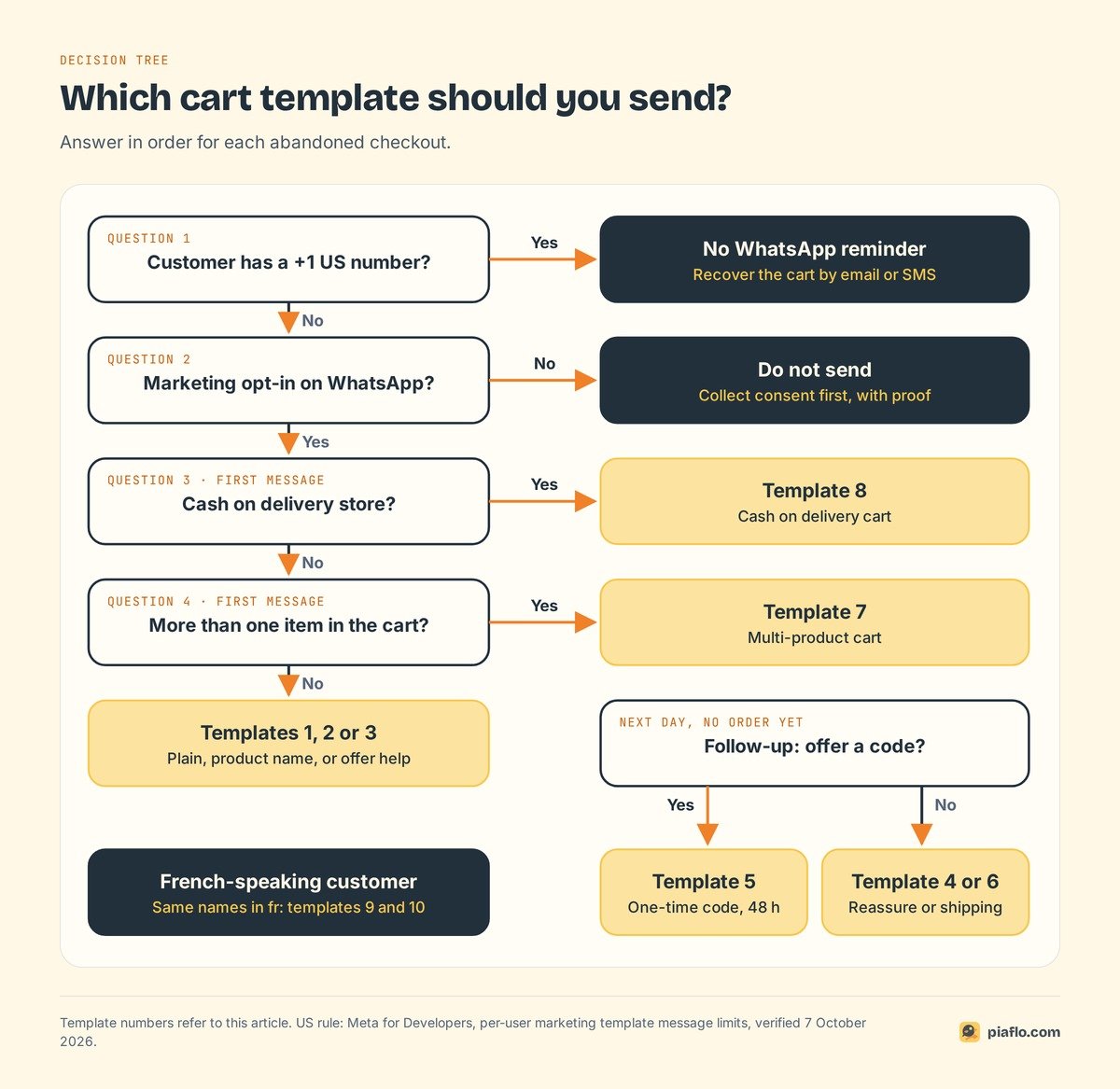
- First reminder about 30 minutes after the checkout is abandoned (template 1, 2, 3, 7 or 8).
- One follow-up the next day, only if no order came in (template 4, 5 or 6). If it carries a code, make it valid for 48 hours.
- Stop. A third and fourth message add pressure and invite blocks.
The sequence ends the moment the customer orders, and nothing goes out at night in the customer's time zone. Only subscribed contacts get it: a phone number typed at checkout is not marketing consent on its own. Our article on WhatsApp marketing consent on Shopify explains how to collect and prove it.
US numbers and delivery limits
Meta's per-user limits page states that WhatsApp "does not currently deliver marketing template messages to WhatsApp users with United States phone numbers". Cart reminders are marketing templates, so a customer with a +1 US number will not receive them. For those customers, cart recovery stays on email and SMS; see what Shopify's abandoned cart emails do and when WhatsApp adds something.
Two more limits explain many "my WhatsApp cart message is not working" complaints:
- Per-user marketing limits. WhatsApp caps how many marketing templates a person receives from all businesses, starting with people who rarely read them. Messages over the cap fail with error 131049; wait at least 24 hours before resending.
- Opt-outs inside WhatsApp. Users can stop marketing from your business in WhatsApp's "Offers and announcements" setting, whatever your own subscriber list says.
What each reminder costs
Meta charges per delivered template message, by category and by the customer's country code. Every cart template is marketing, the most expensive category. Rates from Meta's rate card effective 1 October 2026, linked from its pricing page:
| Customer's country | Marketing rate per message (USD) | 1,000 reminders |
|---|---|---|
| India | $0.0118 | $11.80 |
| Morocco | $0.0414 | $41.40 |
| United Arab Emirates | $0.0576 | $57.60 |
| Saudi Arabia | $0.0576 | $57.60 |
| United Kingdom | $0.0635 | $63.50 |
| France | $0.0859 | $85.90 |
| Germany | $0.1365 | $136.50 |
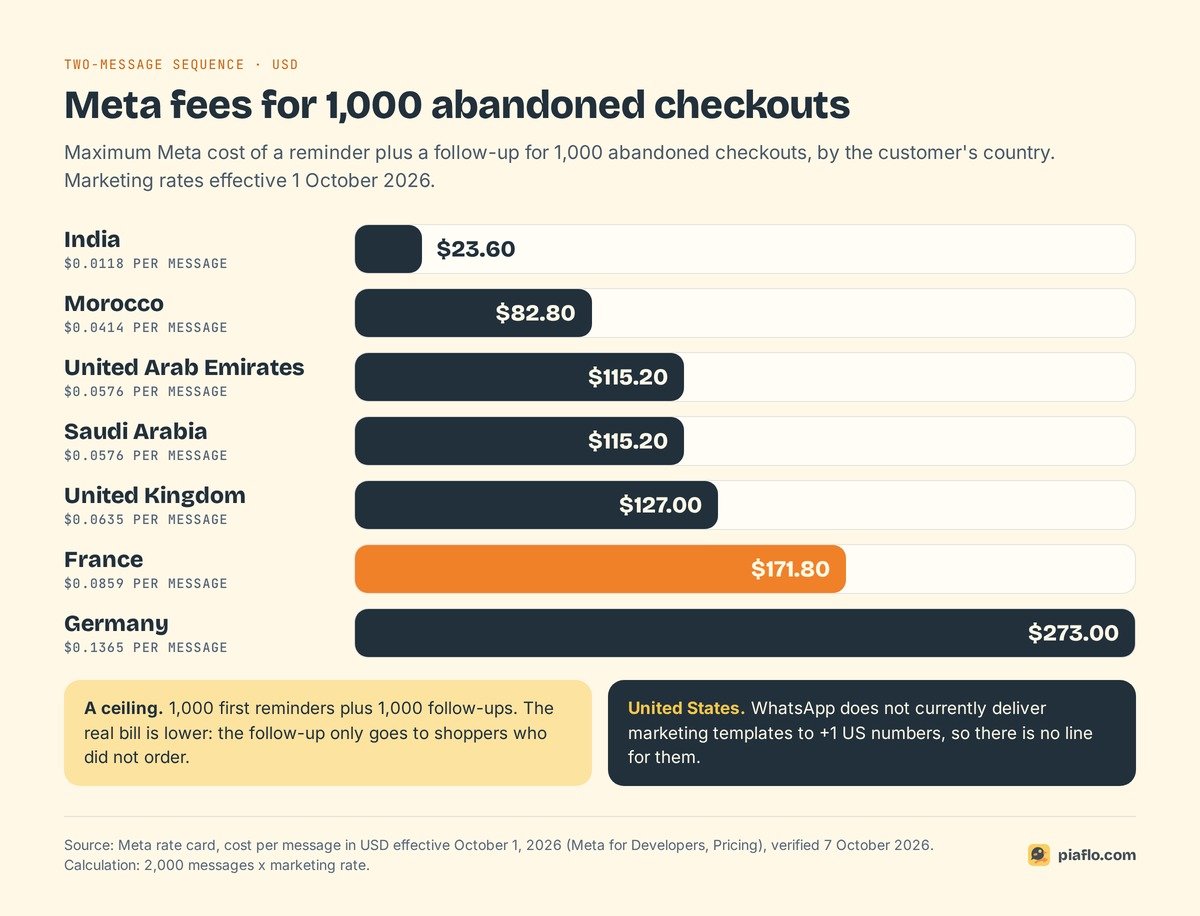
For 1,000 abandoned checkouts in France, the two-message sequence costs at most $171.80 in Meta fees (2,000 messages), and less in practice because the follow-up only reaches shoppers who did not order. The chart below gives that ceiling for each country, from $23.60 in India to $273.00 in Germany. Compare that with your average order value and margin before you pick template 5 over template 4.
Setting it up with Piaflo
Piaflo's Abandoned checkout recovery recipe runs this sequence: a reminder 30 minutes after the shopper leaves, then a one-time 10% code the next day if they still have not ordered, valid for 48 hours. The flow stops as soon as the customer orders, respects quiet hours and only reaches subscribed contacts. Piaflo submits the recipe's templates to Meta in English and French for you, and a customer who replies STOP is unsubscribed right away.
You pay Meta directly for each delivered message at Meta's official rates, with no markup from Piaflo, and the dashboard shows orders and revenue per flow next to the estimated Meta cost. The recipe is included from the Starter plan at $29 per month, with a 14-day trial.
Want to try it? See Piaflo's plans and follow the guide to connect your WhatsApp number. You can also install Piaflo from the Shopify App Store.
Frequently asked questions
Can an abandoned cart message be a utility template?
No. Meta's categorization guide lists a cart reminder ("You left {{items}} in your cart!") as a marketing template and says such retargeting messages are marketing even if the user requested them. Since 9 April 2025, a cart template submitted as utility is approved as marketing.
Can I send WhatsApp cart reminders to customers in the United States?
Not to customers with US phone numbers. Meta states that WhatsApp does not currently deliver marketing template messages to users with a +1 US number, and cart reminders are marketing templates. Use email or SMS for those customers.
How long does Meta take to approve a template?
Up to 24 hours, according to Meta's template review documentation, and often a few minutes for a simple template. If it is rejected, you can edit and resubmit it or appeal with sample values.
Should the first message include a discount code?
Usually not. Many shoppers only need a reminder, and a code in the first message gives away margin on orders that would have come back anyway. Keep a unique, time-limited code for the follow-up the next day.
How much does an abandoned cart WhatsApp message cost?
Meta charges per delivered marketing message, depending on the customer's country. With rates effective 1 October 2026, a message costs $0.0118 to India, $0.0576 to the United Arab Emirates, $0.0859 to France and $0.1365 to Germany. Your WhatsApp tool's subscription comes on top.