Does Shopify send abandoned cart emails? Email vs WhatsApp recovery
Shopify sends one free abandoned checkout email from Shopify Messaging. How it works, why it sometimes does not go out, and when a WhatsApp reminder is worth adding.
Yes. Shopify can automatically email shoppers who leave the checkout after typing their email address. A checkout counts as abandoned once it stays unpaid for ten minutes, and the email carries a link that reopens the exact cart. The automation now lives in the Shopify Messaging app, and it is free: abandoned checkout emails do not count toward the 10,000 emails Shopify gives you each month.
It has limits. It sends one message, on one channel, to shoppers who typed an email address, and a newly created automation waits 10 hours and only writes to marketing subscribers by default. WhatsApp can add a short reminder within the hour for shoppers who opted in to WhatsApp marketing. Meta bills that reminder per message, and it does not deliver marketing messages to US phone numbers at all.
Does Shopify send abandoned cart emails?
Yes, and what changed recently is where you manage it.
Where the setting lives in 2026
The setting used to sit in Settings > Checkout. Shopify is moving it to an automation in the Shopify Messaging app, installed on stores by default. The old setting keeps working until Shopify removes it, and your settings carry over when you switch.
To turn it on or check it:
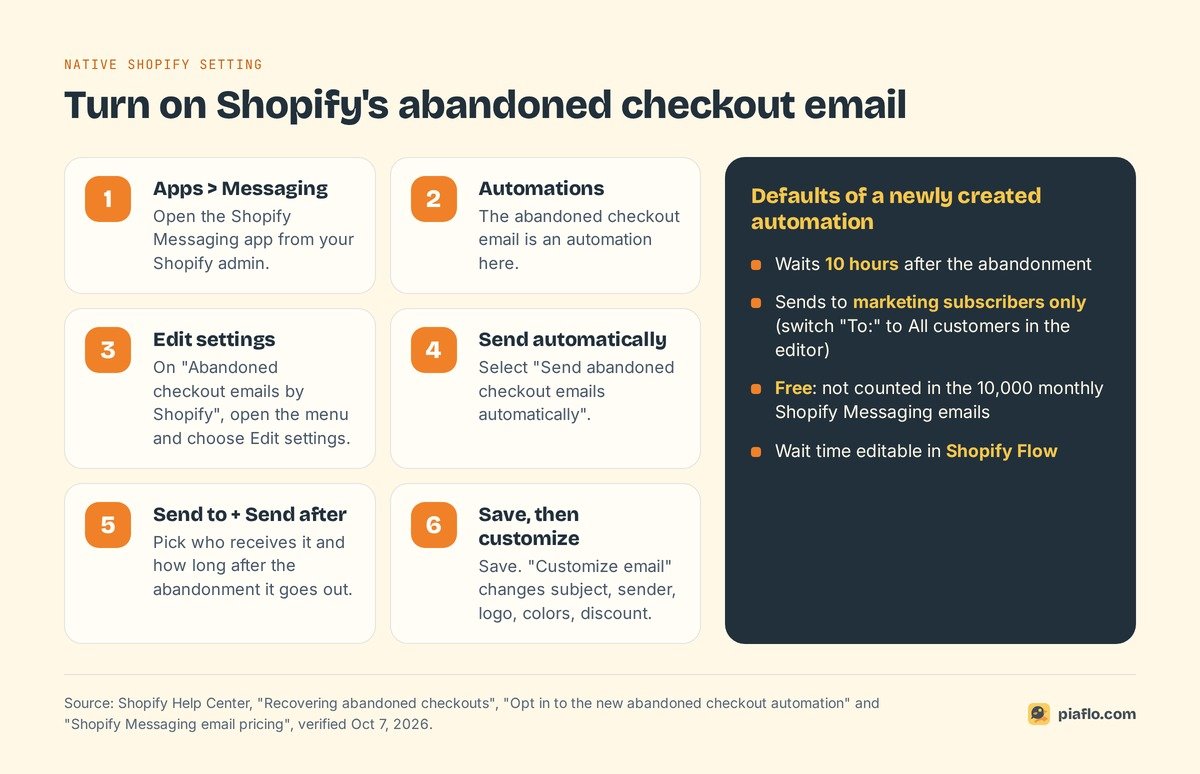
- In your Shopify admin, go to Apps > Messaging.
- Click Automations.
- Open the abandoned checkout automation (on stores that migrated, it is called Abandoned checkout emails by Shopify) and choose Edit settings.
- Select Send abandoned checkout emails automatically.
- Choose who receives it in Send to, and how long after the abandonment it goes out in Send after.
- Click Save, then Customize email if you want to change the design.
The editor lets you change the subject line, preview text, sender address, logo and colors, and add a discount code.
Who gets the email, and when
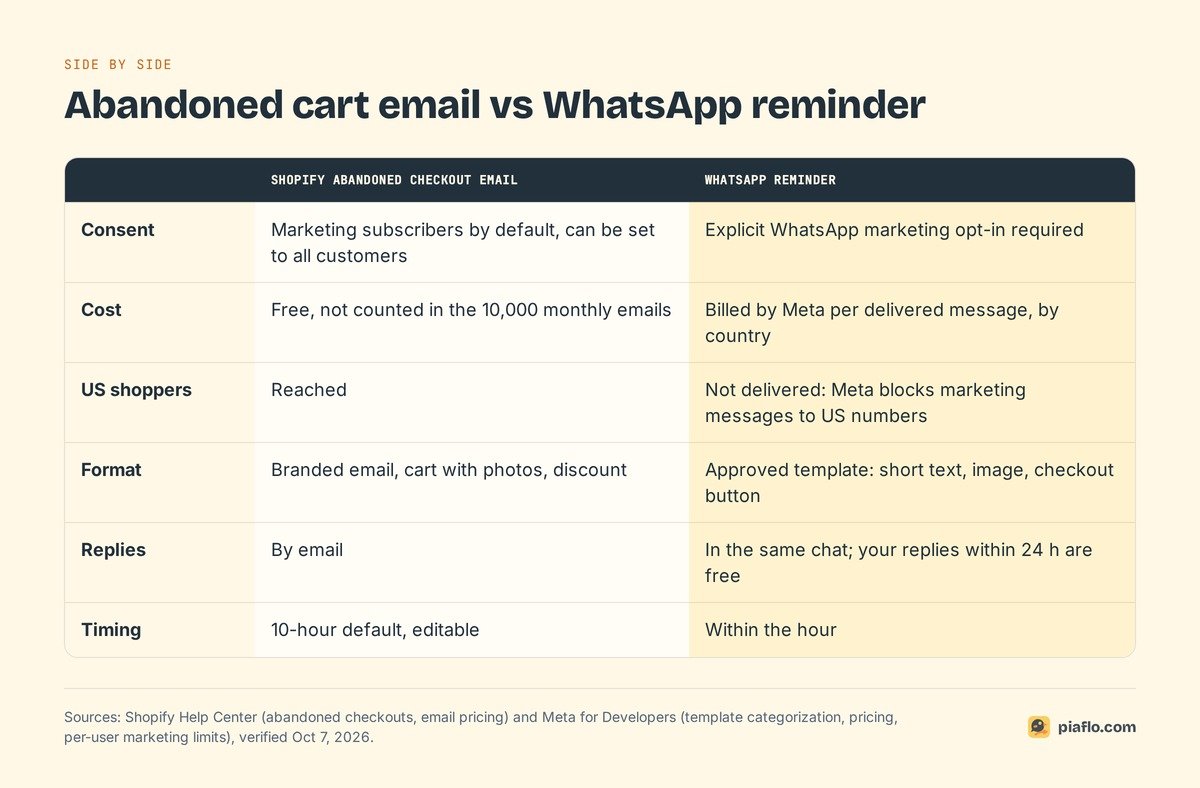
If you create a new abandoned checkout automation, Shopify's defaults are a 10-hour wait and marketing subscribers only. Shoppers who never ticked the email marketing box get nothing. In the email editor you can change the To: field to All customers, which covers every shopper who left an email at checkout.
The automation runs on Shopify Flow, so you can shorten or lengthen the wait in the workflow. Shopify also skips the email if the same shopper abandoned a more recent checkout whose wait has not passed, so nobody gets two reminders for the same cart.
What it costs
Nothing. According to Shopify's email pricing page, abandoned checkout automations "are always free and don't count towards the monthly limit". Your 10,000 free monthly emails stay available for campaigns, and beyond them Shopify charges 1 USD per 1,000 emails. On cost per message, the native email is impossible to beat.
Abandoned checkout vs abandoned cart on Shopify
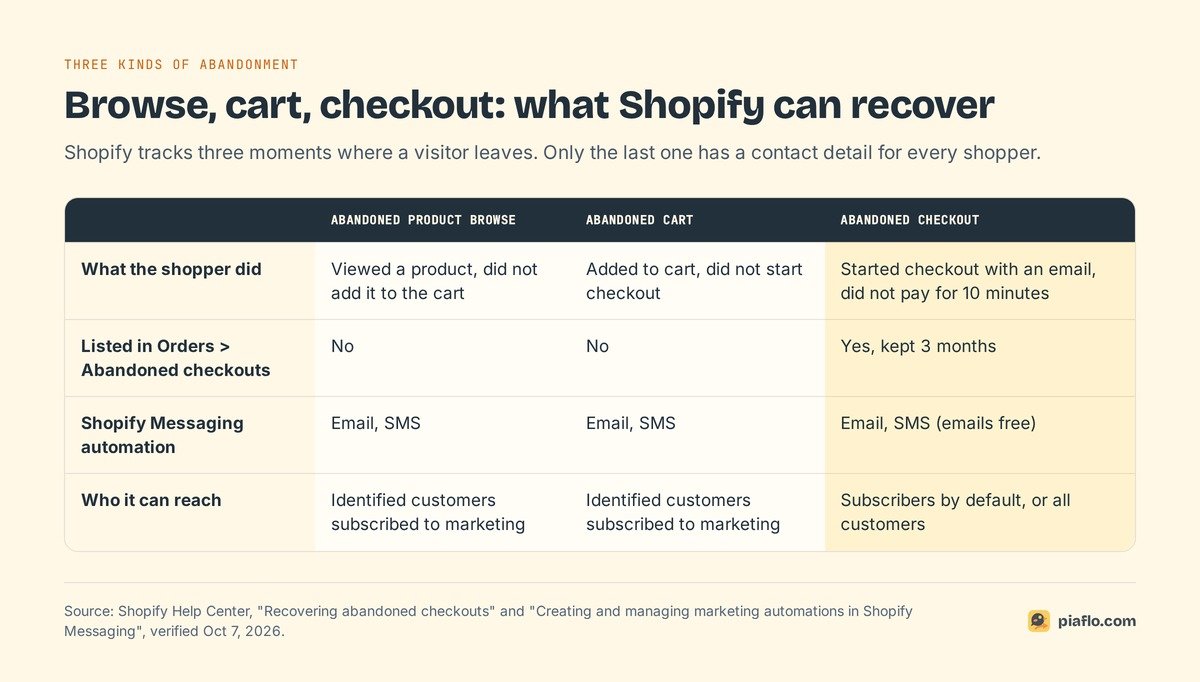
Merchants say "abandoned cart" for everything. Shopify uses three terms, each covering a different group of visitors.
What counts as an abandoned checkout
Shopify defines an abandoned checkout as a checkout where the customer provided their email address but did not pay. It becomes abandoned after ten minutes without payment. Recovery works for the Online Store and the Buy Button sales channels; checkouts on Shopify POS or third-party channels get no recovery email.
Abandoned carts and abandoned browsing
An abandoned cart is earlier in the journey: the shopper added products to the cart but never started checkout. An abandoned browse is earlier still: they viewed a product and left without adding it.
Shopify Messaging has templates for both, Recover abandoned cart and Convert abandoned product browse, on email and SMS. They only reach customers Shopify can identify who agreed to marketing, and the cart template skips anyone who received an abandoned checkout, cart or browse email in the last 14 days. These emails count toward your monthly allowance.
Can you see abandoned carts on Shopify?
You can see abandoned checkouts in Orders > Abandoned checkouts. Each line shows the customer, the cart, an Email status column (sent or not, with a tooltip explaining why) and a Recovery status column (did the customer finish the order, through the link or on their own).
Carts that never reached checkout do not appear in that list. To act on them, use the Recover abandoned cart automation or a third-party app.
Three details save time:
- Bots. Shopify filters out checkouts it identifies as card testing or bot activity, though not all of them. A burst of checkouts with fake emails is usually bots.
- Retention. Abandoned checkouts older than three months are deleted automatically. To keep one, create a draft order with the same details.
- Results. The Abandoned checkouts emails report by Shopify (Growth section) shows sessions, completed orders, conversion rate and sales from the reminder emails.
When Shopify's abandoned checkout email is not sent
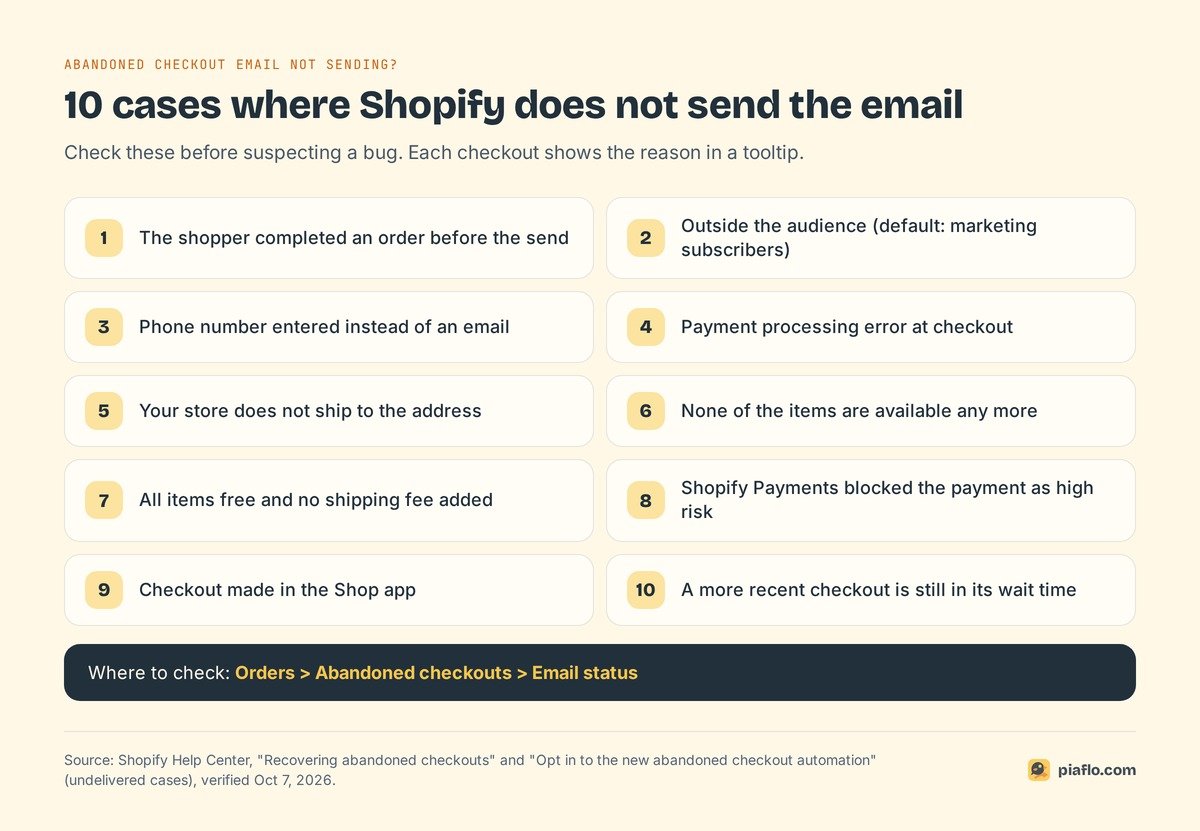
Shopify documents the reasons in its help center.
The cases Shopify lists
Shopify does not send the recovery email when:
- the shopper completed an order before the email went out;
- the shopper is outside the automation's audience (by default, customers subscribed to marketing);
- the shopper entered a phone number instead of an email at checkout;
- a payment processing error occurred at checkout;
- your store does not ship to the shopper's address;
- none of the items are available any more;
- every item is free and no shipping fee was added;
- Shopify Payments blocked the payment as high risk;
- the checkout happened in the Shop app (the automation covers the Online Store checkout);
- the shopper abandoned a more recent checkout and its wait time has not passed.
What one email cannot do
Beyond individual misses, the format has three limits:
- Phone-only checkouts get nothing. Shoppers who give a phone number instead of an email fall outside it.
- One message, one channel. A single email, read whenever the shopper next opens their inbox; extra steps need Shopify Flow or an email app.
- Slow conversation. A shopper with a sizing or delivery question has to write back by email and wait.
Abandoned cart email vs WhatsApp: the differences that matter
Four rules decide whether WhatsApp fits your store.
Consent
An abandoned cart reminder on WhatsApp is a marketing message for Meta. Meta's template rules file "You left items in your cart! Checkout now" under retargeting, which is marketing "even if requested by users". You can only send it to shoppers who explicitly opted in to WhatsApp marketing from your business, and a phone number typed at checkout is not an opt-in on its own.
Shopify can display a WhatsApp marketing opt-in at checkout, and existing consent can be imported with the "Accepts WhatsApp marketing" column. Our guide to WhatsApp marketing consent covers what proof to keep.
Cost per message
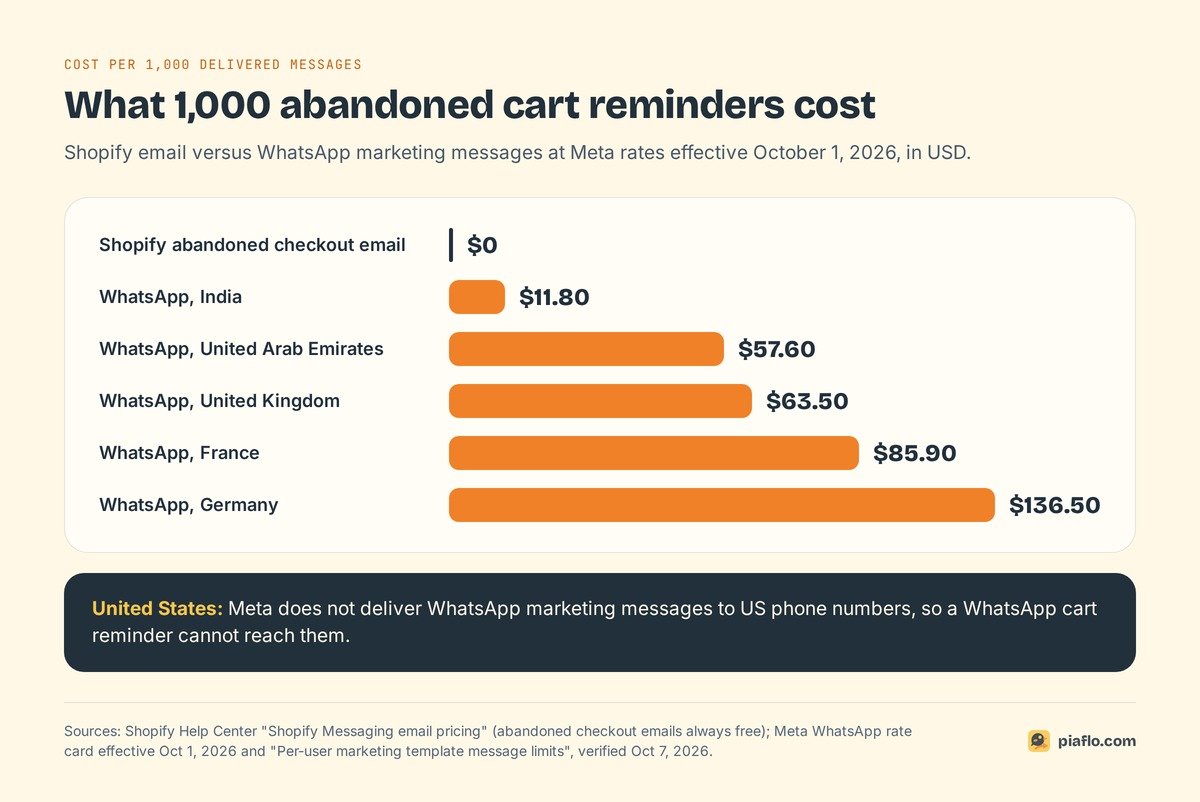
Email reminders are free. Meta bills WhatsApp reminders per delivered template message, at a rate set by the recipient's country. Rates from Meta's pricing page, effective October 1, 2026:
| Shopper's country | Meta rate per marketing message | 1,000 reminders |
|---|---|---|
| India | $0.0118 | $11.80 |
| United Arab Emirates | $0.0576 | $57.60 |
| United Kingdom | $0.0635 | $63.50 |
| France | $0.0859 | $85.90 |
| Germany | $0.1365 | $136.50 |
| United States | not delivered | n/a |
Two details lower the bill. Messages from the shopper are free, and since October 1, 2026 Meta includes the first 1,000 service messages per month and per number (your free-form answers inside the 24-hour customer service window), then charges the service rate beyond that.
Who you can reach
Most comparisons skip this point. Meta does not currently deliver marketing template messages to WhatsApp users with US phone numbers (a +1 dialing code with a US area code). Sending one returns an error, and Shopify applies the same rule to WhatsApp campaigns in Shopify Messaging.
For a store selling only in the United States, WhatsApp cart reminders are off the table for now; email (or SMS) stays your recovery channel. A US store with customers in the UK, Europe, the Gulf, India or Latin America can still reach those shoppers on WhatsApp.
Meta also caps how many marketing messages one person receives from all businesses, based on how much they read them. A shopper who ignores marketing messages may not get yours.
Format and replies
An email can show the cart with product photos, your branding and a discount block. A WhatsApp reminder is an approved template: a short text, the shopper's first name, an optional image and a button that opens the checkout. It arrives next to messages from friends, which is why it gets attention and why it should stay short and rare.
The bigger difference is the reply. On WhatsApp, the shopper answers in the same thread, and your team can settle the doubt that stopped the purchase.
When adding WhatsApp is worth it
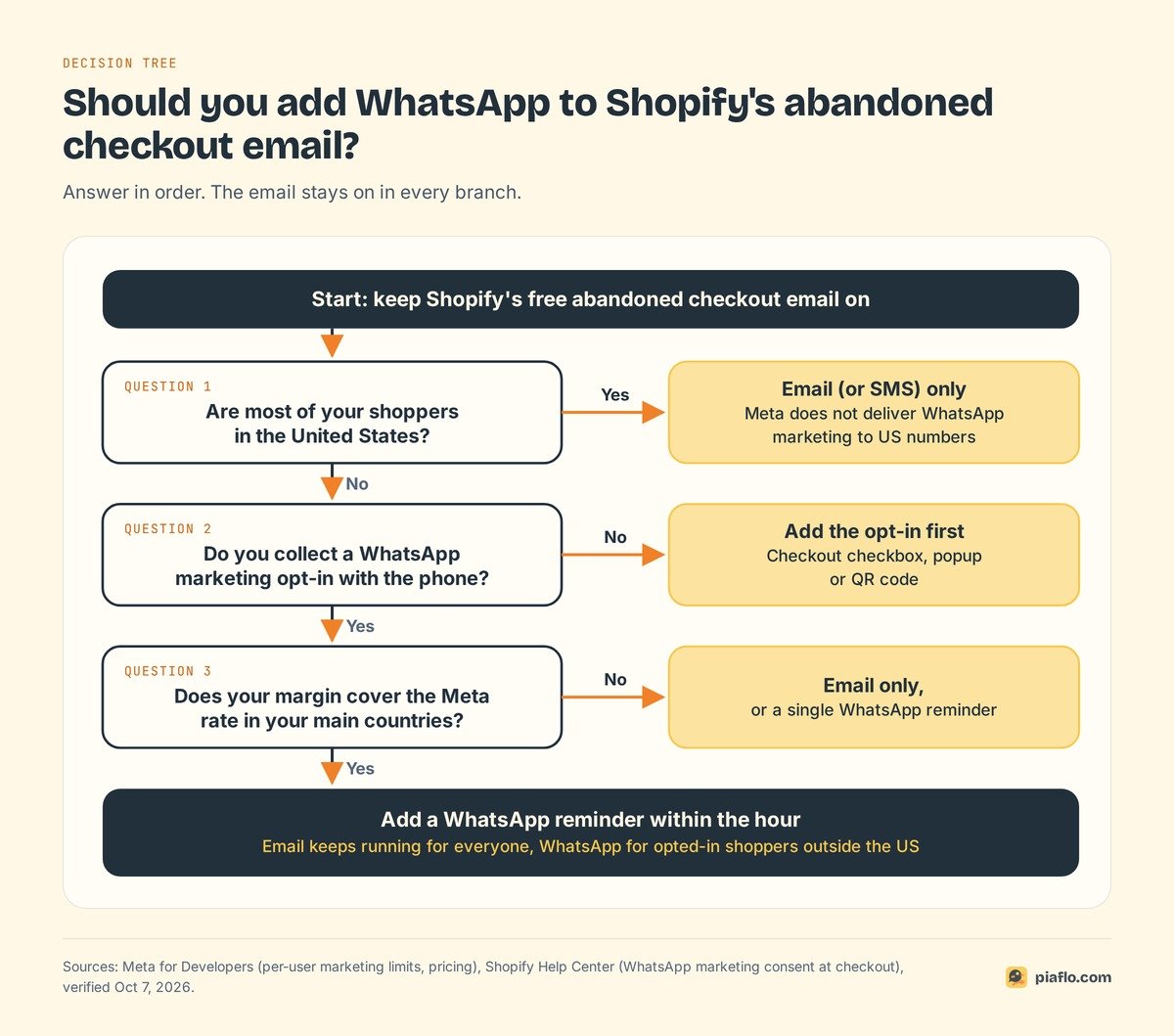
Keep the free email running in every case. Then add WhatsApp if three answers are yes:
- Do a meaningful share of your shoppers live outside the United States? If not, WhatsApp cannot reach them with a cart reminder.
- Do you collect phone numbers with a WhatsApp marketing opt-in? If your checkout accepts phone numbers instead of emails, WhatsApp also covers the shoppers the email misses.
- Does your margin cover the message? Compare the rate for your main countries with your average order value. At $0.0118 per message in India the question barely arises; at $0.1365 in Germany, two reminders per checkout deserve a quick calculation.
Cash on delivery stores get a second use from the same number: confirming COD orders on WhatsApp.
An email and WhatsApp sequence that does not double up
Two channels can easily turn into four messages in a day.
A starting sequence
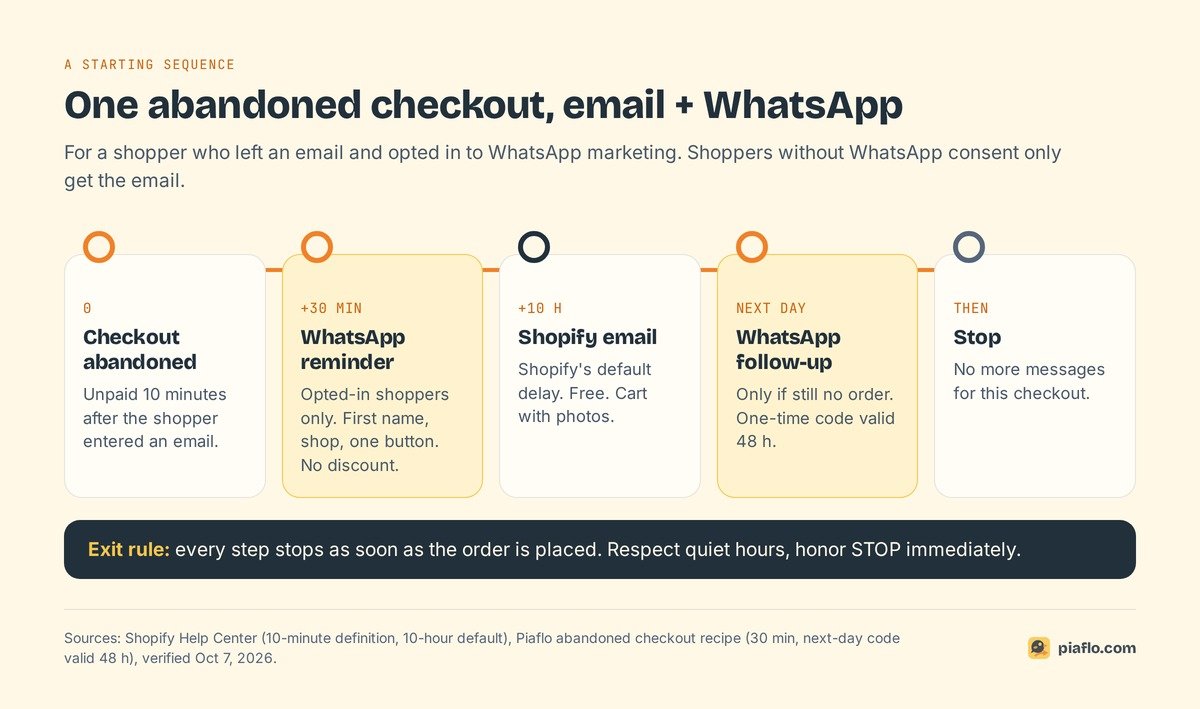
For a shopper who left an email and opted in to WhatsApp marketing:
- After about 30 minutes: WhatsApp reminder. First name, your shop name, one button back to the checkout. No discount.
- After about 10 hours: Shopify's abandoned checkout email. Shopify's default delay, with the cart and photos for shoppers who decide on a bigger screen.
- The next day: one last WhatsApp message, only if there is still no order. This is where a one-time discount code fits, valid for a short period such as 48 hours.
- Then stop.
Shoppers without WhatsApp consent simply get step 2. For timing details and message wording, see our WhatsApp abandoned cart recovery guide and the abandoned cart WhatsApp message templates.
Rules that keep it clean
- Exit on purchase, everywhere. Shopify cancels its email when the order comes in first. Your WhatsApp tool must do the same.
- One discount, one channel. If the email carries a code, keep the WhatsApp follow-up without one, or the other way round.
- Respect quiet hours. A WhatsApp message at 2 am lands on a phone next to someone's bed.
- Honor STOP immediately. Unsubscribing from WhatsApp marketing leaves email consent untouched, and the other way round.
Setting it up with Piaflo
Piaflo adds the WhatsApp side and leaves Shopify's email untouched. Its Abandoned checkout recovery recipe sends a reminder 30 minutes after the shopper leaves, waits for an order, then sends a one-time 10% code the next day, valid 48 hours, if they still have not bought. The flow stops as soon as the customer orders, respects quiet hours and only reaches subscribed contacts.
Consent collected through Piaflo's opt-in popup or QR links is written into Shopify's native WhatsApp consent, with the date, text and page as proof, and STOP unsubscribes immediately. Meta bills the messages directly to your WhatsApp Business account at its official rates, with no markup from Piaflo. Every link is tracked, so the dashboard shows orders and revenue per flow next to the estimated Meta cost. When a team member answers a shopper in the shared inbox, that customer's flow pauses.
The recipe is part of the Starter plan at $29 per month, billed by Shopify, with a 14-day trial. See the plans and follow the guide to connect your WhatsApp number. You can also install Piaflo from the Shopify App Store.
Frequently asked questions
How do I turn off abandoned cart emails on Shopify?
In your Shopify admin, go to Apps > Messaging > Automations, open the abandoned checkout automation and click Turn off automation. Shopify cancels any workflow still in its wait stage, so no pending email goes out. On stores still using the older setting, it sits in Settings > Checkout.
Do Shopify abandoned checkout emails cost anything?
No. Shopify states that abandoned checkout automations are always free and do not count toward the 10,000 free emails included each month on the Basic, Grow, Advanced and Plus plans. Other automations, such as abandoned cart or browse emails, do count.
Can Shopify Messaging send abandoned checkout reminders on WhatsApp?
Shopify Messaging's recovery automations (abandoned checkout, abandoned cart, abandoned browse) run on email and SMS. Its WhatsApp channel is used for marketing campaigns, billed per message on your Shopify bill. For an automated WhatsApp reminder after an abandoned checkout, you need a WhatsApp app connected to your store.
Can I send WhatsApp cart reminders to customers in the United States?
Not at the moment. Meta does not deliver WhatsApp marketing template messages to US phone numbers, and an abandoned cart reminder is a marketing message. US stores can still send WhatsApp reminders to opted-in customers in other countries.
How long does Shopify keep abandoned checkouts?
Three months. Abandoned checkouts older than that are deleted automatically from the admin, and you cannot delete one manually before then. To keep the details of one, create a draft order with the same items and customer.