How to reduce COD RTO and fake orders on Shopify
Why cash on delivery orders come back unpaid, and a 6-step system to stop it: WhatsApp confirmation before shipping, address checks, rules for risky orders, partial prepayment and weekly tag reviews.
A cash on delivery order becomes an RTO (return to origin) when the parcel ships and comes back unpaid. The customer refused it, the order was fake, the address was wrong, or nobody was home. You pay the courier both ways and collect nothing.
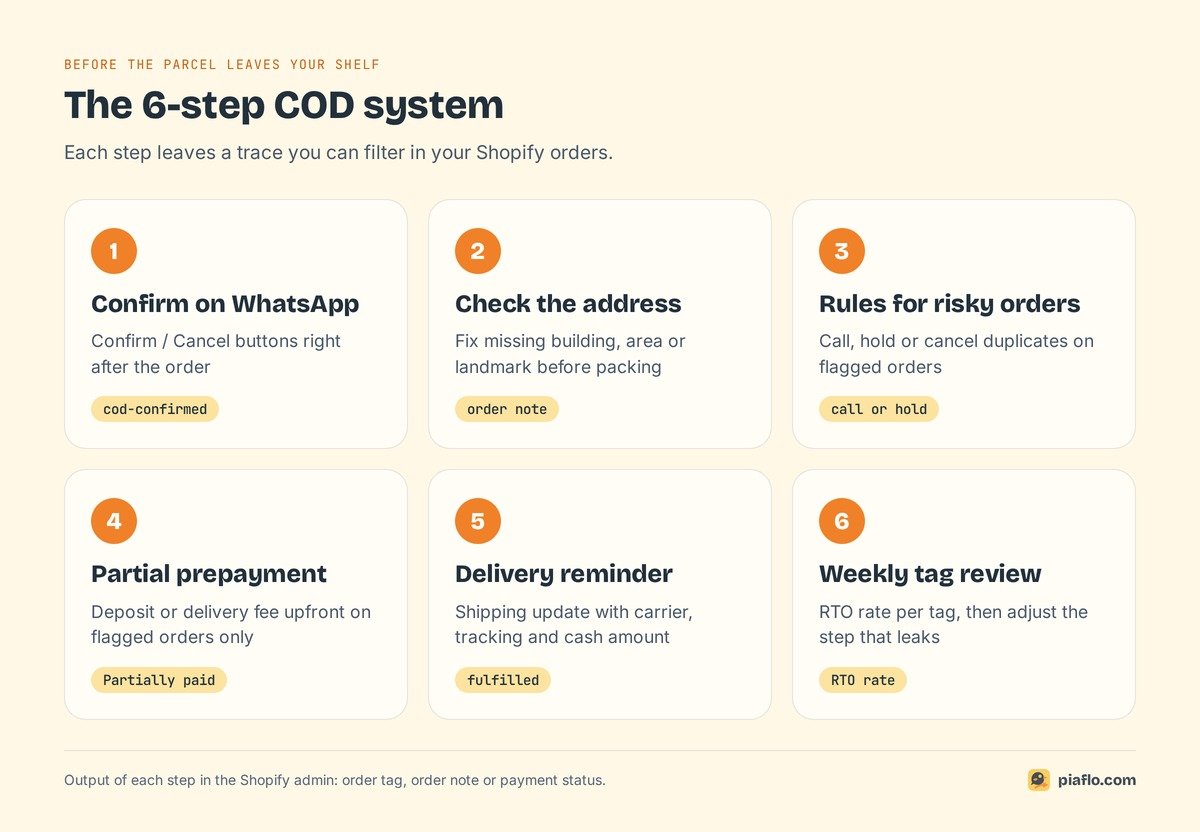
To reduce RTO on Shopify, stop bad orders before they leave your shelf, with a system you can read in your order list:
- Confirm every COD order on WhatsApp before it ships, with Confirm and Cancel buttons.
- Check the address while the customer is still reachable.
- Apply stricter rules to risky orders.
- Ask for part of the payment upfront when the risk is high.
- Remind the customer before the courier arrives.
- Review the results every week with Shopify order tags.
What RTO costs a cash on delivery store
With a prepaid order, a failed delivery is a delay. With a COD order, it is a loss: the money was supposed to arrive with the parcel, and the parcel is on its way back.
Where the money goes on a returned parcel
A returned COD parcel costs you several times:
- Forward shipping, already invoiced by the courier.
- Return shipping, often billed on top.
- Handling: unpacking, checking, repacking.
- Blocked stock that could not be sold to someone else while it travelled.
- Ad spend that bought the order in the first place.
- Cash flow: COD money arrives late even when delivery works. When it fails, it never arrives.
Your courier invoice holds the exact figures. Write the forward and return rates for your main zones next to your average order value: that line tells you how many confirmed orders a single RTO wipes out.
Measure your own RTO rate
Online "average RTO rates" rarely cite a source. Measure your own:
RTO rate = COD orders returned to origin ÷ COD orders shipped, over the same period.
Take the last 30 days, count COD orders shipped, count those your courier marked as returned, and divide. Then split the figure by product, region and traffic source. Fake and refused orders tend to cluster: one campaign, one product, one city. That is where your rules will bite hardest.
Write the number down. Every step below is measured against it.
Why COD orders come back
Couriers give a reason code for each failed delivery (often called NDR, non-delivery report). Map your codes to four causes.
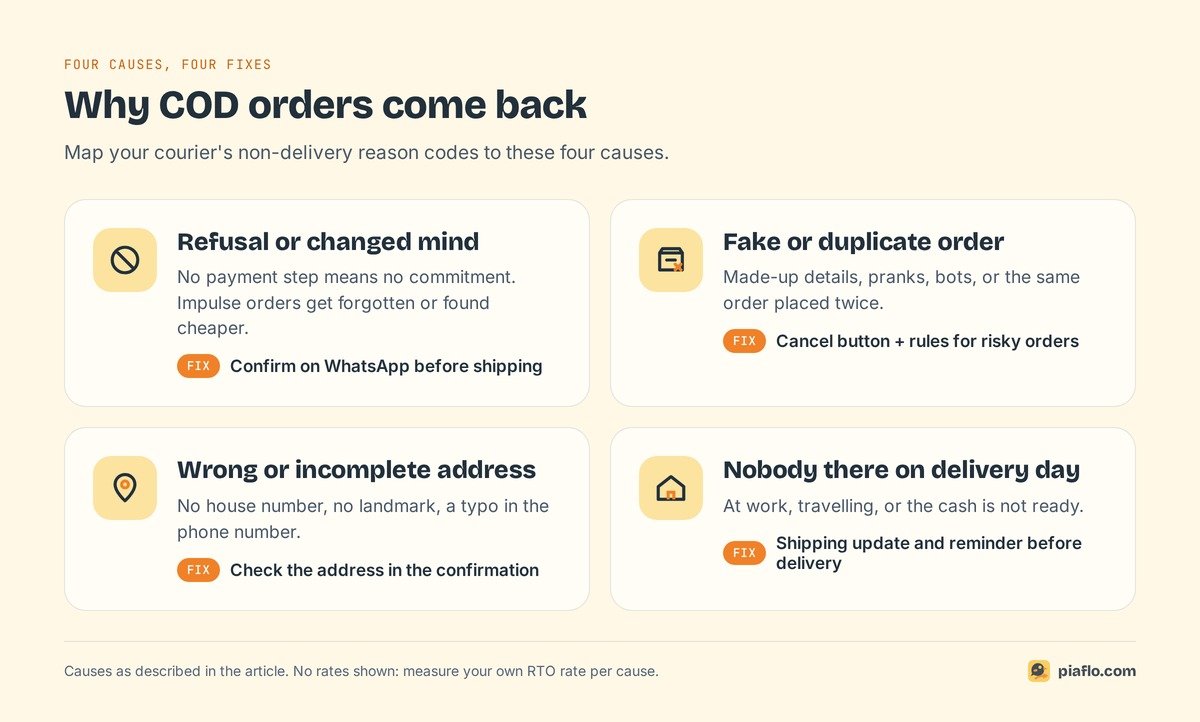
Refusals and changed minds
With no payment step, there is no moment of commitment. A shopper orders on impulse from an ad at night, forgets, or finds the product cheaper the next day. When the courier calls, the answer is "I don't want it anymore". Some refuse because the parcel arrives later than they expected.
Fake and duplicate orders
Without a card, nothing stops someone from ordering with made-up details: a competitor, a prank, a bot filling forms. Duplicates are innocent and just as costly: the customer tapped "Buy" twice, or ordered again because the thank-you page loaded slowly.
Wrong or incomplete addresses
A missing house number, no landmark, a wrong postal code, a phone number with a typo. The courier cannot find or call the customer and returns the parcel after a few attempts. These customers wanted the product. They lose it because of a typo.
Nobody there on delivery day
The customer is at work, travelling, or does not have the cash ready. If they did not know the parcel was coming that day, the delivery fails on a real order.
Four causes, one pattern: each can be caught by talking to the customer before the courier does.
Step 1: Confirm every COD order on WhatsApp before it ships
COD order verification means checking, before you pack, that a real person placed the order and still wants it. Calls work but cost staff time. An SMS one-time code checks the phone number at checkout, and stops there. A WhatsApp message with buttons checks the number and the intent at once, on an app many COD customers open every day. The complete guide to COD confirmation on WhatsApp covers the basics; here is how it fits into an RTO system.
The confirmation message
Send it right after the order, while the customer still has their phone in hand. Repeat what they ordered, the delivery address and the amount to pay on delivery, and ask for a tap:
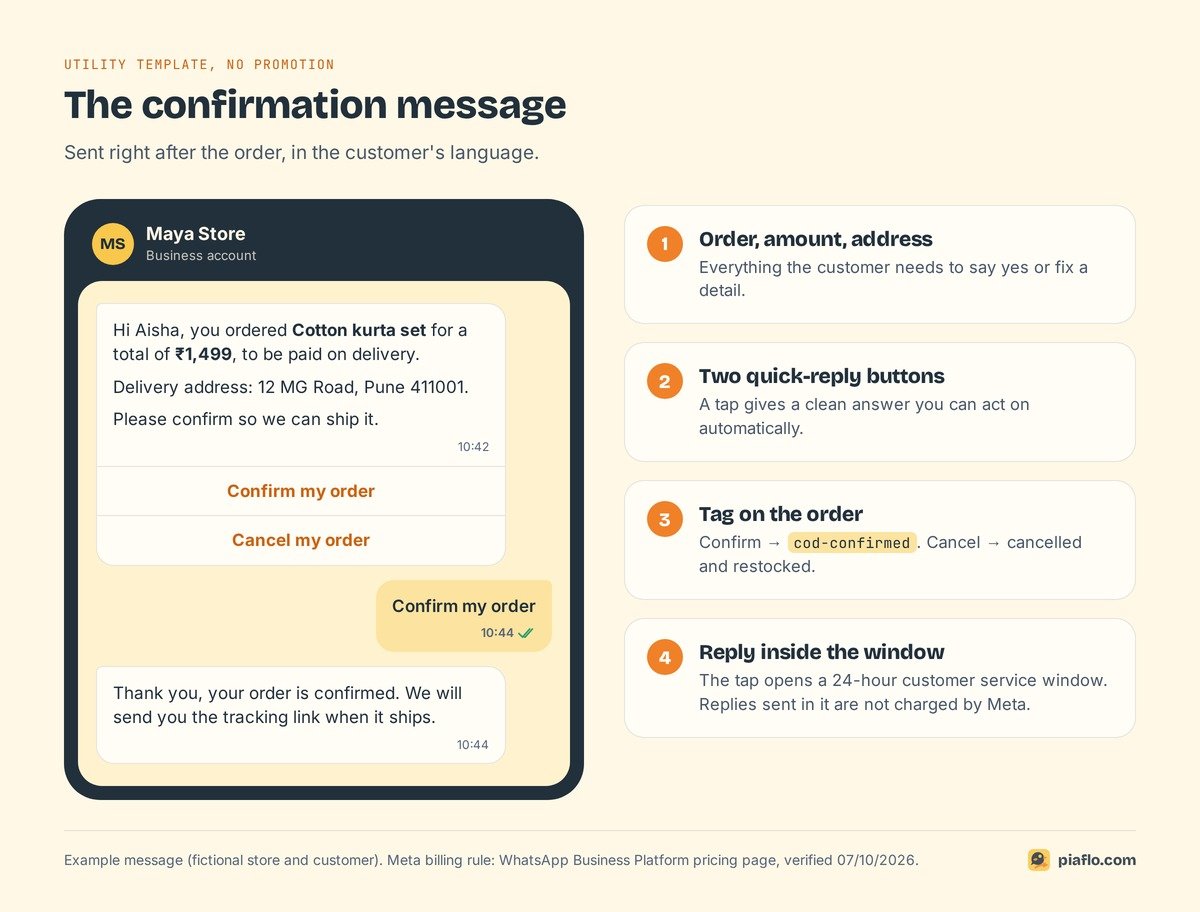
Three details make the difference:
- Buttons for the answer. A tap gives you a clean answer you can act on automatically. "ok", "👍" or "who is this?" needs a human.
- The address in the message, with a line asking the customer to reply if it is wrong. The confirmation doubles as an address check.
- The customer's language. A message they cannot read gets ignored.
For Meta, this is a utility message: an order update sent because the customer placed an order. Keep it free of promotion. Meta automatically moves a utility template with marketing content into the marketing category, which costs more and requires marketing consent.
Tag every answer in Shopify
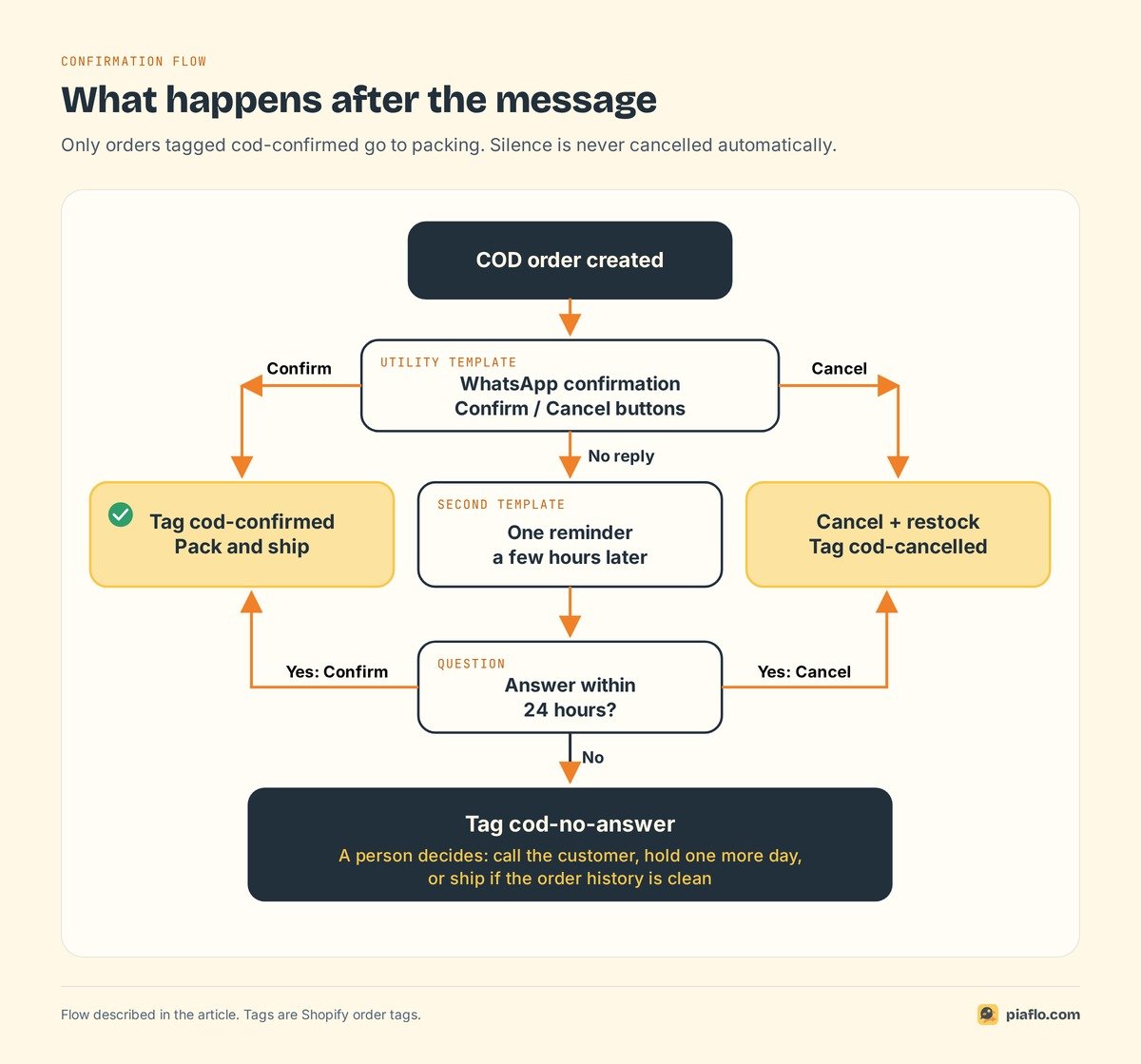
Make every answer visible with an order tag: tags are filterable, and your team and fulfillment app can read them.
- Confirmed → tag
cod-confirmed. Ship it. - Cancelled → cancel the order in Shopify and restock the items for the next customer. Tag
cod-cancelled. - No answer → tag
cod-no-answer, and keep the order open: some of these are real customers who missed the message.
Then give the warehouse one rule: only orders tagged cod-confirmed get packed. Everything else waits.
Send one reminder before you flag silence
Silence is the expensive case. Before you tag the order cod-no-answer, send one reminder a few hours later, at a reasonable time of day, with a second utility template ("We are holding your order #1042 until you confirm").
After the reminder, stop. If the customer still has not answered after 24 hours, tag the order and let a person decide: call, hold one more day, or ship if the customer has a clean order history. More messages feel like pressure, and pressured people block numbers.
What a confirmation costs
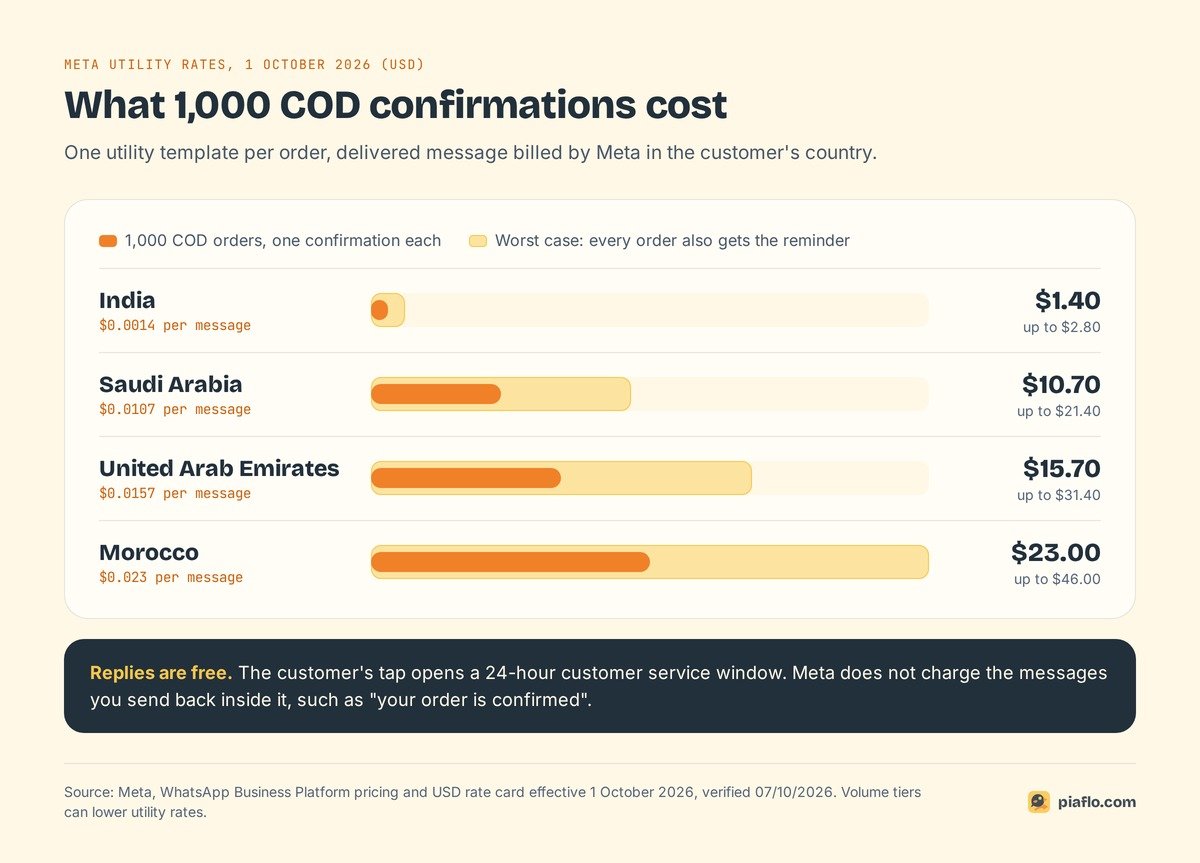
Meta charges per delivered template message, by category and by the customer's country. At Meta's official rates of 1 October 2026, one utility message costs:
| Customer's country | Utility rate (USD) | 1,000 COD orders, one message each |
|---|---|---|
| India | $0.0014 | $1.40 |
| Saudi Arabia | $0.0107 | $10.70 |
| United Arab Emirates | $0.0157 | $15.70 |
| Morocco | $0.023 | $23.00 |
If every order also needed a reminder, the worst case doubles: $2.80 per 1,000 orders in India, $46.00 in Morocco. Meta's rules soften the bill a little more: the customer's tap opens a 24-hour customer service window, and a free-form reply sent inside it, such as "your order is confirmed", is a service message. Since 1 October 2026, Meta includes the first 1,000 service messages per month and per number, then charges the service rate (a template sent inside the window is billed at its own category rate).
Compare that with the return shipping on one parcel in your courier invoice.
Step 2: Check the address before you pack
Shopify can validate shipping addresses at checkout and suggest fixes, and checks them again after the order is placed. Turn it on in Settings > Checkout > Address collection. The catch for COD sellers: detailed suggestions cover 20 countries, mostly in Europe and North America, and India, the UAE, Saudi Arabia and Morocco are outside that list (as of 7 October 2026). Other countries still get basic format and length checks and fewer suggestions.
In COD markets, the address check falls on you:
- Make the right fields required at checkout: phone number, and the address line where customers write building, area and landmark.
- Scan for empty signals before packing: no house or building number, a one-word address, a postal code that does not match the city, a phone number with the wrong number of digits.
- Fix it in the order before printing the label, and add an order note saying what changed and when.
An address fixed before packing costs a minute. The same address fixed by the courier costs a return trip.
Step 3: Set rules for risky orders
Shopify shows a fraud analysis on the order page, and it is built for card payments: fraud analysis works with online credit card orders that Shopify can verify. A cash on delivery order has no card to check, so it needs your own rules.
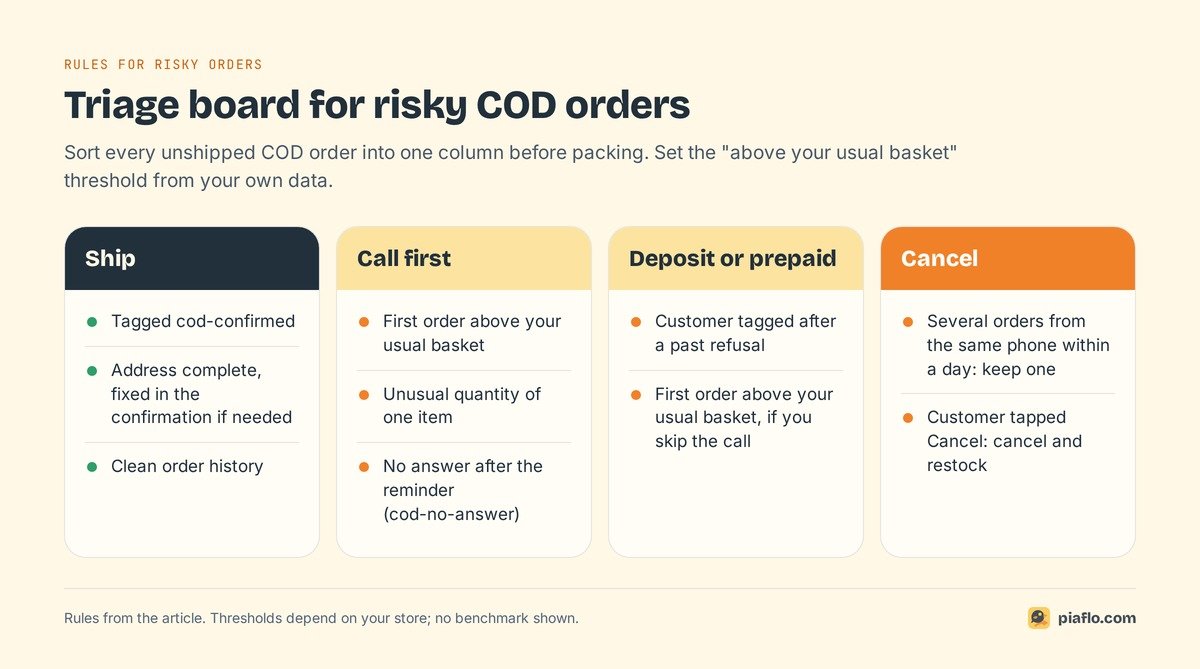
Keep them few and visible. Each rule is a signal you can see on the order, and an action:
| Signal on the order | Action |
|---|---|
| First order from this customer, above your usual basket | Call before shipping, or ask for a deposit |
Customer already refused a parcel (tagged cod-refused) |
Prepaid only, or deposit before shipping |
| Several orders from the same phone number within a day | Keep one, cancel the duplicates |
| Address with no house number, area or landmark | Fix it in the confirmation before packing |
| No answer after the reminder | Tag cod-no-answer, a person calls |
| Unusual quantity of the same item | Call before shipping |
Two habits make these rules work. Tag the customer, as well as the order, when a parcel is refused: next time, the signal sits on their profile. And set thresholds from your own data: a "high" order value for a fashion store in Casablanca differs from one for an electronics store in Dubai.
Rules can also run in automation. A Shopify Flow workflow can add order tags when a condition matches, and WhatsApp flows can branch the confirmation on order value or item count.
Step 4: Ask for partial prepayment when the risk is high
A deposit changes the customer's position: they have already paid something, so refusing the parcel costs them too. A common approach is to ask flagged orders to prepay the shipping fee or a fixed share of the order, and collect the rest on delivery.
Check how your setup handles it first. Shopify's built-in partial payments apply to orders with payment terms, such as a draft order you create with terms: you collect a fixed amount or a percentage, and the order shows as "Partially paid". A standard COD order placed at checkout has no payment terms, so the deposit usually comes from a COD form or checkout app, or from a new draft order you send to the customer.
Use it selectively: a deposit on every order turns COD back into prepaid. Keep it for flagged orders, and offer the choice plainly: "pay the delivery fee now and the rest at the door, or pay in full now".
Step 5: Remind the customer before the courier arrives
A confirmed order can still fail if the customer is out when the courier comes. Send a shipping update the moment the parcel leaves: carrier, tracking link, and the amount to have ready in cash. If your courier gives an expected delivery date, add it.
For Meta, this is another utility message, priced like the confirmation, and it gives the customer one more chance to say "I am away this week". If you already send WhatsApp order confirmations on Shopify, the shipping update belongs in the same set of messages.
Step 6: Review your tags every week
Your tags now tell a story. Once a week, filter your orders in the Shopify admin and write down five numbers:
- COD orders placed
- orders tagged
cod-confirmed - orders tagged
cod-cancelled - orders tagged
cod-no-answer - orders returned to origin, from your courier report
Then compare the RTO rate of each group. If cod-no-answer orders you shipped anyway come back often, stop shipping them without a call. If confirmed orders still come back, look after the confirmation: delivery time, courier, or the reminder before delivery. If many orders end in no answer, test another send time or wording.
Setting it up with Piaflo
Piaflo is a Shopify app that sends WhatsApp messages from your own number through Meta's official API. Its Cash on delivery confirmation recipe covers Step 1: every COD order gets a message with Confirm and Cancel buttons. Confirmed orders are tagged cod-confirmed, cancelled orders are cancelled and restocked in Shopify, and orders with no answer after 24 hours are tagged cod-no-answer for your team. Piaflo submits the templates to Meta in English and French for you.
The Shipping update recipe covers Step 5, with the carrier and tracking link. On the Growth plan, unlimited custom flows let you add a reminder step or branch on order value and tags for your risky-order rules, and Piaflo connects to Shopify Flow.
Meta bills its message fees directly to your WhatsApp Business account at its official rates; Piaflo adds no markup. The COD recipe comes with the Starter plan ($29 per month) and above, with a 14-day free trial. See the plans or read the guide to connect your WhatsApp number. You can also install Piaflo from the Shopify App Store.
Frequently asked questions
What is RTO in ecommerce?
RTO means return to origin: a shipped parcel that could not be delivered and goes back to the seller. For cash on delivery orders it is a direct loss, because you pay shipping both ways and collect nothing. Your RTO rate is the number of COD orders returned divided by the number shipped over the same period.
How do I stop fake COD orders on Shopify?
Confirm every COD order on WhatsApp before shipping, and only pack orders the customer confirmed. Cancel duplicates from the same phone number, call or ask for a deposit on risky orders, and tag customers who refused a parcel so their next order is checked first.
Does Shopify flag risky cash on delivery orders?
Shopify's fraud analysis works with online credit card orders that Shopify can verify, so COD orders need your own checks: a confirmation before shipping, an address review, and rules based on order value, order history and duplicates.
Is OTP or WhatsApp confirmation better for COD orders?
An OTP at checkout proves the phone number works when the order is placed. A WhatsApp confirmation after the order also tells you whether the customer still wants the parcel, lets them fix the address, and cancels the order in one tap if they changed their mind. You can use both, with the WhatsApp confirmation as the step that decides what ships.
Do I need marketing consent to send a COD confirmation?
An order update sent as a utility template can go out without marketing consent, as long as it contains no promotion and you tell customers at checkout that order updates are sent on WhatsApp.