WhatsApp Order Confirmation for Shopify: Templates, Costs and Setup
How to send Shopify order confirmations, shipping updates and cancellation notices on WhatsApp: Meta's utility rules, costs by country, copy-ready templates and setup.
A customer orders at 11 pm and goes to bed. The next morning, they check WhatsApp first. If your confirmation is there, with the order number and a tracking link, "did my order go through?" never reaches your inbox.
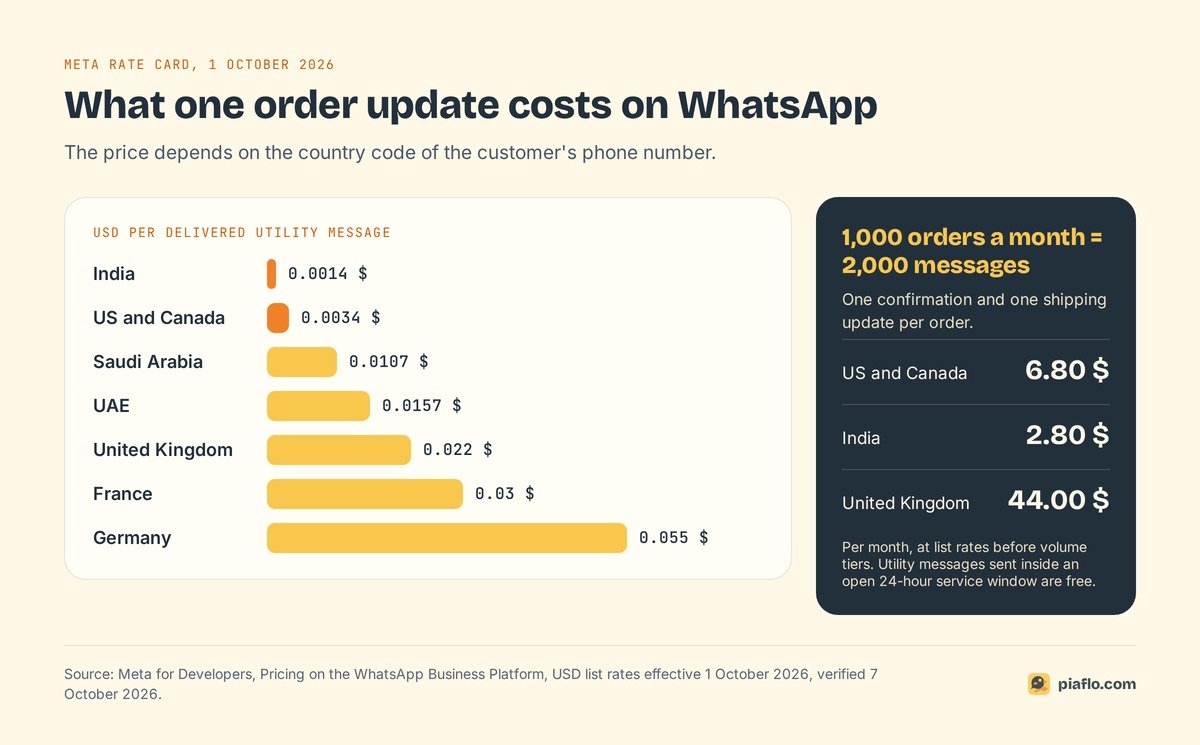
To send order confirmations on WhatsApp from Shopify, you need three things: a number on the WhatsApp Business Platform, a message template Meta has approved in the utility category, and a tool that listens to Shopify order events and fills in the template. Order confirmations, shipping updates and cancellation notices all qualify as utility messages, as long as they contain nothing promotional. On Meta's October 2026 rate card, a utility message costs 0.0034 USD to a customer in the US or Canada and 0.0014 USD in India, and an opt-in covering order updates is enough: marketing consent is only required for promotions.
Below: the three messages, Meta's rules, the costs, copy-ready templates and the setup.
The order messages worth sending on WhatsApp
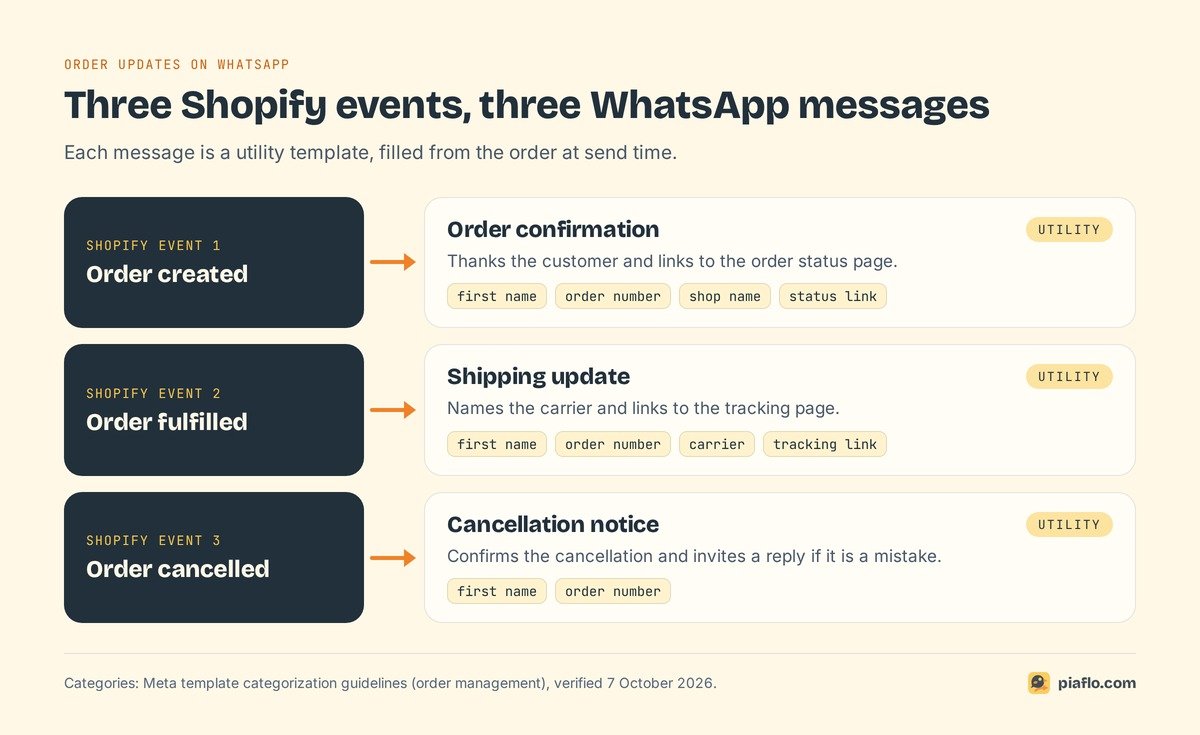
Shopify sends emails for each step of an order, and SMS confirmations in some countries. WhatsApp is not among its notifications, so you add it with an app. Three messages cover what customers want to know after they pay.
Order confirmation
Sent as soon as the order is created. It repeats the order number, thanks the customer and links to the Shopify order status page, where they can check progress without writing to you. Keep it short: the customer already saw the checkout summary.
Shipping update with tracking
Sent when you fulfill the order and add a tracking number. It names the carrier and links to the tracking page, which answers most "where is my order?" questions before they are asked. If you ship in several parcels, each fulfillment triggers its own update: say which part of the order is on its way.
Cancellation notice
Sent when an order is cancelled, by the customer, a failed payment or a stock problem. State the order number and invite the customer to reply if it is a mistake. Mention a refund only if you can say when it will arrive.
Cash on delivery stores add a fourth message before shipping, the COD confirmation with Confirm and Cancel buttons. See confirming cash on delivery orders on WhatsApp, and the tactics to cut refused COD parcels and fake orders.
Why order updates are utility messages
Every business-initiated WhatsApp message is a template, and every template has a category that decides its price and who may receive it. For order updates, you want utility.
What Meta counts as utility
Meta's template category guidelines set two conditions, and a utility template must meet both:
- It is non-promotional. No promotional or persuasive intent.
- It is specific to the user. It relates to their order, account or transaction (or it is essential to them, such as a safety alert).
Under "order management", Meta lists messages that confirm, update or cancel an order "using specific order or transaction details in the body of your message". Its examples read like a Shopify flow: "Your order {{order_number}} is confirmed", "Your package from order {{order_number}} is on its way. Your tracking number is {{tracking_ID}}".
One promo line turns it into marketing
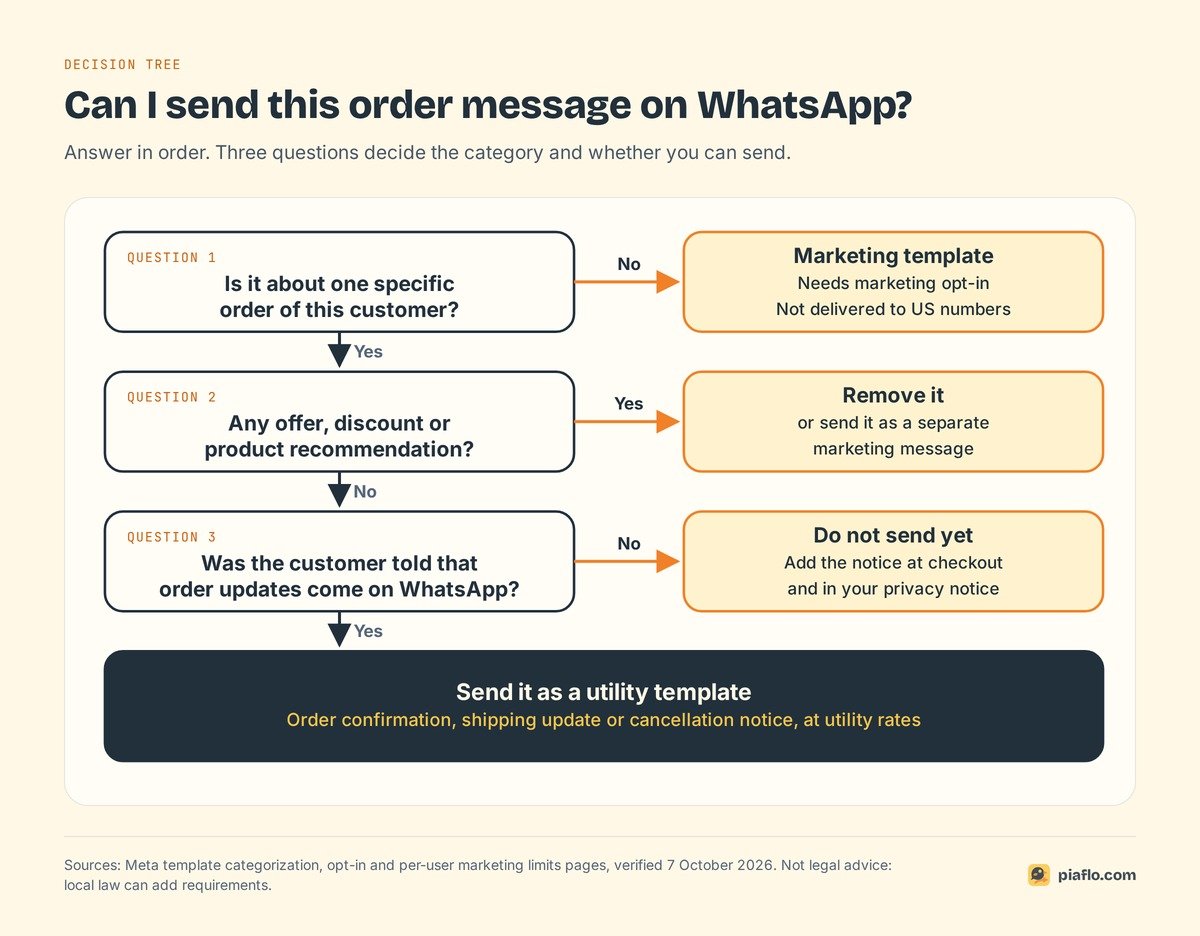
These messages "should not promote, recommend, upsell, or cross-sell products" or include offers. A template mixing an order update and a promotion is marketing. Since 9 April 2025, if you submit a template as utility and Meta judges it promotional, it is approved as marketing. WhatsApp Manager shows the new category, so check it before you switch the flow on. Two consequences follow:
- The price changes. In the US and Canada, a marketing message costs 0.025 USD on the October 2026 rate card, more than 7 times the utility rate.
- The audience shrinks. Marketing templates only go to customers who opted in to marketing, and WhatsApp currently does not deliver them to US phone numbers at all (Meta's per-user limits page). Add "10% off your next order" to a shipping update and your US customers stop receiving it.
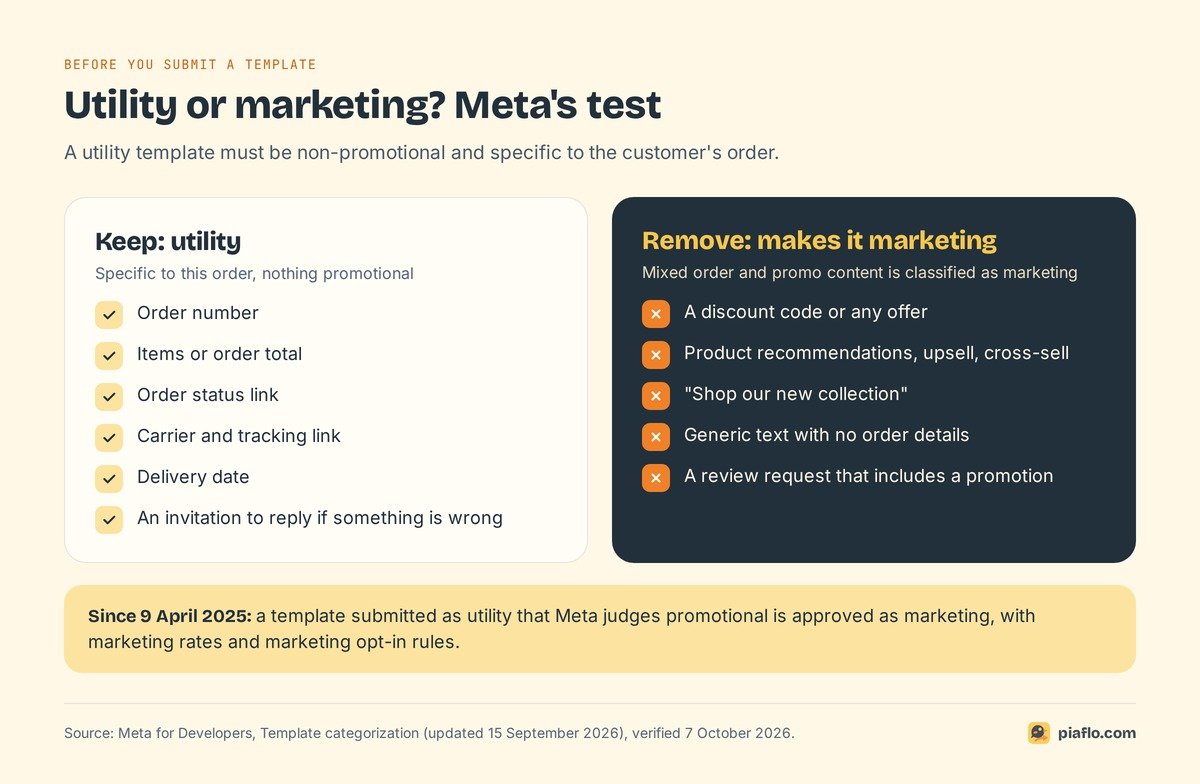
Rule of thumb: a sentence that makes sense without this specific order belongs in a separate marketing message.
What WhatsApp order notifications cost
Meta charges per delivered template message, by category and by the country code of the customer's phone number (your own location does not matter). Utility rates also drop automatically at high monthly volumes. The full grid is on Meta's pricing page; the pricing model is explained in our guide to WhatsApp Business API pricing.
Utility rates by country
Rates effective 1 October 2026, in USD per delivered utility message:
| Customer's country | Utility message | 2,000 messages a month |
|---|---|---|
| US and Canada (North America) | 0.0034 | 6.80 |
| India | 0.0014 | 2.80 |
| Saudi Arabia | 0.0107 | 21.40 |
| United Arab Emirates | 0.0157 | 31.40 |
| United Kingdom | 0.022 | 44.00 |
| France | 0.03 | 60.00 |
| Germany | 0.055 | 110.00 |
Why 2,000? A store with 1,000 orders a month sends one confirmation and one shipping update per order. At list rates, a US store pays under 7 USD a month for both.
When an update costs nothing
When a customer writes to you, a 24-hour customer service window opens, and each new message from them resets it. Utility templates sent inside an open window were free from 1 July 2025, and Meta charges them again since 1 October 2026.
Example: a customer replies to the confirmation "Can you deliver after 6 pm?". If the tracking update goes out within 24 hours of that reply, Meta does not charge for it. That is why the Meta invoice often comes in below orders × rate.
Opt-in for order updates
What Meta asks for
Meta's opt-in rules cover every business-initiated message, order updates included: the person gave you their number and agreed to receive messages from your business. Since November 2024, that opt-in can be general and need not mention WhatsApp, as long as you comply with local law. Two requirements stay:
- the person must clearly see that they are agreeing to receive messages;
- your business name must be stated.
Meta also recommends naming the kinds of messages you will send (order updates, offers), or a separate opt-in for each, plus a clear way to opt out.
Tell customers at checkout
The simplest setup is a line near the phone field at checkout and in your privacy notice: "We will send your order and shipping updates on WhatsApp. Reply STOP to stop them." Keep it separate from any marketing opt-in, which should stay an unchecked box.
Local rules can be stricter, especially in the EU: see WhatsApp consent and GDPR for Shopify. For US customers, order updates are the main proactive WhatsApp message you can send, since marketing templates do not reach US numbers today.
Copy-ready order message templates
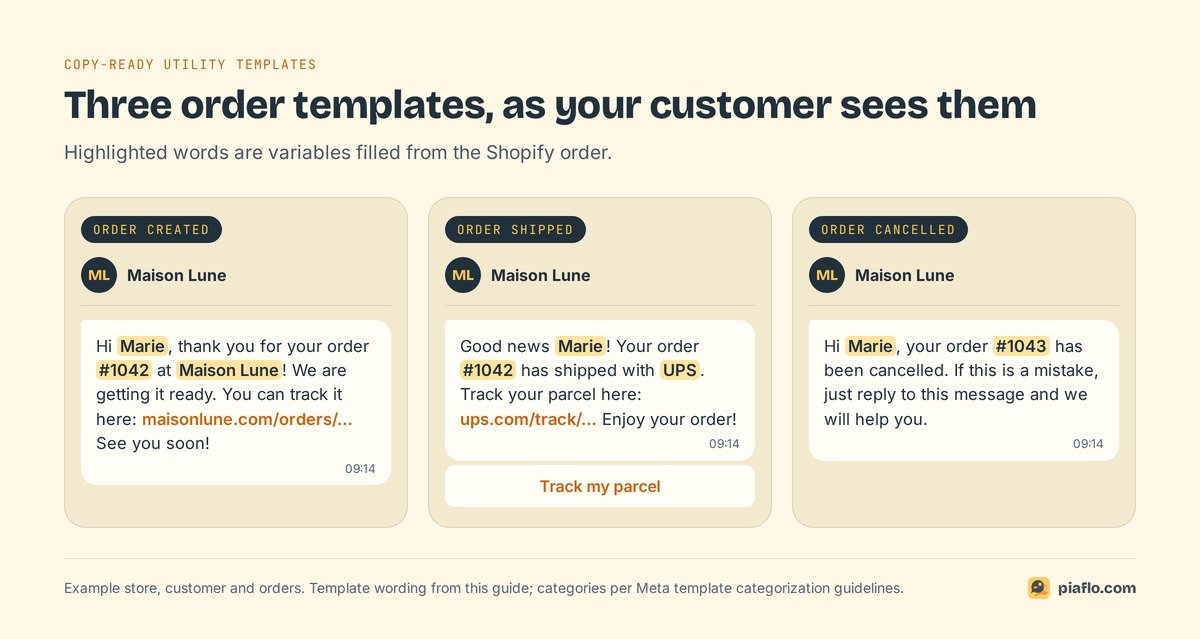
Templates use numbered variables ({{1}}, {{2}}) filled from the order at send time. Each one below sticks to the order, stays well under Meta's 1,024-character body limit and ends with words, since Meta rejects templates that start or end with a variable.
Order confirmation template
Hi {{1}}, thank you for your order {{2}} at {{3}}! We are getting it ready. You can track it here: {{4}} See you soon!
Variables: first name, order number, shop name, order status link. Give the first name a fallback ("there").
Shipping notification template
Good news {{1}}! Your order {{2}} has shipped with {{3}}. Track your parcel here: {{4}} Enjoy your order!
Variables: first name, order number, carrier, tracking link. If your tool supports it, put the tracking link in a URL button labeled "Track my parcel": the message stays short and the link is easy to tap.
Cancellation template
Hi {{1}}, your order {{2}} has been cancelled. If this is a mistake, just reply to this message and we will help you.
Variables: first name, order number. A reply opens the service window, so your team can answer freely.
Getting templates approved
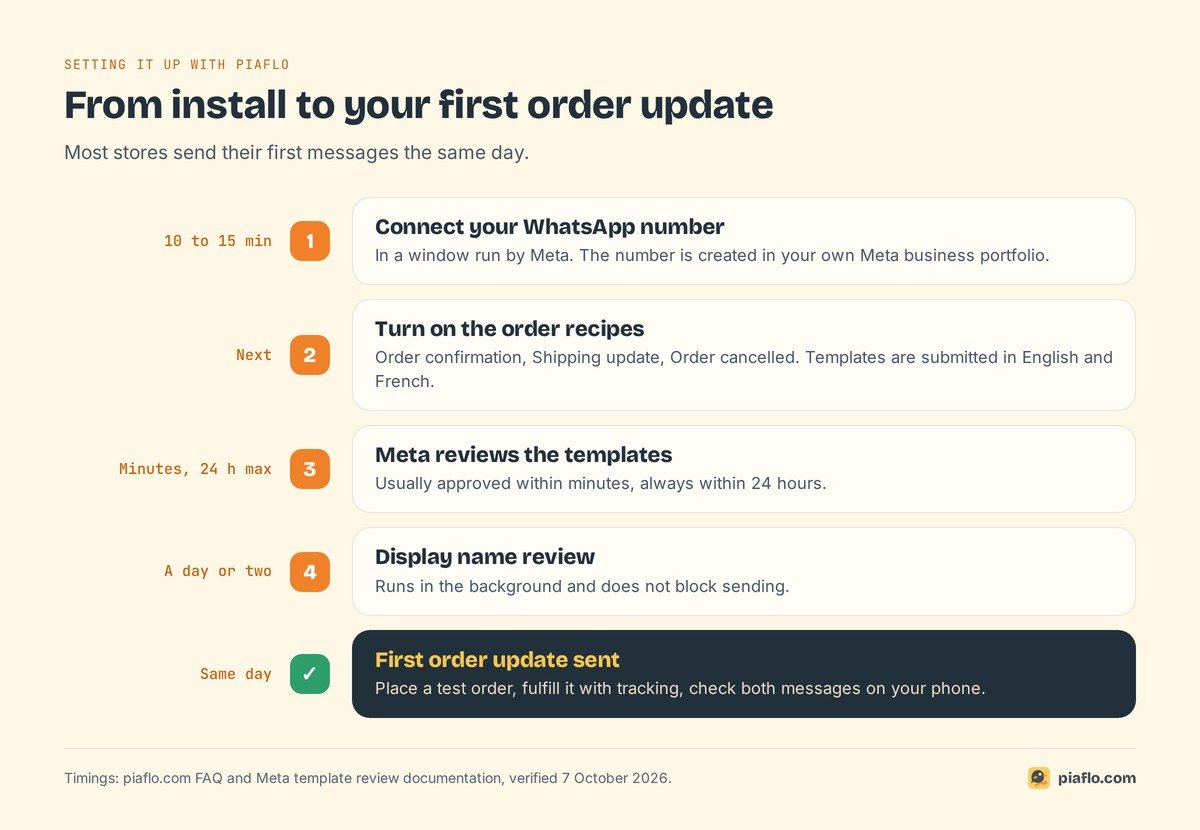
Meta's decision can take up to 24 hours. Most rejections come from avoidable mistakes:
- Variables out of order or malformed. Use
{{1}},{{2}},{{3}}in sequence, with no special characters inside. - Too many variables for the length. Write real sentences around them.
- A variable at the very start or end. "{{1}}, your order..." gets rejected; "Hi {{1}}, your order..." passes.
- Sample values missing. Provide an example for each variable when you submit.
- A duplicate. Same body and footer as one of your existing templates.
Write each template in every language your customers use; Meta approves each language separately.
Which Shopify event sends which message
Each message hangs on a Shopify order event that carries the data the template needs:
| Shopify event | WhatsApp message | Data available for the template |
|---|---|---|
| Order created | Order confirmation | order number, total, first item, order status link |
| Order fulfilled (shipped) | Shipping update | order number, carrier, tracking number, tracking link |
| Order cancelled | Cancellation notice | order number, total, cancellation reason |
Three details avoid most surprises:
- Use "order created" for confirmations. With manual payment methods such as bank transfer or cash on delivery, an order is marked paid later, so a confirmation sent on "order paid" arrives late or not at all.
- Shipping updates need a tracking number. Make sure your fulfillment app or 3PL sends tracking to Shopify.
- Do not send the same message twice. Shopify's own documentation warns that the same webhook can arrive more than once, after a timeout or a retry. Apps handle this for you; if you build it yourself, store the delivery ID and skip duplicates.
Set it up step by step
- Connect a WhatsApp Business Platform number that can receive a verification code. Through an app, this happens in a Meta window. Depending on your country, you can keep the WhatsApp Business app on the same number.
- Choose your messages. Start with confirmation and shipping update; add the cancellation notice.
- Write the templates in each language you need, with the variables listed above and no promotion.
- Submit them to Meta as utility and wait for approval (up to 24 hours). If one comes back as marketing, remove the promotional sentence and resubmit.
- Map each event to its template and fill the variables from the order.
- Add the checkout notice that order updates are sent on WhatsApp.
- Test with a real order on your own phone: place it, fulfill it with a tracking number, cancel a second one. Check the names, links and language.
You can build it yourself with a Shopify webhook, a small server and the WhatsApp Cloud API. You then own retries, duplicates, template versions and an inbox for replies. For most stores, an app is the shorter road.
Setting it up with Piaflo
Piaflo includes Order confirmation, Shipping update and Order cancelled recipes, built on the Shopify events above and sent as utility templates. The confirmation carries the order status link; the shipping update names the carrier and the tracking link; the cancellation notice invites the customer to reply. Piaflo submits the templates to Meta in English and French. A variant of the confirmation asks whether the customer wants updates on WhatsApp, and a "Yes" subscribes them. Connecting your number takes 10 to 15 minutes, and the display name review that follows does not block sending, so most stores send their first order update the same day.
Order and shipping updates are included in the Free plan, with a one-seat shared inbox where replies land next to the Shopify order. Meta bills its fees directly to your WhatsApp Business account at its official rates; Piaflo adds no markup. Abandoned cart and COD flows come with the Starter plan at 29 USD a month, with a 14-day free trial (see the abandoned cart recovery guide).
See the plans and follow the guide to connect your WhatsApp number. You can also install Piaflo from the Shopify App Store.
Frequently asked questions
Do I need marketing consent to send order confirmations on WhatsApp?
No. Order confirmations, shipping updates and cancellation notices are utility messages. Meta requires an opt-in to receive messages from your business, which can be general, so tell customers at checkout that order updates are sent on WhatsApp. Marketing consent is only needed for promotional messages.
Can I add a discount code to my order confirmation?
You can, but the template then becomes marketing: Meta classifies mixed order and promo content as marketing. It costs more, only reaches customers who opted in to marketing, and is not delivered to US phone numbers. Send the offer as a separate marketing message instead.
How much does a WhatsApp shipping notification cost?
It is billed as a utility message at the rate of the customer's country. On Meta's rate card of 1 October 2026, that is 0.0034 USD in the US and Canada, 0.0014 USD in India, 0.022 USD in the UK and 0.055 USD in Germany. Since 1 October 2026, utility templates sent inside an open customer service window are charged too (they had been free since 1 July 2025).
Can I use the WhatsApp Business app instead?
The WhatsApp Business app has no connection to Shopify order events, so every message would be typed by hand. Automated confirmations and shipping updates need the WhatsApp Business Platform (Cloud API), usually through a Shopify app.
Why was my order confirmation not delivered?
Check, in order: the template is approved and exists in the customer's language, the phone number on the order includes the country code, and the customer has not blocked your number. If Meta moved the template to marketing, it will not reach US numbers or customers without a marketing opt-in.