WhatsApp Review Requests for Shopify: When to Send, What to Write and Meta's Rules
When to ask Shopify customers for a review on WhatsApp, what to write in the two messages, how Meta classifies the template, what it costs and why every customer should get the same link.
On this page 8
A customer's parcel arrived on Tuesday. By Saturday they have worn the jacket twice, and that is the moment to ask what they think. To ask Shopify customers for a review on WhatsApp, send one approved template a few days after delivery that asks how their order went, then send your review link to every customer who answers, in the same chat. Expect that template to count as marketing: it needs the customer's opt-in to WhatsApp marketing, it costs the marketing rate of their country, and Meta does not deliver it to US phone numbers. Give every customer the same invitation, happy or not: the FTC tells businesses not to ask for reviews only from customers they expect to be positive.
This guide covers review requests sent to your customers. Asking WhatsApp to review a banned business number is a separate topic.
Where WhatsApp fits in your review process
Reviews on a Shopify store live in a review app, which hosts the form, shows the stars and sends its own requests.
Your review app already sends emails
Two widely installed review apps, with the details from their Shopify App Store listings, verified on November 4, 2026:
- Judge.me is rated 5.0 from 49,633 reviews on its App Store listing. It has a free plan and says it sends "unlimited, automatic review requests via email, SMS, and push". Automatic reminders are part of its Awesome plan, at $15 a month.
- Loox is rated 4.9 from 10,033 reviews on its App Store listing. Its free plan includes "review request emails & reminders" for up to 500 orders, and paid plans start at $49.99 a month.
Neither listing mentions WhatsApp. Keep your review app to collect and display the reviews: WhatsApp delivers the request, and its link points to where customers leave the review, such as the product page that shows your app's form.
What WhatsApp adds
- It lands in a chat the customer already knows, after the order confirmation and shipping update if you sent them there.
- The customer can answer in one tap. Quick reply buttons ("Loved it", "Not great") take one second.
- Problems reach you privately. An unhappy customer can tell you in the chat, and you can fix it while it is still a conversation.
Email stays cheaper, since your review app's emails come with its plan. WhatsApp earns its place with customers who already talk to your store there.
Marketing or utility: how Meta classifies a review request
Every message a business sends first on WhatsApp is a template approved by Meta, and its category sets the price and who can receive it. A review request sits on the line.
What Meta accepts as utility feedback
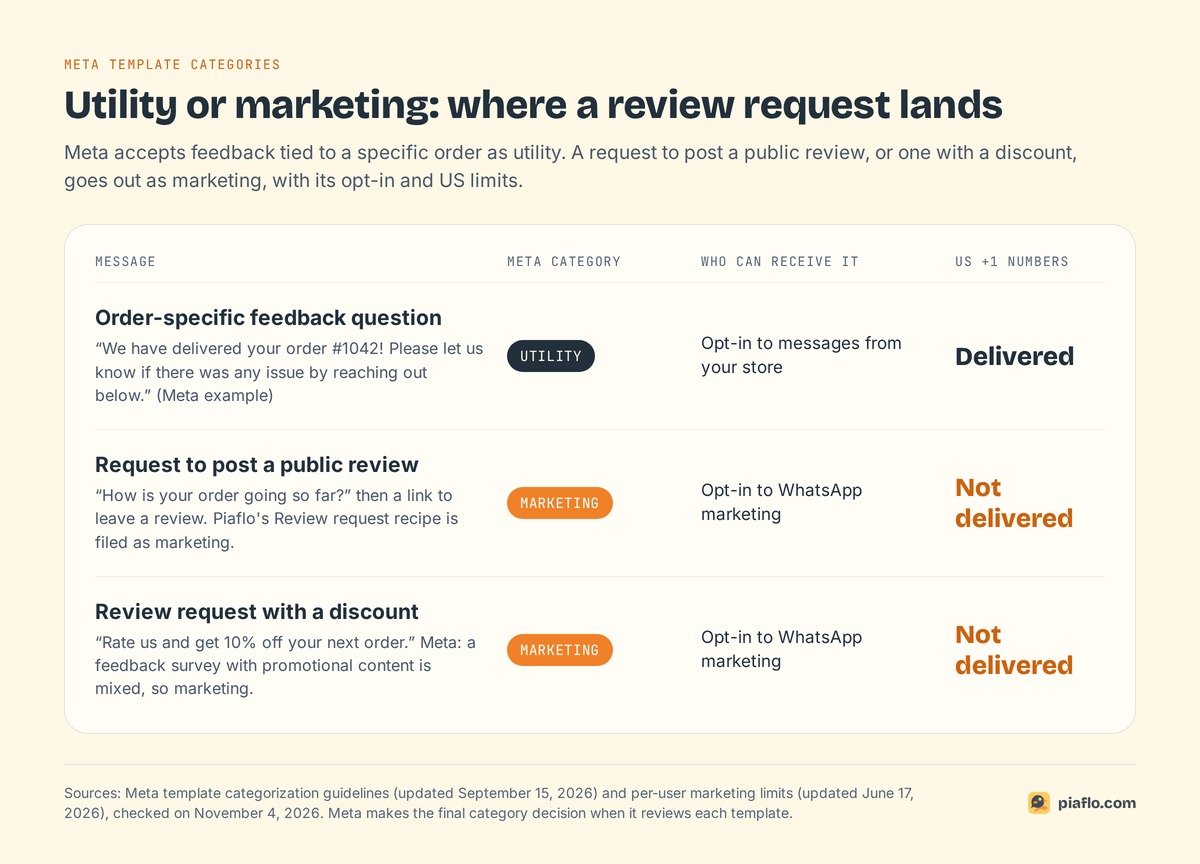
Meta's template categorization guidelines, updated September 15, 2026, list feedback surveys among utility messages, with one condition: "Specificity of the order or interaction to which these relate is necessary. A general/generic survey or request for feedback will not be approved as utility."
Meta's own examples show the line:
- "We have delivered your order {{order_number}}! Please let us know if there was any issue by reaching out below."
- "You chatted with us {{online}} recently about order {{order_number}}. How was your experience? Click below to fill out a short survey."
The same page treats "a feedback survey with promotional content" as marketing, because it mixes both categories. "How did order #1042 go?" can qualify as utility. "Rate us and get 10% off your next order" cannot.
Why a review request usually goes out as marketing
None of Meta's utility examples asks the customer to post a public review. A review on your product page also sells to the next visitor, which puts the request closer to marketing than to an order update. Piaflo's own review request recipe is filed as marketing.
Meta has the last word: since April 9, 2025, a template submitted as utility that WhatsApp judges to be marketing is approved as marketing. Our guide to rejected WhatsApp templates explains recategorization and appeals.
What it costs and who it reaches
A marketing template brings three conditions:
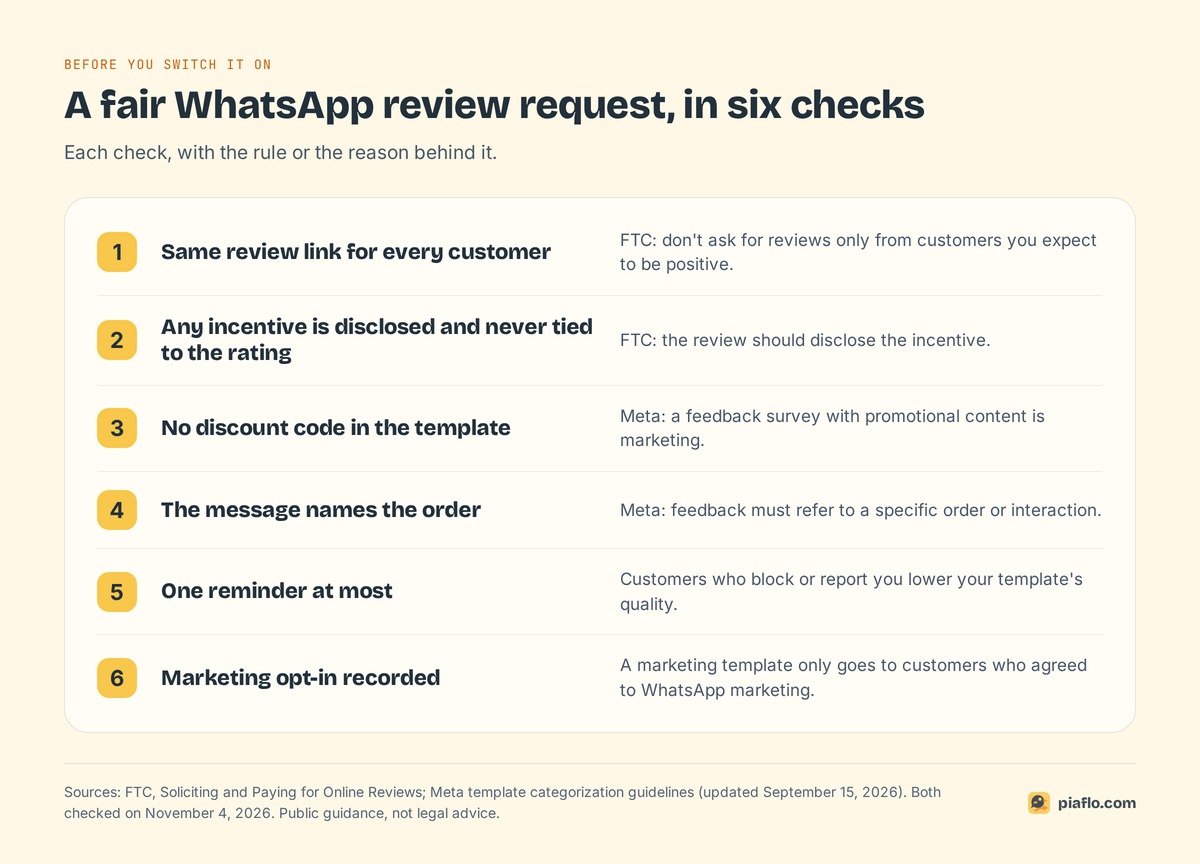
- Opt-in to marketing. The customer must have agreed to receive marketing messages from your store on WhatsApp.
- No US numbers. Meta's documentation, updated June 17, 2026, says WhatsApp "does not currently deliver marketing template messages to WhatsApp users with United States phone numbers". The message fails with error 131049.
- The marketing rate. Meta charges each delivered message at the rate of the customer's country code. On the rate card effective October 1, 2026: $0.0118 in India, $0.025 in North America (which covers Canada), $0.0576 in the United Arab Emirates, $0.0635 in the United Kingdom, $0.0859 in France and $0.1365 in Germany.
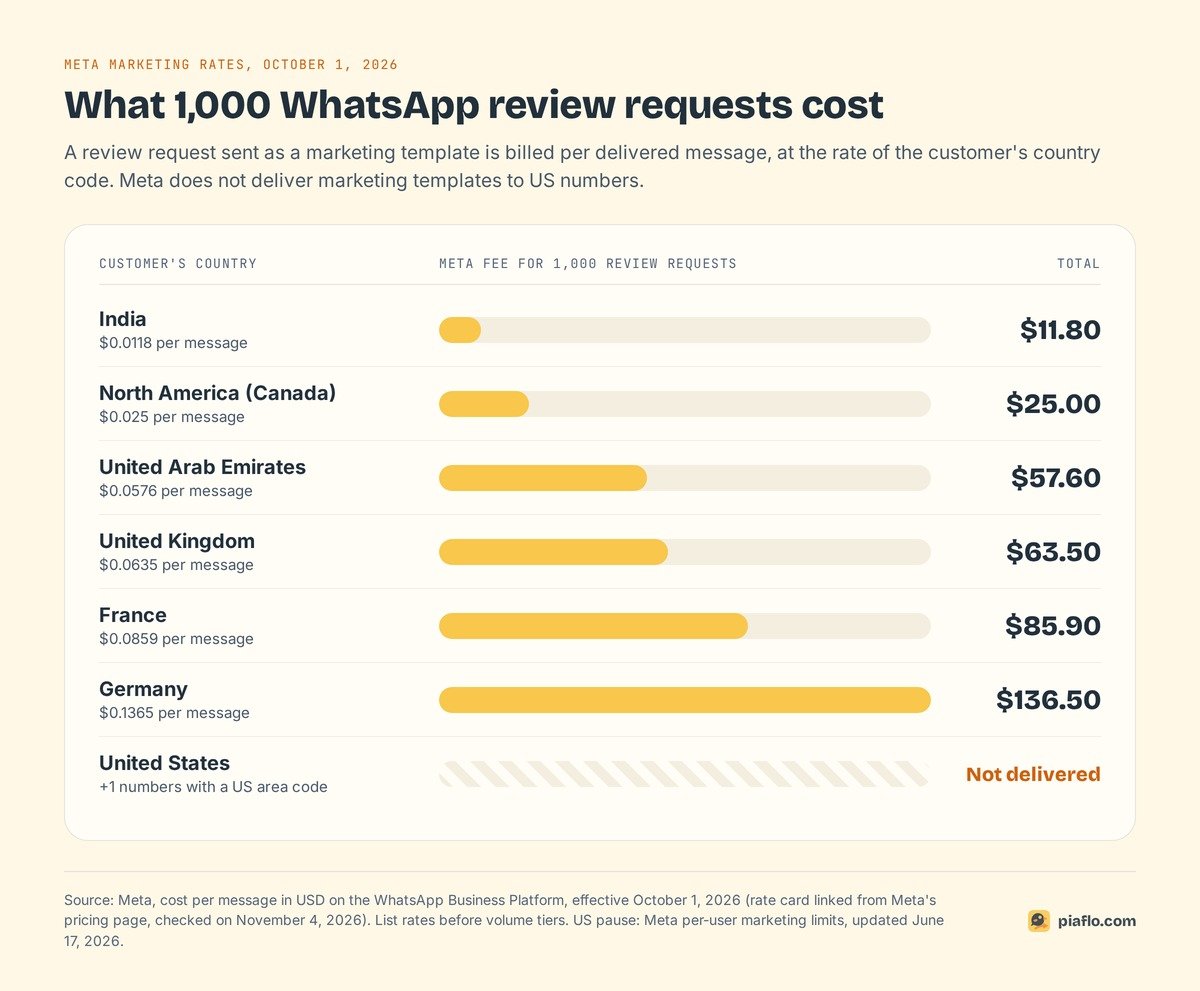
500 review requests a month to customers in France cost $42.95 in Meta fees. A US store reaches its Canadian and international customers this way; US customers keep the review app's email. What still reaches +1 numbers is in our guide to WhatsApp marketing messages to US numbers, and rates for every country in our WhatsApp Business API pricing guide.
When to send it
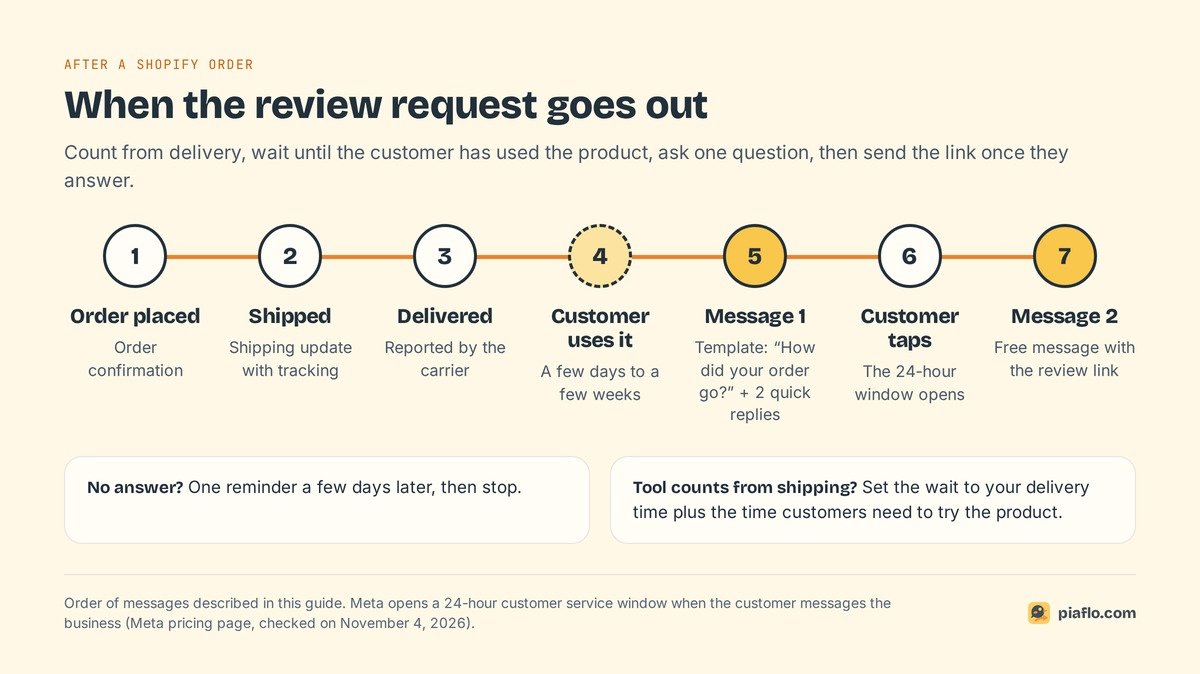
Count from delivery
A request sent before the parcel arrives asks about a product the customer has not seen. Merchants on Reddit say the same about review emails: count the delay from delivery.
Shopify only knows a parcel is delivered when the carrier or fulfillment app reports it. If your tool counts from shipping, set the wait to your usual delivery time plus the few days the customer needs to try the product. The messages that come before this one are in our guide to Shopify shipping updates on WhatsApp.
Match the wait to the product
- Used straight away (clothing, accessories, phone cases): a few days after delivery.
- Results take time (skincare, supplements, hair care): after a few weeks of use, so the review talks about results.
- Needs assembly or setup (furniture, electronics): once the customer has had time to set it up.
- Consumables (coffee, refills): after the customer has used one, or when they order again.
If you sell several of these, run one flow per product type, or pick the delay that fits your best sellers.
One reminder at most
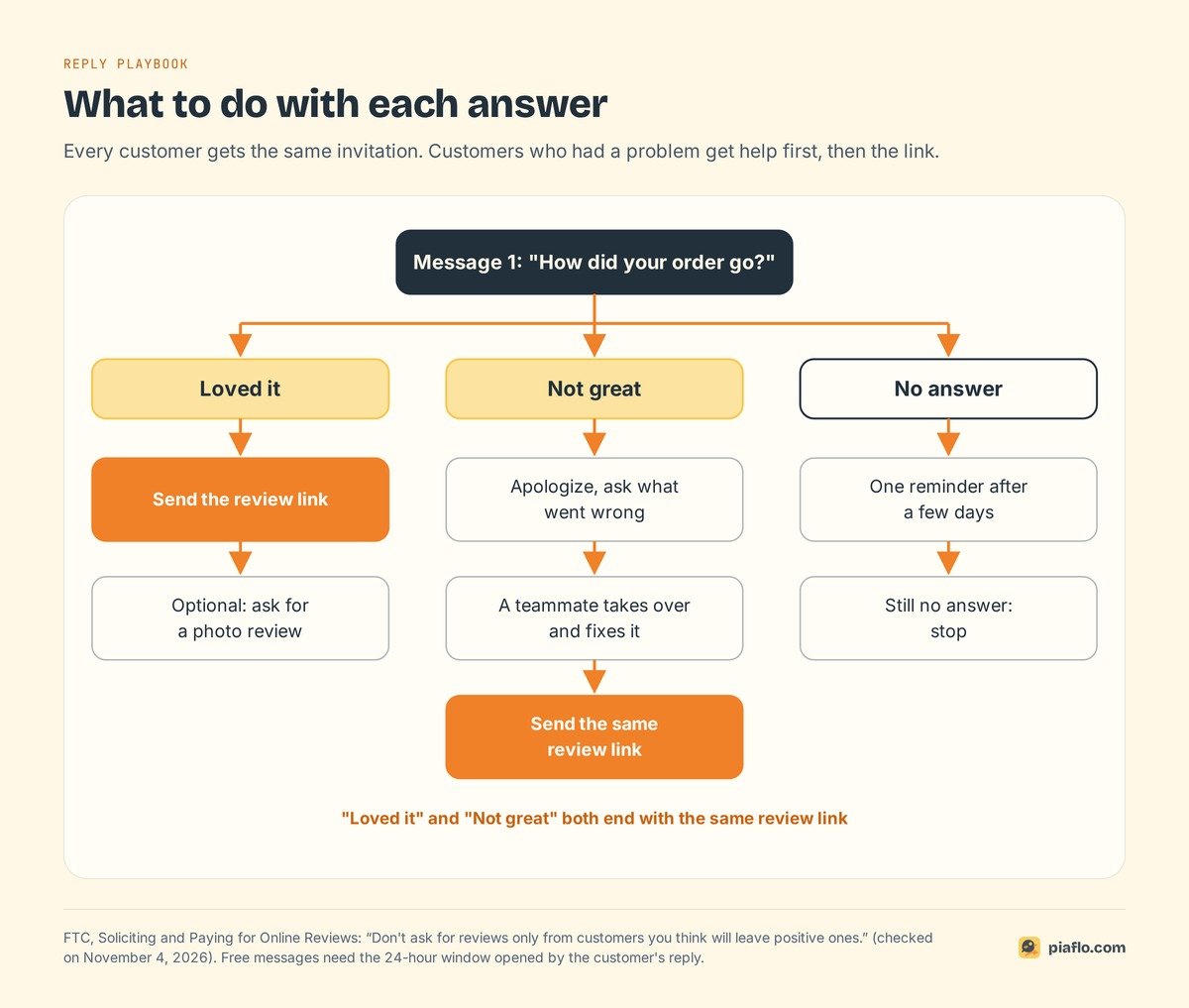
No answer? Send one reminder a few days later, then stop. Each marketing template is billed, and customers who block or report your number pull down your template's quality until Meta pauses it. Two messages per order is plenty.
What to write: ask first, then send the link
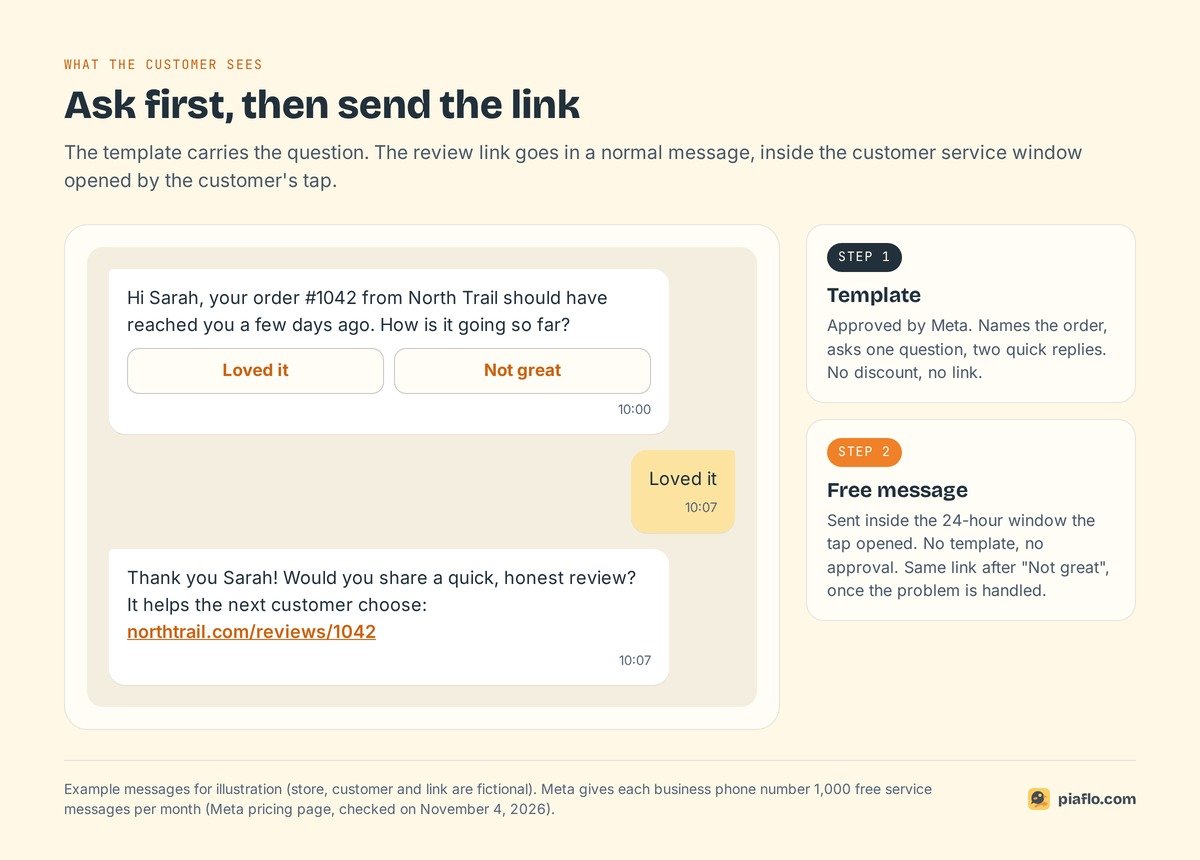
The template asks a question. The link comes after the answer.
Message 1: ask how the order went
The template names the order, asks one question and offers two quick reply buttons:
Hi {{1}}, your order {{2}} from {{3}} should have reached you a few days ago. How is it going so far?
Buttons: Loved it | Not great
Three variables: first name (fallback "there"), order number and store name. Naming the order is what Meta looks for in feedback messages. Leave out discount codes and product suggestions.
Message 2: the review link, inside the 24-hour window
A tap on a button counts as the customer writing to you. That opens Meta's 24-hour customer service window, where you can send a normal message, with no template and no approval. The review link goes there:
Thank you {{name}}! Would you share a quick, honest review? It helps the next customer choose: {{link}}
Meta gives every business phone number 1,000 free service messages per month, so this second message usually costs nothing. The template stays short and easy to approve, and you can change the link any time without a new review by Meta.
Three templates to adapt
Illustrative messages written for this guide, for a clothing store:
The reminder (template, submitted as marketing):
Hi {{1}}, one last quick question about order {{2}}: how did it work out? Tap below to answer. We won't ask again.
Buttons: Loved it | Not great
The photo ask (free message, sent after "Loved it"):
Glad you like it! If you have a minute, a photo with your review shows other customers how it fits: {{link}}
After a fixed problem (free message, sent while the support conversation is still open):
Thanks for your patience, {{name}}. Your replacement is on its way. Once it arrives, we'd value your honest review of the whole experience: {{link}}
Write each template in every language your customers use.
Keep it fair: the same invitation for everyone
Sending the link only to customers who tapped "Loved it" is called review gating, and US guidance addresses it.
No review gating
The Federal Trade Commission's guide Soliciting and Paying for Online Reviews says it plainly: "Don't ask for reviews only from customers you think will leave positive ones."
In a WhatsApp flow, both buttons lead to the review link. Customers who tap "Not great" get help first, then the same invitation. This describes public guidance and is not legal advice: for your own store, read the FTC page and ask a lawyer if you are unsure.
Incentives: disclose them, never tie them to the rating
Some stores thank reviewers with a discount, and Loox's free plan lists "Offer discounts for photo reviews". The FTC guide sets two conditions: the incentive must not depend, "explicitly or implicitly", on the review being positive, and "the review should disclose the incentive".
On WhatsApp, a discount code inside the request also makes it promotional content, which Meta treats as marketing. If you offer a thank-you, mention it on the review form and send the code after the review, to every reviewer.
When a customer replies with a problem
A "Not great" arrives in private, while you can still fix it.
- Answer inside the window. Thank them, ask what went wrong and say a person will reply in the chat.
- Hand it to a person with the order in front of them: size exchange, damaged item, missing part.
- Fix it under your usual policy, as for a customer who wrote by email.
- Send the review link afterwards. The customer then reviews the whole experience, including how you handled the problem.
- Tag the customer or the order in Shopify. A tag such as
review-issuelets you count problems per product each month.
Never make a refund depend on changing or deleting a review. Fix the problem, then let the customer say what they think.
Measure what the request brings
Track three numbers over a month:
- Reply rate: customers who tapped a button or wrote back.
- Problems caught: "Not great" answers and complaints, by product.
- Reviews collected: reviews published from the WhatsApp link, read in your review app.
Reviews per 100 requests = reviews from the WhatsApp link ÷ requests delivered × 100
A UTM tag on the link shows which reviews came from WhatsApp; compare with your review app's email requests over the same period. Each problem caught is a complaint heard in private.
Setting it up with Piaflo
Piaflo is a Shopify app that sends WhatsApp messages from your own number, connected through Meta's sign-up window in 10 to 15 minutes. Its Review request recipe runs five days after shipping and asks how the order went, with two quick replies, "I love it" and "Not great". As shipped, the review link sits on the "I love it" branch; the "Not great" branch sends an apology and hands the chat to your team.
It is a marketing flow, so it reaches customers who opted in to WhatsApp marketing, and Meta does not deliver it to US numbers. Two settings are worth changing in the flow builder:
- The wait. Piaflo counts from shipping, so set the delay to your delivery time plus the time your customers need to try the product.
- The "Not great" branch. Add a text step with the same review link to this branch, after the apology and before the hand-off to your team, or send the link yourself from the inbox once the problem is fixed, while the 24-hour window is still open. Every customer then gets the same invitation.
Replies land in Piaflo's shared inbox next to the customer's Shopify orders and tags, and the flow pauses as soon as a teammate answers. A tag step can mark customers who reported a problem. Every link is tracked, and the dashboard shows orders and revenue per flow next to the estimated Meta cost.
To grow the list of customers you can ask, the Order confirmation with opt-in recipe thanks customers for their order and asks if they want updates on WhatsApp; "Yes" subscribes them. Starter ($29 a month) includes ready-to-use flow recipes, an opt-in popup and QR links; Growth ($79) unlocks all recipes and unlimited custom flows, with five inbox seats. Piaflo submits templates to Meta in English and French. Meta bills its fees directly to your WhatsApp Business account at its official rates, with no Piaflo markup, and messages are unlimited on Piaflo's side. The Free plan has no time limit, so you can test before you upgrade.
See the plans and follow the guide to connect your WhatsApp number. You can also install Piaflo from the Shopify App Store.
Frequently asked questions
Is a WhatsApp review request marketing or utility?
It depends on the content, and Meta decides. Meta accepts feedback surveys as utility when they refer to a specific order, and treats generic feedback requests and surveys with promotional content as marketing. A request to post a public review goes out as marketing in Piaflo's recipe, which means it needs the customer's marketing opt-in.
Can I send WhatsApp review requests to US customers?
Not as a marketing template. Meta does not deliver marketing templates to WhatsApp users with a +1 US phone number, and the message fails with error 131049. US customers can still get your review request by email or SMS from your review app.
How long after delivery should I ask for a review?
Count from delivery and wait until the customer has used the product: a few days for clothing and accessories, a few weeks for products whose results take time, such as skincare. If your tool counts from shipping, add your usual delivery time to the delay.
Can I offer a discount in exchange for a review?
The FTC says an incentive must not depend on the review being positive and that the review should disclose it. On WhatsApp, a discount code inside the request also makes the template marketing. Send the same invitation to everyone and give any thank-you to every reviewer.
Do Judge.me and Loox send review requests on WhatsApp?
Their Shopify App Store listings, checked on November 4, 2026, do not mention WhatsApp. Judge.me lists requests by email, SMS and push; Loox lists review request emails and reminders. A WhatsApp app can send the request and link to the review form those apps display on your store.