WhatsApp Business App vs API: What Changes for a Shopify Store
WhatsApp Business app or API for a Shopify store: devices, automation, templates, sending limits, Meta pricing, the 24-hour rule, coexistence on one number and when to switch.
The WhatsApp Business app is free and built for people who reply by hand: one phone, up to four linked devices, broadcast lists of up to 256 contacts who saved your number. The WhatsApp Business Platform, usually called the WhatsApp Business API, is what lets your Shopify store send messages on its own: an order confirmation the second an order lands, a reminder when a checkout is abandoned, a confirm or cancel request on every cash on delivery order. It runs on message templates approved by Meta, follows a 24-hour customer service window, and Meta bills it per delivered message.
You do not always have to pick one. With coexistence, the same number stays in the app on your phone while an API tool sends the automated messages.
WhatsApp Business app vs API at a glance
"API" stands for application programming interface: a way for software, such as a Shopify app, to send and receive WhatsApp messages without anyone touching a phone. Meta's official name for it is the WhatsApp Business Platform, and the version most tools use today is the Cloud API, hosted by Meta.
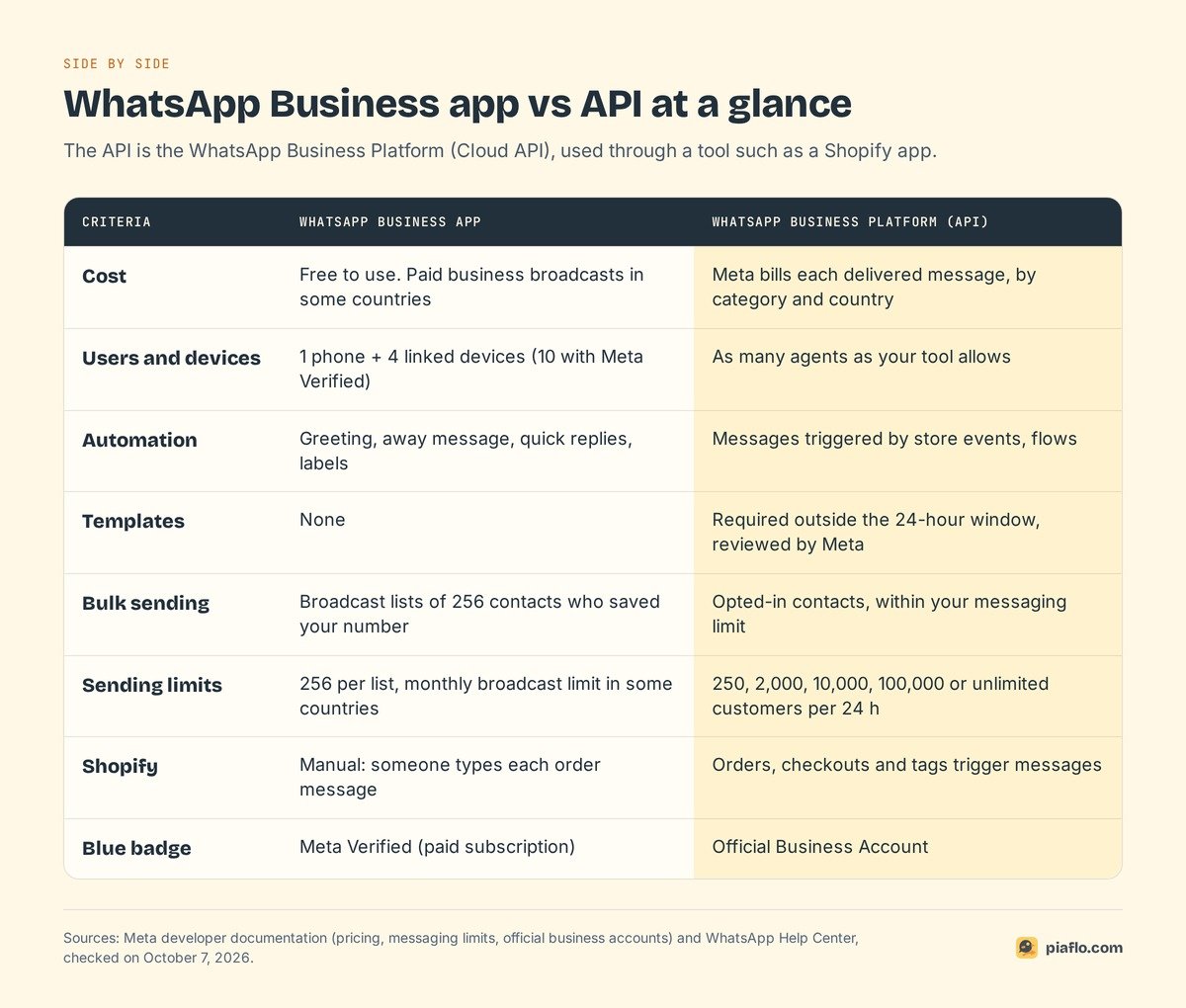
The key differences, one by one
Users and devices
The app lives on one primary phone. According to WhatsApp's Help Center, you can use WhatsApp Business on up to four linked devices (a computer, a tablet, a second phone) without keeping the primary phone online, as long as you open the app on the primary phone at least every 14 days. A paid Meta Verified subscription raises that to 10 devices and adds chat assignment to agents, where the feature is available.
For a two-person store, four devices is plenty. For a team of six handling hundreds of order questions a day, it gets tight. On the API, WhatsApp sets no device limit: your tool decides how many people reply, usually from a shared inbox.
Automation
The app gives you a greeting message for new chats, an away message outside business hours, quick replies and labels. Useful, and that is where it stops. The app does not know an order was placed, a parcel shipped or a checkout was abandoned: every one of those messages is written by a person.
On the API, your Shopify app listens to store events (order created, fulfillment created, checkout abandoned), sends the right message, then reacts to the reply: tag the order, cancel it, or hand the chat to a person.
Templates and message types
On the API, any message you send first, or more than 24 hours after the customer's last message, must be a template: a pre-written message with variables (name, order number, tracking link). Meta reviews each template automatically when you create or edit it, and only approved templates can be sent.
Templates fall into three categories, and the category sets the price:
- Marketing: promotions, new products, abandoned cart reminders.
- Utility: order confirmations, shipping updates, cash on delivery confirmations.
- Authentication: one-time passcodes.
Inside an open 24-hour window, you reply with normal messages. The app has no templates: Meta states they can only be sent from the API side.
Broadcasts and lists
The app's broadcast lists let you send one message to many contacts at once, with two rules from WhatsApp's Help Center: a list holds up to 256 contacts, and only people who saved your number in their phone receive the message. In some countries, WhatsApp is also rolling out a monthly broadcast limit, and paid business broadcasts that reach customers who did not save your number, billed per delivered message.
On the API, there is no list size. A campaign goes to every contact who opted in, within your messaging limit: for a store, your customers with WhatsApp marketing consent, segmented like your email list.
Sending limits and messaging tiers
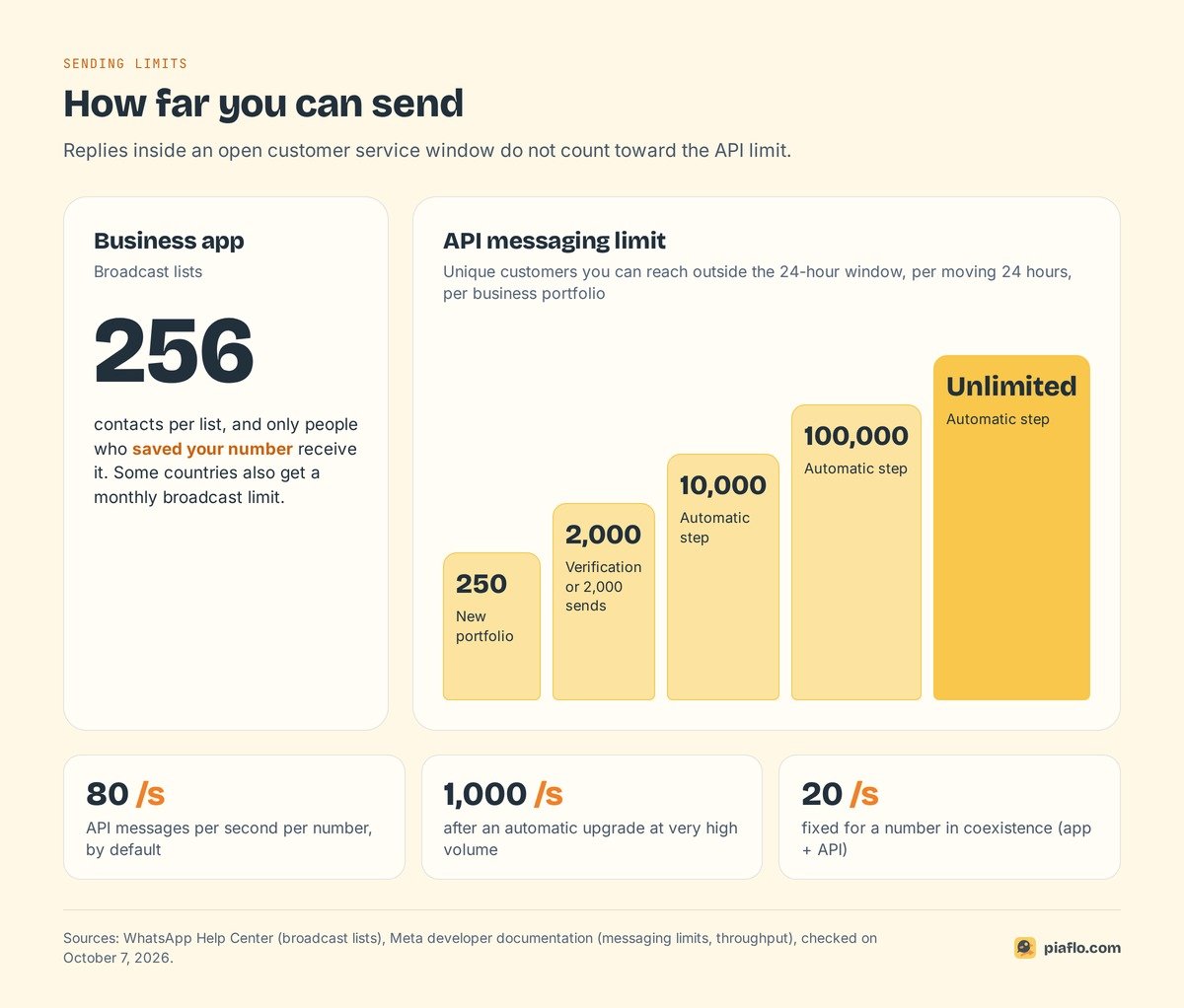
On the app, the practical ceiling is the broadcast list: 256 recipients per list, plus any monthly limit WhatsApp applies in your country.
On the API, Meta sets a messaging limit: the number of unique customers you can reach outside a customer service window in a moving 24-hour period. It is set at the business portfolio level and shared by all your numbers.
- A new business portfolio starts at 250 unique customers per 24 hours.
- It moves to 2,000 once you verify your business with Meta, or after you deliver 2,000 template messages to unique customers within 30 days with good quality ratings.
- From there, Meta raises it automatically to 10,000, then 100,000, then unlimited, when your quality stays high and you used at least half of your current limit in the last 7 days. Each step happens within 6 hours.
Replies to customers who wrote to you do not count. Speed is capped too: 80 messages per second per number by default, up to 1,000 for very high volumes.
Price
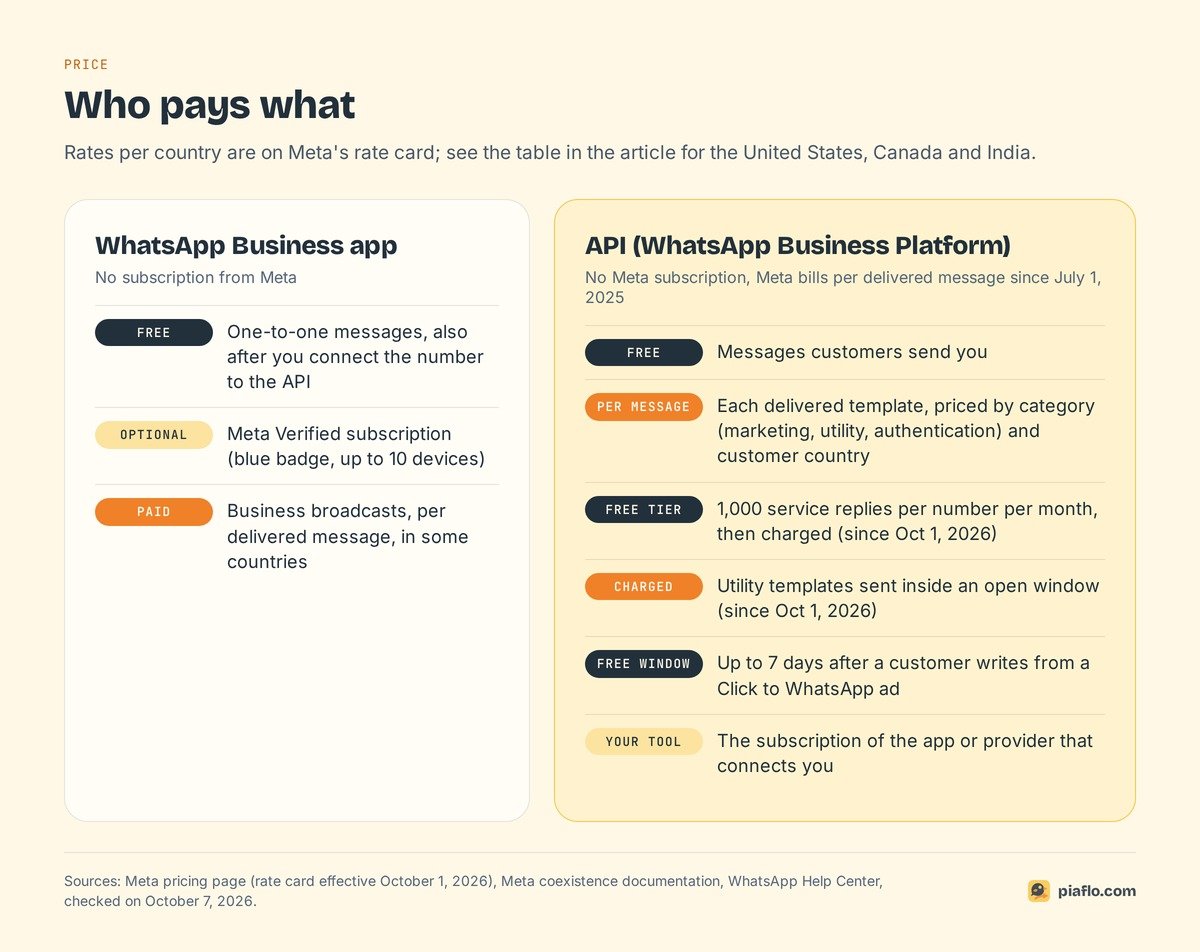
The app is free, and Meta states that app messages stay free even after you connect the number to the API. The paid extras are optional: Meta Verified, and business broadcasts where offered.
The API has no Meta subscription. Since July 1, 2025, Meta bills per delivered message, at a rate set by the message category and the customer's country code. Messages customers send you are free. Two changes took effect on October 1, 2026, per Meta's pricing page:
- Service messages (your free-form replies inside the 24-hour window) are now charged, after 1,000 free service messages per phone number per month.
- Utility templates sent inside an open window, free since July 2025, are charged again.
A few rates from Meta's October 1, 2026 rate card, in US dollars per delivered message:
| Customer's country | Marketing | Utility | Service |
|---|---|---|---|
| United States and Canada | $0.025 | $0.0034 | $0.0034 |
| India | $0.0118 | $0.0014 | $0.0014 |
Add the tool that connects to the API: providers charge their own subscription, and some add a margin on Meta's rates. Our full breakdown of WhatsApp Business API pricing covers every country group and how to estimate a monthly bill.
Shopify integration
This is where the gap is widest. With the app alone, Shopify and WhatsApp never talk. A chat button on your theme lets customers write to you, but every order message (confirmation, shipping update, cash on delivery check, cart reminder) means someone copies details from the Shopify admin and types it.
With the API, a Shopify app connects your WhatsApp Business account through a Meta sign-up window and uses your store data: orders, fulfillments, abandoned checkouts, tags and marketing consent. The abandoned cart recovery flow is the clearest example: a reminder 30 minutes after the checkout, to subscribed customers only, that stops as soon as the order is placed. Nobody can do that by hand for every cart.
Verification and the blue badge
- On the app, the blue badge comes with Meta Verified, a paid subscription, where available.
- On the API, it comes with Official Business Account status. Meta's conditions: follow the WhatsApp Business Messaging Policy, be on the platform for at least 30 days, verify your business, turn on two-step verification and have an approved display name. Meta does not grant it to WhatsApp Business app numbers.
Most stores sell fine without the badge. Business verification matters more: it is one way to raise your messaging limit from 250 to 2,000.
What is the 24-hour rule for WhatsApp Business?
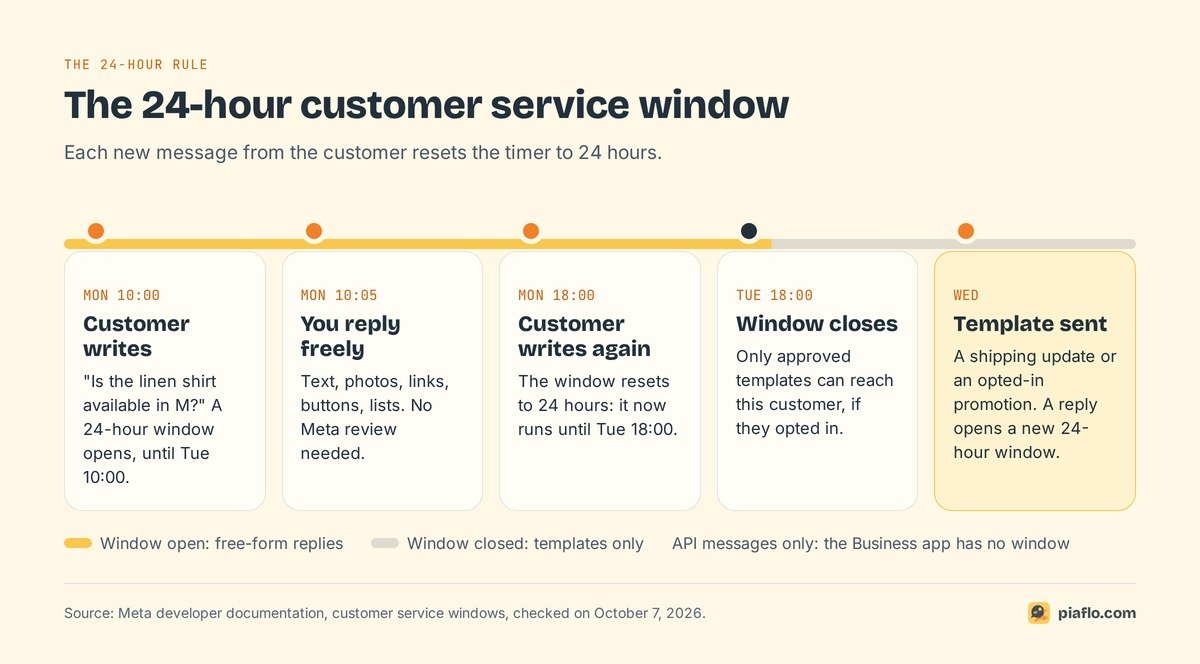
The 24-hour rule is Meta's customer service window. When a customer messages your business, a 24-hour timer starts. Each new message from that customer resets it to 24 hours. While the window is open, you can reply freely. When it closes, you can only reach that customer with an approved template.
A customer writes at 10:00 on Monday: "Is the linen shirt available in M?" You can reply with text, a photo, a link and buttons until 10:00 on Tuesday. If they write again at 18:00 on Monday, the window runs until 18:00 on Tuesday. On Wednesday, only a template reaches them, such as a shipping update or a promotion they agreed to receive.
Inside the window
Any normal message works: text, images, video, documents, reply buttons, lists, location requests, with no Meta review. Since October 1, 2026, these service messages are free up to 1,000 per number per month, then billed at the service rate.
Outside the window
Only templates, and only to customers who opted in. That is why order updates and reminders are always templates: they reach customers hours or days after their last message, if they ever wrote.
One exception helps stores that advertise: when a customer writes to you from a Click to WhatsApp ad on Facebook or Instagram and you reply within the window, Meta opens a free entry point window of up to 7 days in which your messages are not charged.
Does the 24-hour rule apply to the Business app?
No. The window is an API rule: in the app, you write to anyone in your chats whenever you like. Meta's coexistence documentation confirms that app messages are outside the window and do not open, extend or affect API windows or pricing.
Coexistence: the app and the API on the same number
For years, moving to the API meant deleting the number from the WhatsApp Business app, and leaving your chat history behind. Meta now offers another path, which its documentation calls onboarding WhatsApp Business app users and support teams call coexistence.
How coexistence works
You connect the number you already use in the app to an API tool through Meta's sign-up window:
- In the tool, choose to connect an existing WhatsApp Business app account and enter your number.
- Open the WhatsApp Business app on your phone: a message from Meta asks you to connect to the Business Platform.
- Confirm, enter the code shown in the sign-up window, and choose whether to share your chat history with the tool.
- The tool synchronizes your contacts and, if you agreed, your chat history.
After that, both sides work at once: you reply from your phone, the tool sends automated messages from the same number, and messages are mirrored in both.
What stays and what changes
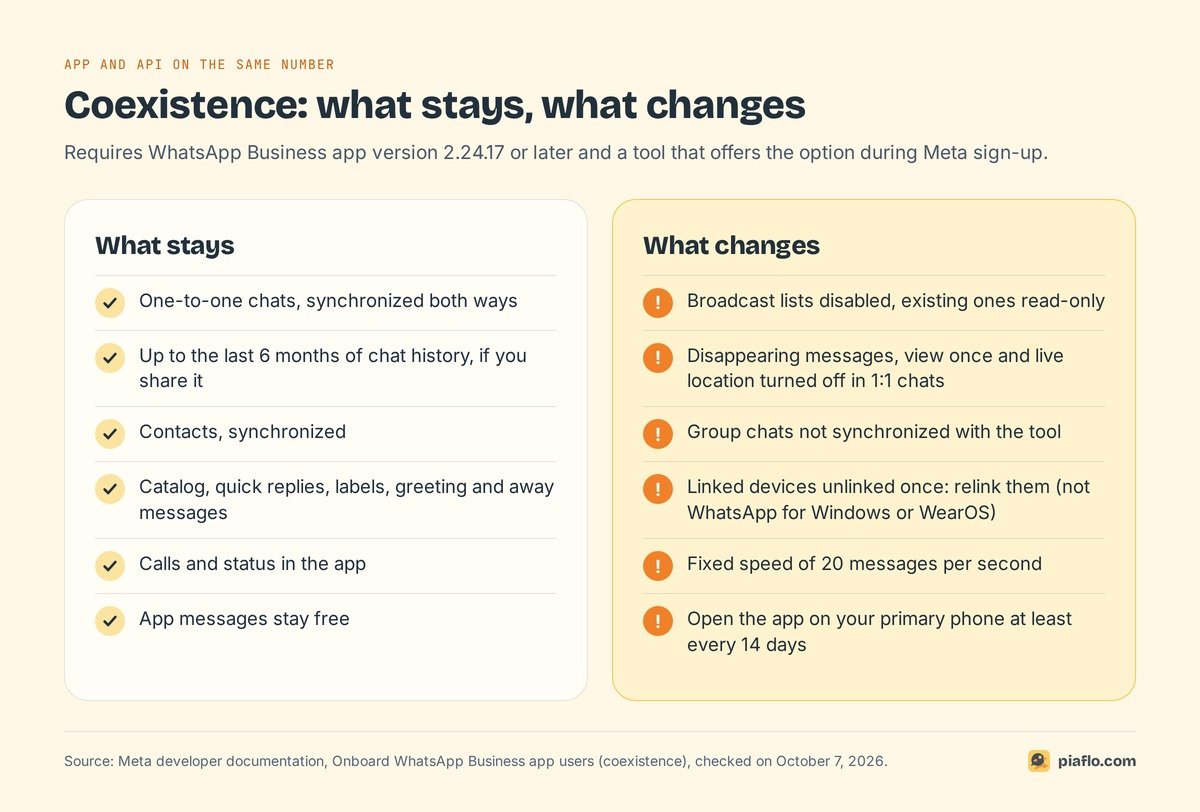
What stays:
- One-to-one chats and contacts, synchronized both ways, with up to the last 6 months of history if you share it.
- Your app tools: catalog, quick replies, labels, greeting and away messages, calls and status.
- Free app messages: only API messages are billed.
What changes:
- Broadcast lists are disabled; existing lists become read-only. Campaigns move to the API tool.
- Disappearing messages, view once and live location are turned off in one-to-one chats.
- Group chats stay in the app but are not synchronized with the tool.
- Linked devices are disconnected once. You can relink up to four, except WhatsApp for Windows and WearOS, which are not supported.
- Speed is fixed at 20 messages per second, against 80 by default on the API. That still means 1,200 messages a minute.
Conditions and availability
Meta's documentation sets these conditions:
- The app must be version 2.24.17 or later.
- The tool must be a Meta Tech Provider or Solution Partner that has enabled the option.
- The connection is made through Meta's sign-up window, and the tool has 24 hours to synchronize your data.
- Keep using your primary phone: Meta disconnects the API side if the primary device stays inactive for about 14 days.
Meta's developer pages do not publish a list of countries. Availability shows during sign-up: if the option to connect your existing WhatsApp Business app does not appear for your number, the alternative is a dedicated number on the API.
When should a Shopify store move to the API?
The answer depends on what your store needs WhatsApp to do.
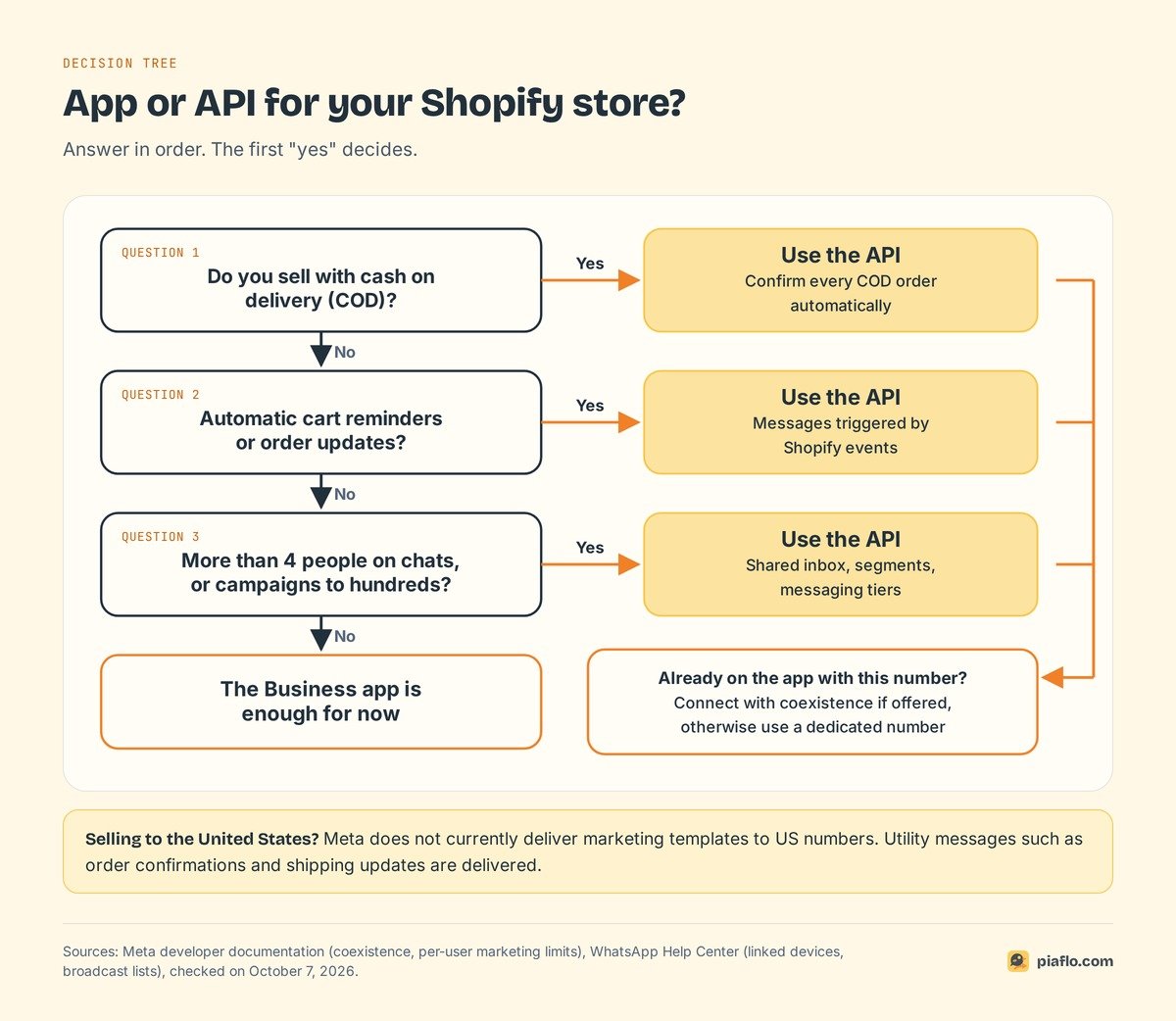
The app is enough when
- You answer questions by hand, and four devices cover your team.
- Customers write first, and you rarely contact them days later.
- Your announcements fit in broadcast lists of 256 people.
- You need no messages tied to orders.
The API pays off when
- You sell with cash on delivery. Confirming each order before shipping is a utility message triggered by the order, which only the API can send on time. Our guide to cash on delivery confirmation shows the full flow.
- You want automatic cart reminders or order updates. These depend on Shopify events and templates.
- Your team grows past four devices, or you need to know who answered which customer.
- You run campaigns to opted-in customers by segment, beyond what broadcast lists allow.
- You sell to the United States. Meta's documentation states that WhatsApp does not currently deliver marketing template messages to US phone numbers. Utility messages such as order confirmations and shipping updates still go through, so a US store can use the API for order messages and keep promotions on other channels.
Already on the app? Connect with coexistence when it is offered and keep answering from your phone. For the bigger picture on campaigns, consent and flows, see our WhatsApp marketing guide for Shopify.
Setting it up with Piaflo
Piaflo is a Shopify app that connects your number to the WhatsApp Business Platform. When you connect, Piaflo asks whether you already use the number in the WhatsApp Business app. If you do, keep using it: Piaflo sends the automated messages from the same number, and messages you send from your phone appear in the Piaflo inbox. Coexistence depends on your country; if it is not offered for your number, you can connect a dedicated number instead. The Meta window takes 10 to 15 minutes, and the number and WhatsApp Business account stay in your own Meta business portfolio.
From there, the store events do the work. The Free plan sends order and shipping updates. Starter, at $29 a month, adds abandoned checkout and cash on delivery flows, ready-made recipes and campaigns to your Shopify segments. When someone on your team replies to a customer in the shared inbox, that customer's automated flow pauses. Meta's fees are billed by Meta directly to your account at its official rates: Piaflo adds no margin, and messages are unlimited on Piaflo's side.
See the plans, with a 14-day trial on paid plans, or read the guide to connect your WhatsApp number. You can also install Piaflo from the Shopify App Store.
Frequently asked questions
Is the WhatsApp Business API free?
No. Meta charges no subscription for the API. It bills each delivered template message by category and country, and since October 1, 2026, service replies beyond 1,000 per number per month. Messages from customers are free. The tool you use to access the API usually charges its own fee.
Can I use the WhatsApp Business app and the API on the same number?
Yes, with coexistence. You connect your existing WhatsApp Business app number to an API tool through Meta's sign-up window and keep using the app on your phone, while the tool sends automated messages from the same number. Broadcast lists are disabled and the number is limited to 20 messages per second. The option appears during sign-up only where it is offered for your number.
How many messages can I send per day without the API?
The WhatsApp Business app has no published daily cap for normal chats, but broadcast lists hold up to 256 contacts each and only reach people who saved your number. Some countries also see a monthly broadcast limit. On the API, a new business can reach 250 unique customers outside the 24-hour window per day, rising to 2,000 and then up to unlimited with good quality.
Can a WhatsApp API number be banned?
Yes, if the business breaks the WhatsApp Business Messaging Policy. Meta tracks blocks and reports over the last 7 days to rate your quality, and low quality can restrict how many customers you can reach. Messaging only customers who opted in, with useful messages, is the best protection.
Can I send WhatsApp marketing messages to customers in the United States?
Not with marketing templates for now. Meta states that WhatsApp does not currently deliver marketing template messages to phone numbers with a +1 code and a US area code. Utility messages, such as order confirmations and shipping updates, are still delivered to US customers.