WhatsApp marketing for Shopify: the complete guide
What WhatsApp marketing covers on Shopify, the rules Meta applies, what it costs per message, six flows worth setting up, how to measure them and the mistakes that hurt your number.
WhatsApp marketing on Shopify means sending automated messages (cart reminders, order updates, welcome messages, review requests) and campaigns to customers who agreed to hear from your store on WhatsApp. To run it from a Shopify store, you connect the WhatsApp Business Platform, also called the API, through an app. Then you follow three rules set by Meta: get opt-in before you write, use an approved template to start a conversation, and send free-form replies only within 24 hours of the customer's last message. Meta charges for every delivered message, at a rate set by the message category and the customer's country.
This guide takes each piece in turn, with links to deeper articles when you need the detail.
What WhatsApp marketing covers on a Shopify store
Picture a customer called Priya. She subscribes from a popup and gets a welcome message. Two days later she abandons a checkout, receives a reminder and orders. Then come an order confirmation, a shipping update with tracking, and a message asking how it went. Nobody on your team typed any of them.
That chain has two parts, and two kinds of messages.
Automated flows and campaigns
Flows are automations triggered by something that happens in your store: a new subscriber, an abandoned checkout, a new order, a fulfilled order. Once built and tested, a flow runs in the background, one customer at a time.
Campaigns are one-off sends to a segment of subscribers: a new collection, a restock, a seasonal sale. They are useful, and they are where stores most often overdo it.
Marketing messages and utility messages
Meta sorts every message a business starts into a category, and the category decides the consent you need and the price you pay.
- Marketing messages try to sell: promotions, new products, cart reminders, welcome offers, review requests.
- Utility messages follow up on something the customer did: an order confirmation, a cash on delivery confirmation, a shipping update, a cancellation notice.
A utility message can go to a customer who placed an order, as long as you told them at checkout that order updates come on WhatsApp. A marketing message needs a marketing opt-in. Marketing also costs more per message in every market on Meta's rate card.
WhatsApp Business app or the API
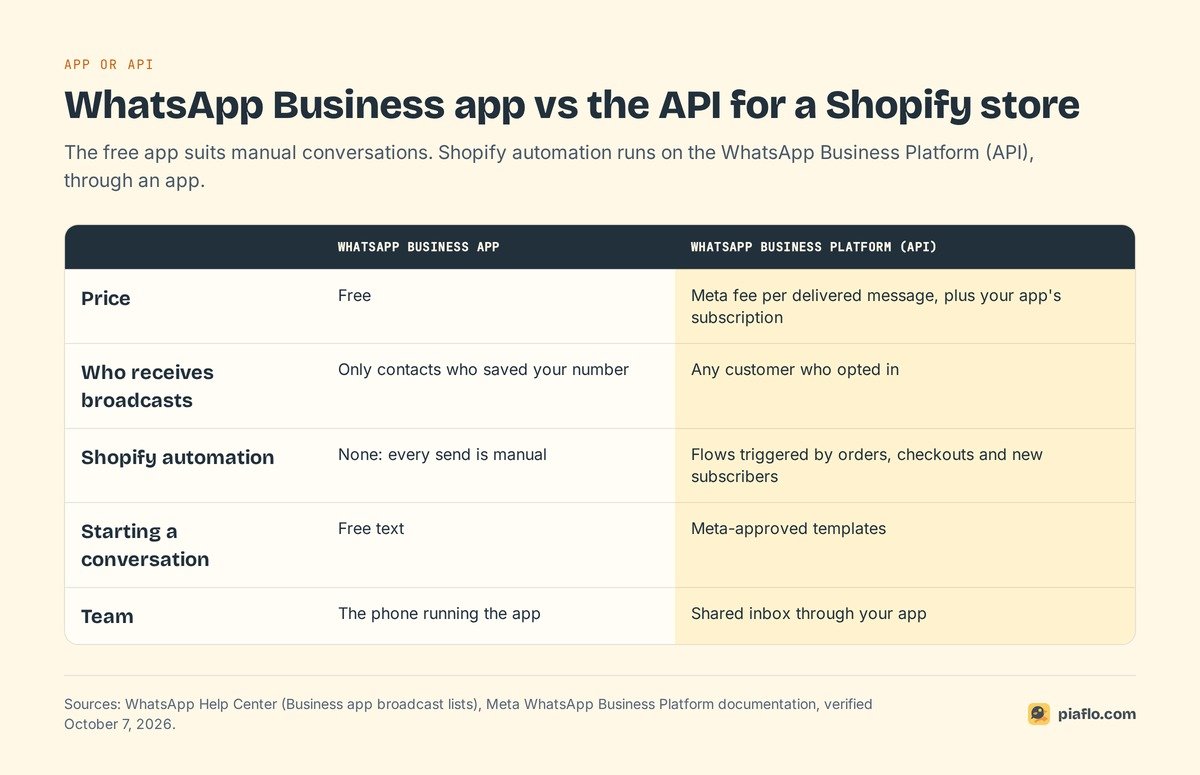
Two products carry the WhatsApp Business name. The full comparison is in WhatsApp Business app vs API; here is the short version.
What the free app can do
The WhatsApp Business app is free and runs on a phone, with a business profile, quick replies, labels, a catalog and broadcast lists. For a small store answering customer questions by hand, it is a good start.
Its limits show up when you want to market. According to WhatsApp's help center, broadcasts from the app only reach customers who saved your number in their address book. Every send is manual, and the app has no connection to Shopify orders, customers or segments.
Why Shopify automation needs the API
The WhatsApp Business Platform is what Shopify apps connect to. It lets your store send messages automatically when Shopify events happen, to any customer who opted in, whether they saved your number or not. It supports approved templates with buttons and variables (first name, order number, tracking link), a shared inbox for your team, and delivery and read reports.
A Shopify app handles the connection without code: you link your number to Meta in a signup window, and the app sends the right template when a store event happens. In some countries you can keep using the WhatsApp Business app on the same number while the API runs the automations, a setup Meta calls coexistence.
The rules Meta applies
Meta keeps WhatsApp pleasant for users with five rules, and each one shapes how you build flows and campaigns.
Opt-in comes first
Meta's policy is direct: you may only contact people who gave you their number and agreed to receive messages from your business. Meta's opt-in guidelines add that the opt-in must clearly say the person is agreeing to receive messages, must name your business, and must comply with the law where you sell.
Meta also recommends asking for consent by category, so a customer who wants order updates is not surprised by promotions. In Europe, the GDPR and the ePrivacy rules add their own requirements: an unchecked box, clear wording, proof of when and where consent was given. Our guide to WhatsApp marketing consent and GDPR covers them in detail.
Templates and their three categories
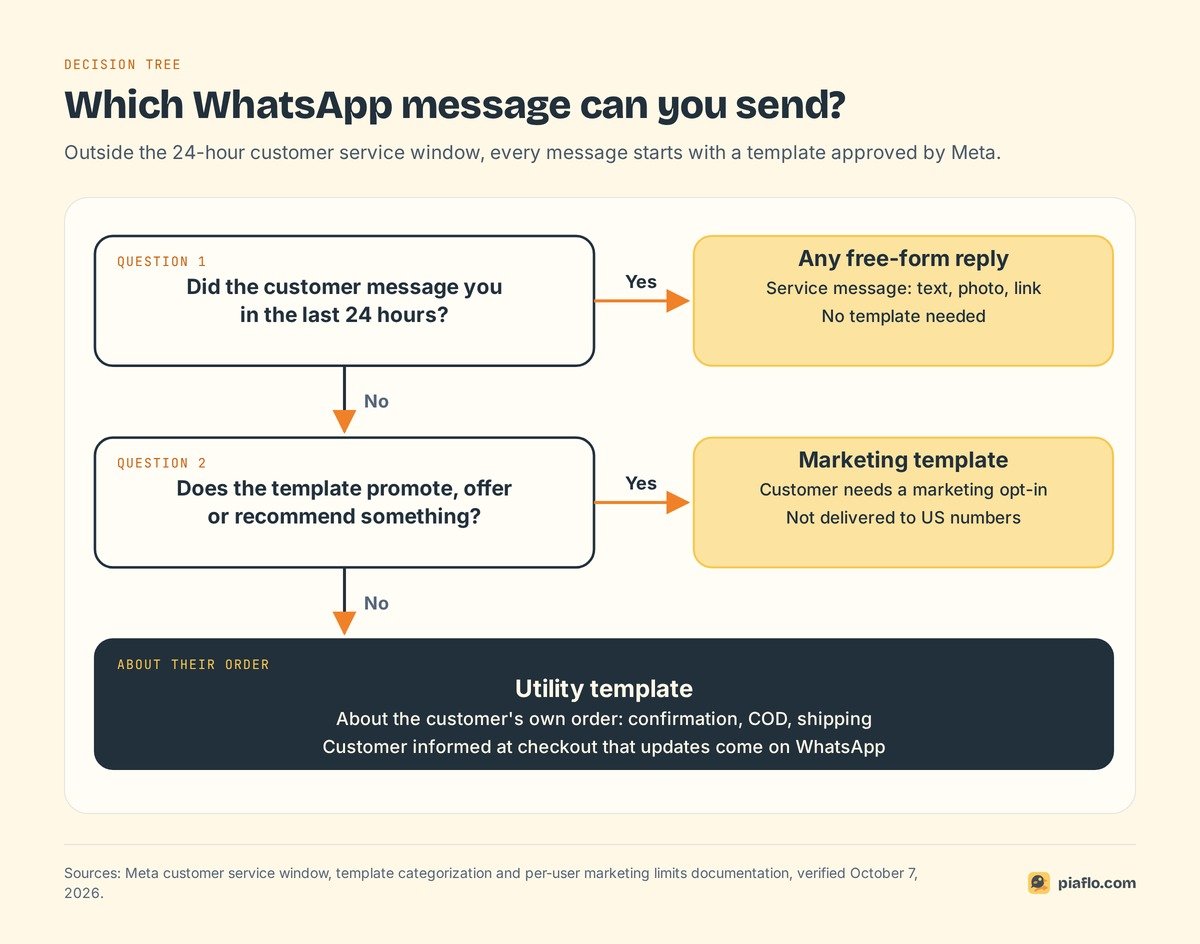
To start a conversation, a business must use a template: a message written in advance, submitted to Meta and approved. Variables let one template greet thousands of customers by name with their own order details. According to Meta's template documentation, review can take up to 24 hours.
Each template belongs to one of three categories:
- Marketing: promotions, offers, cart reminders, product recommendations.
- Utility: order confirmations, shipping updates, account alerts, specific to something the customer did.
- Authentication: one-time codes to verify an identity.
Meta's template categorization rules are strict about the line between marketing and utility. A template that mixes an order update with a promotion is marketing. A cart reminder is marketing even when the customer asked for it. And since July 2024, Meta reviews approved utility templates on a recurring basis and moves the ones that should be marketing.
The 24-hour customer service window
When a customer writes to you, a 24-hour customer service window opens. Each new message from the customer resets the timer. While the window is open, you can reply with any free-form message: text, photos, a voice note, a product link.
When the window closes, you are back to templates. That is the 24-hour rule, and it is why automations rely on approved templates.
Messaging limits: how many people you can reach
Meta caps how many different customers you can reach with templates in a moving 24-hour period. According to Meta's messaging limits documentation, a new business portfolio starts at 250 unique customers per 24 hours. Verifying your business, or sending 2,000 delivered template messages to unique customers within 30 days with high-quality templates, raises it to 2,000. After that, Meta raises the limit automatically to 10,000, 100,000 and then unlimited, as long as your message quality stays high and you used at least half of your current limit in the last 7 days.
Replies inside a customer service window do not count.
A second limit works at the customer level. WhatsApp may cap how many marketing templates a person receives from all businesses combined, based on how much that person reads marketing messages and how busy their inbox is. When a message is held back for that reason, Meta returns an error and recommends waiting at least 24 hours before trying again.
No marketing templates to US numbers
Meta states that WhatsApp does not currently deliver marketing template messages to users with United States phone numbers. Utility templates still work, so order confirmations and shipping updates reach US customers. Campaigns, cart reminders and welcome offers do not.
For a US store, that means:
- Build your WhatsApp setup around order and shipping updates for US customers.
- Use WhatsApp marketing for subscribers outside the US, if you sell internationally.
- Answer conversations customers start freely inside the 24-hour window, including product questions that lead to a sale.
What WhatsApp marketing costs
You pay two bills: Meta's fee per message and your app's subscription. Our article on WhatsApp Business API pricing covers the rate card in depth.
Meta's fee per delivered message
Since July 1, 2025, Meta charges per delivered message, according to its pricing page. Two things set the rate: the template category and the country code of the customer's phone number. Messages customers send you are free, and a message that fails to deliver is not charged.
Two changes took effect on October 1, 2026, and many older guides still miss them:
- Service messages (your free-form replies in a customer service window) are charged again, with the first 1,000 service messages per month free for each business phone number.
- Utility templates sent inside an open customer service window are charged again. They had been free since July 2025.
One exception keeps things cheaper: when a customer writes to you from a Click to WhatsApp ad and you reply within the window, the messages that follow are free for up to 7 days.
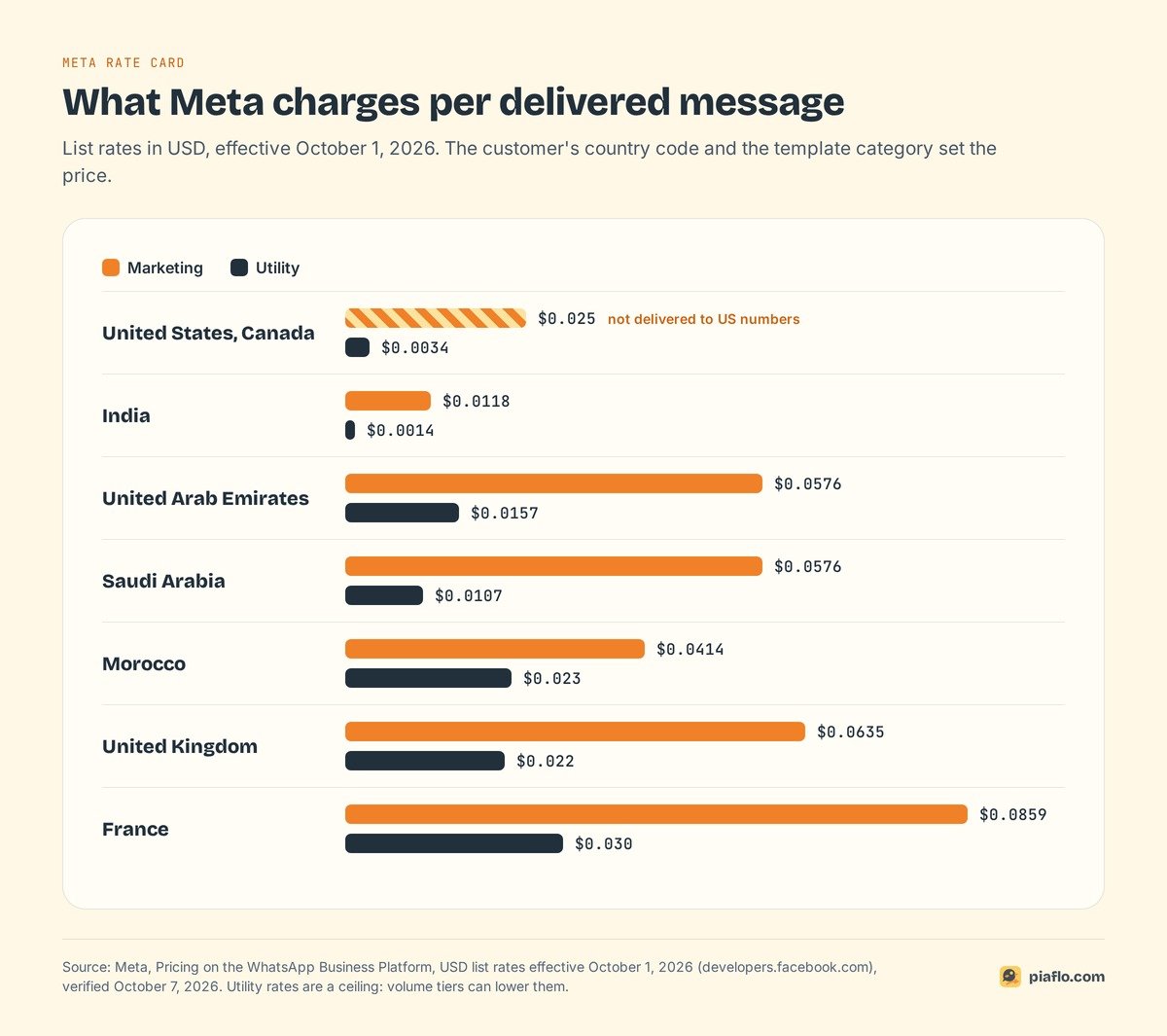
Meta's list rates in USD, effective October 1, 2026, for markets Shopify merchants often sell to:
| Customer's country | Marketing | Utility |
|---|---|---|
| United States, Canada | $0.025 (not delivered to US numbers) | $0.0034 |
| India | $0.0118 | $0.0014 |
| United Arab Emirates | $0.0576 | $0.0157 |
| Saudi Arabia | $0.0576 | $0.0107 |
| Morocco | $0.0414 | $0.023 |
| United Kingdom | $0.0635 | $0.022 |
| France | $0.0859 | $0.03 |
Meta can update these rates only on the first day of a quarter (January 1, April 1, July 1, October 1). Utility messages also get volume discounts above certain thresholds, so the utility rates above are a ceiling.
Your tool's subscription
Three things about your app change the total bill:
- The monthly fee, and what each plan includes (flows, campaigns, number of contacts, inbox seats).
- How Meta fees are billed. Some apps let Meta bill you directly at its rates. Others resell messages with a markup on top of Meta's rate.
- Limits on contacts or messages, which decide when you have to move up a plan.
At tens of thousands of marketing messages a month, a markup can weigh more than the subscription, so check who bills the Meta fee.
A worked monthly example
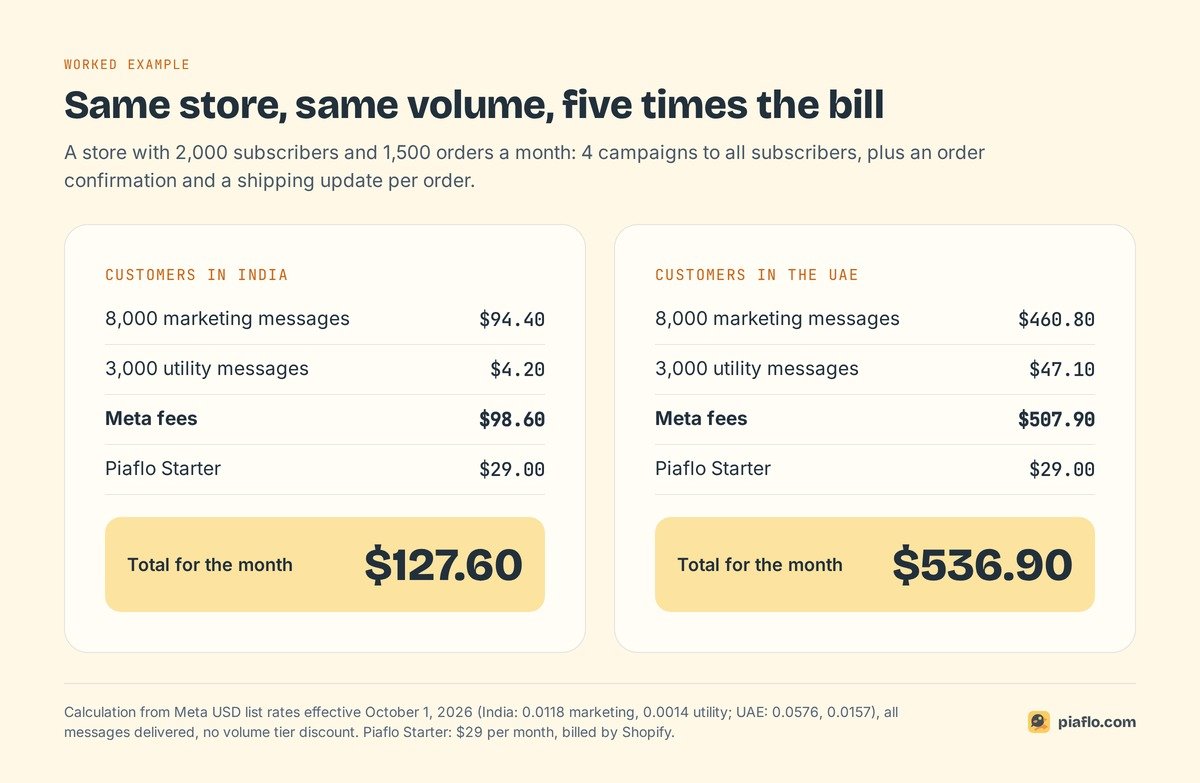
Take a store with 2,000 WhatsApp subscribers and 1,500 orders a month. It sends 4 campaigns a month to all subscribers, plus an order confirmation and a shipping update for each order:
- 4 campaigns x 2,000 subscribers = 8,000 marketing messages
- 1,500 orders x 2 updates = 3,000 utility messages
At Meta's list rates:
| Customers in India | Customers in the UAE | |
|---|---|---|
| 8,000 marketing messages | $94.40 | $460.80 |
| 3,000 utility messages | $4.20 | $47.10 |
| Meta total | $98.60 | $507.90 |
| With Piaflo Starter ($29) | $127.60 | $536.90 |
Same store, same volume, five times the bill. The customer's country drives the cost far more than the tool does, so estimate your Meta fees by market before you plan campaign frequency.
Building your subscriber list on Shopify
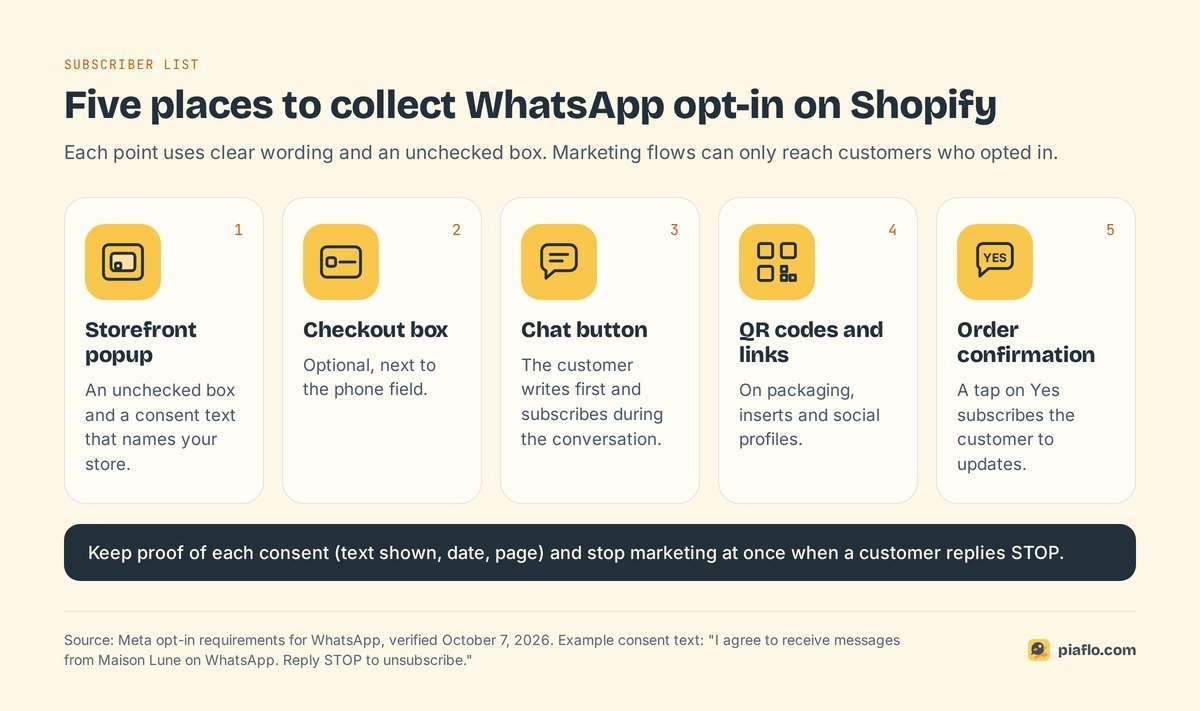
A list grows from several collection points, each with clear wording and an unchecked box:
- A popup on your store offering WhatsApp updates, with a consent text naming your business, for example: "I agree to receive messages from Maison Lune on WhatsApp. Reply STOP to unsubscribe."
- An optional box at checkout, next to the phone field.
- A chat button on product pages: a customer who writes first can subscribe during the conversation.
- QR codes and links on packaging, inserts and social profiles, leading to a pre-filled message that subscribes the customer.
- An opt-in question in the order confirmation: thank the customer and ask whether they want updates on WhatsApp. A tap on "Yes" subscribes them.
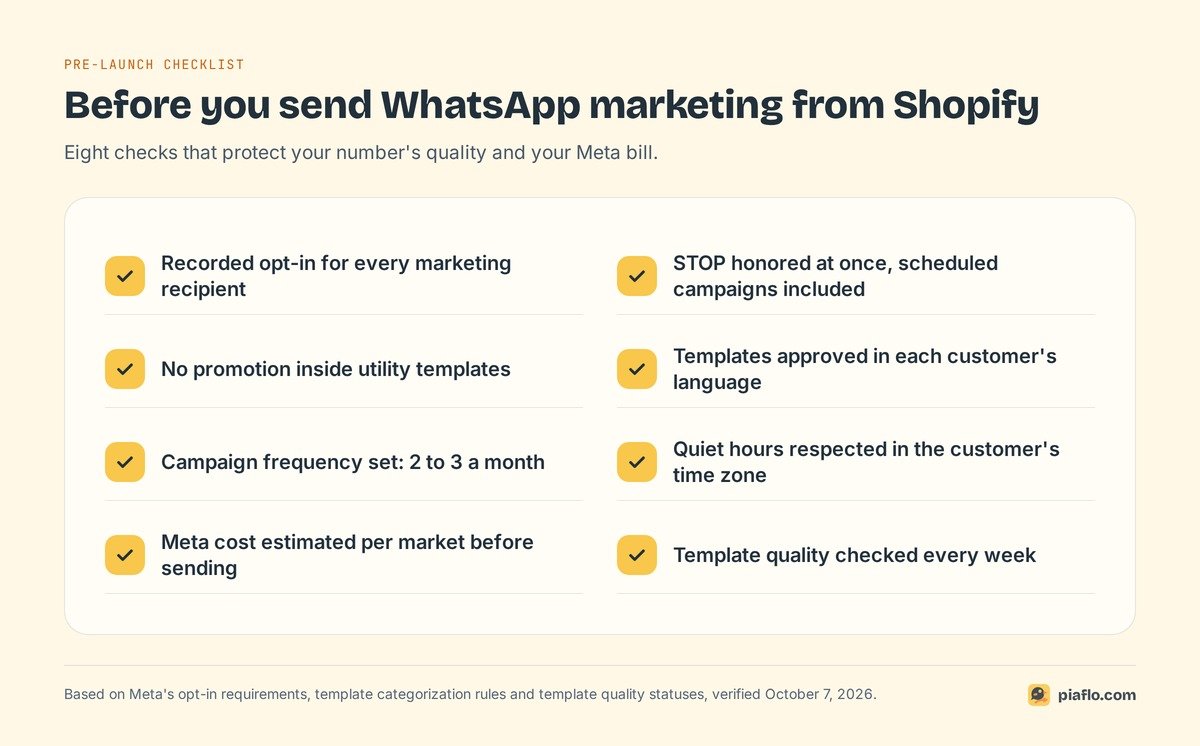
Store the proof of each consent (text shown, date, page) on the customer record, and honor STOP immediately, scheduled campaigns included.
Skip the shortcuts: bought lists, every phone number from past orders, pre-ticked boxes. They break Meta's rules, and the blocks and reports that follow damage your number for every future message.
Six use cases that pay for themselves
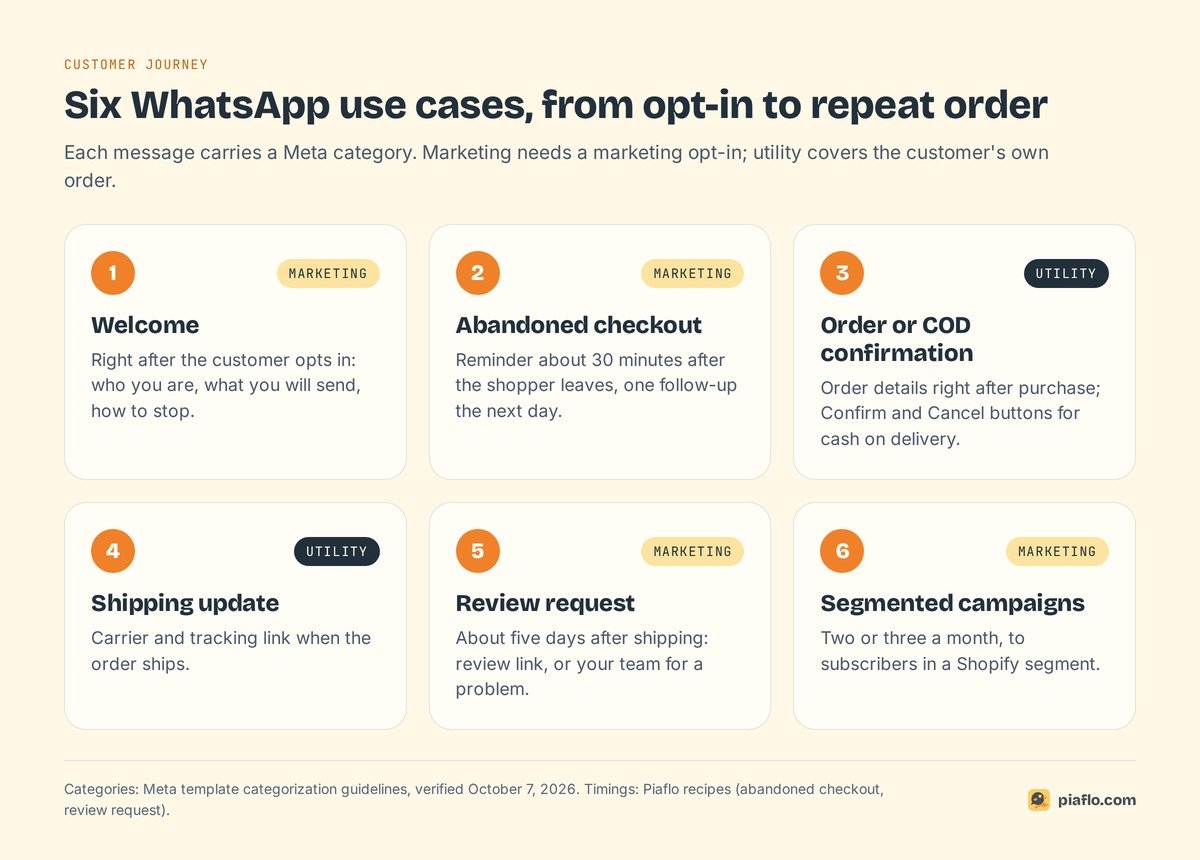
Six automations cover the moments where a message changes what the customer does next. The Meta category of each tells you which consent and rate apply.
Abandoned checkout recovery
Category: marketing. When a shopper enters a phone number at checkout and leaves, Shopify records an abandoned checkout with a link back to the cart.
A good default: a first reminder about 30 minutes after the shopper leaves, one follow-up the next day if they still have not ordered, then nothing. Stop the flow as soon as the customer orders, and hold messages during the night. Keep any discount for the follow-up. Our guide to WhatsApp abandoned cart recovery covers timing and discounts, and you can copy wording from these abandoned cart message templates. Already sending Shopify's abandoned checkout emails? Here is how email and WhatsApp reminders compare.
Cash on delivery confirmation
Category: utility. In markets where customers pay the courier, such as Morocco, India and the Gulf, some orders never become sales: wrong addresses, duplicates, changed minds, fake orders. A WhatsApp message right after the order, with Confirm and Cancel buttons, catches many of them before you ship.
Tag confirmed orders, cancel and restock the ones the customer cancels, and flag silent orders after 24 hours for your team to call. The method is in our guide to cash on delivery confirmation on WhatsApp, and reducing COD returns and fake orders covers the other levers.
Order and shipping notifications
Category: utility. An order confirmation with the order status link, then a shipping update with the carrier and tracking link. Customers expect these messages, and they answer "where is my order?" before it reaches your support team.
Keep them strictly factual. A "10% off your next order" line turns a utility template into a marketing one, with a higher price and a consent requirement. Our guide to WhatsApp order confirmation on Shopify shows how to set up both messages.
Welcome message for new subscribers
Category: marketing. Someone who just opted in is at their most interested. Send a short welcome right away: who you are, what messages they will receive and how often, and how to stop. If your popup promised a discount code, deliver it here.
A customer who knows they will hear from you twice a month is less likely to block you when the second message arrives.
Review requests
Category: marketing. A few days after delivery, ask how the order went. Happy customers get the link to leave a review. Customers with a problem reach your team, which can fix it before it turns into a public complaint.
Send it once; five days after shipping is a reasonable start for most products.
Segmented campaigns
Category: marketing. Campaigns work best when they go to a segment that cares: customers who bought a category, customers who have not ordered in 90 days, VIPs, subscribers in one country. Shopify customer segments already hold that data, so use them.
Two or three campaigns a month is plenty for most stores. Estimate the Meta cost before you send, and check the segment size against your messaging limit.
Measuring what WhatsApp brings in
Measure each flow and each campaign separately, with four numbers:
- Delivered rate. Low delivery points to wrong numbers, per-user limits or a paused template.
- Read rate. WhatsApp reports when a message is read. A low read rate on one template is an early warning before its quality rating drops.
- Orders and revenue attributed. Use tracked links or unique discount codes, so each order traces back to the message that brought it.
- Meta cost. Compare it with the revenue of the same flow or campaign. When a campaign costs more in Meta fees than it brings in, change the segment, the offer or the frequency.
Watch opt-outs and blocks too. A campaign that triggers many STOP replies costs you future reach, even if it sold well that day.
Mistakes that hurt your number
Meta rates each template on quality, based on customer feedback and read rates. According to Meta's template documentation, a template moves through high, medium and low quality, and can then be paused or disabled. A paused template stops your flow until it recovers. Four mistakes cause it most often.
Messaging people who never opted in
A promotion sent to every phone number from past orders collects blocks: people who do not remember agreeing report it as spam. Send marketing only to customers with a recorded opt-in, and utility messages only about an order the customer placed.
Hiding a promotion in a utility template
An offer inside a shipping update looks like a free marketing message. Meta treats it as a marketing template, and its recurring review moves mixed templates to marketing, at marketing rates. Keep promotions in marketing templates sent to subscribers.
Sending too often
Every extra campaign raises the chance that a customer blocks you, or that per-user limits hold your message back. Once customers stop reading, extra messages only add cost. Cap campaigns, keep flows to the moments that matter, and respect quiet hours in the customer's time zone.
Ignoring quality signals
A template shows medium or low quality before Meta pauses it. Check template quality every week. When one drops, look at what changed (wording, audience, frequency) and fix it before the template is paused.
Setting it up with Piaflo
Piaflo is a Shopify app built around the flows in this guide. It connects your own WhatsApp number, which stays in your Meta business portfolio; depending on your country, you can keep the WhatsApp Business app on it.
- Ready-made recipes for each use case above: abandoned checkout recovery (reminder after 30 minutes, then a one-time 10% code the next day, valid 48 hours), cash on delivery confirmation, order confirmation, shipping update, welcome for new subscribers and a review request five days after shipping. Each opens in an editable visual flow builder.
- Opt-in tools: a storefront popup with an unchecked box, a chat button, QR codes and links. Consent is written to the customer's WhatsApp marketing consent in Shopify, with the text, date and page as proof. STOP unsubscribes the customer at once.
- Campaigns to your existing Shopify segments, to subscribed contacts only, with the Meta cost estimated before you send.
- Meta fees at cost. Meta bills your WhatsApp Business account directly at its official rates. Piaflo adds no markup and never handles that money. Messages are unlimited on Piaflo's side.
- Tracking: orders and revenue per flow, next to the estimated Meta cost.
The Free plan covers order and shipping updates. Starter at $29 a month adds abandoned checkout and COD flows, campaigns and up to 2,500 subscribed contacts. Growth at $79 adds every recipe, unlimited custom flows, A/B testing and 15,000 contacts. Pro at $199 removes the contact limit. Paid plans come with a 14-day free trial, billed by Shopify.
See the plans and follow the guide to connect your WhatsApp number. You can also install Piaflo from the Shopify App Store.
Frequently asked questions
Does Shopify integrate with WhatsApp?
Yes. Apps from the Shopify App Store connect your store to the WhatsApp Business Platform, so orders, abandoned checkouts and customer segments can trigger WhatsApp messages automatically. You connect your own number to Meta during setup, and Meta bills each delivered message.
Is WhatsApp marketing legal?
Yes, when customers opted in. Meta requires an opt-in that names your business before you send messages, and you must honor every opt-out. In the EU, marketing consent must also be freely given, specific and recorded, with an unchecked box and clear wording.
What is the 24-hour rule on WhatsApp?
When a customer messages your business, a 24-hour customer service window opens and resets with each new customer message. Inside it, you can reply with any free-form message. Outside it, you can only send templates approved by Meta.
Can I send WhatsApp marketing messages to customers in the United States?
Not at the moment. Meta states that WhatsApp does not deliver marketing template messages to US phone numbers. Utility templates such as order confirmations and shipping updates still reach US customers, and you can reply freely when a US customer writes to you first.
How can I send 10,000 messages on WhatsApp?
Use the WhatsApp Business Platform through an app, with opted-in customers and approved templates. A new business portfolio can reach 250 unique customers per 24 hours. Verifying your business raises that to 2,000, and Meta then raises the limit automatically to 10,000 and beyond when your message quality stays high and you use at least half of your current limit.