WhatsApp Template Rejected? Every Reason, How to Fix It and What Each Status Means
Meta tells you why it rejected a WhatsApp template. What each reason code means, how to fix, appeal or request a category review, and why approved templates get paused.
On this page 8
When Meta rejects a WhatsApp template, it tells you why. The reason shows up in WhatsApp Manager, in Business Support Home and in the rejection email, as one of a short list of codes, such as INVALID_FORMAT (a variable at the start or end of the body, variables out of order), INCORRECT_CATEGORY (a promotion inside a utility template) or a policy reason. Fix that one cause and resubmit, appeal with a sample if you think Meta got it wrong, or request a category review if the dispute is about utility versus marketing. Meta decides a review, and an appeal, within 24 hours.
Approval is half the story: an approved template that customers react badly to gets paused for 3 hours, then 6 hours, then disabled. Every example template below is illustrative, written for this guide around a Shopify store's everyday messages.
Find the rejection reason first
Where Meta shows it
Meta's template review page (updated June 17, 2026) lists three places:
- WhatsApp Manager, under Message templates, where the template shows as Rejected.
- Business Support Home: Account Overview, View my accounts, your business, your WhatsApp account, then Rejected message templates. The notification carries the reason.
- Email to the admins of your Meta business account.
A tool that creates templates for you receives the same decision through the message_template_status_update webhook.
The six rejection reasons Meta sends
Meta's webhook reference (updated May 21, 2026) lists eight reason values. One is deprecated and NONE marks a paused template, which leaves six rejection reasons:
| Reason code | What Meta means | First fix |
|---|---|---|
INVALID_FORMAT |
The template has an invalid format | Read the detailed reason Meta attaches, fix variables or structure |
INCORRECT_CATEGORY |
The content does not match the category you chose | Remove the promotion, or switch to marketing |
TAG_CONTENT_MISMATCH |
Same definition as INCORRECT_CATEGORY |
Same fix |
PROMOTIONAL |
Content that violates Meta's policies | Rewrite it against the WhatsApp policies |
ABUSIVE_CONTENT |
Content that violates Meta's policies | Remove threats and pressure |
SCAM |
Content that violates Meta's policies | Rewrite it against the WhatsApp policies |
With INVALID_FORMAT, Meta adds a plain-language reason and a recommendation. Its own example: "Your template has parameters placed next to each other (like {{1}}{{2}}) without text or punctuation between them", with the advice to "separate parameters with descriptive text".
Invalid format: variables, samples and duplicates
Every formatting cause is mechanical, so you can catch them all before you submit.
Variables Meta refuses
Meta's review page lists these formatting rejections:
- Broken braces. The format is
{{1}}.{1}or{{1}fails. - Special characters inside a variable, such as
#,$or%. Keep the sign in the text, outside the braces: "{{1}}% off". - Variables out of sequence.
{{1}},{{2}},{{5}},{{4}}is rejected. Number them 1, 2, 3 in order. - Too many variables for the length of the text. Add words or remove variables.
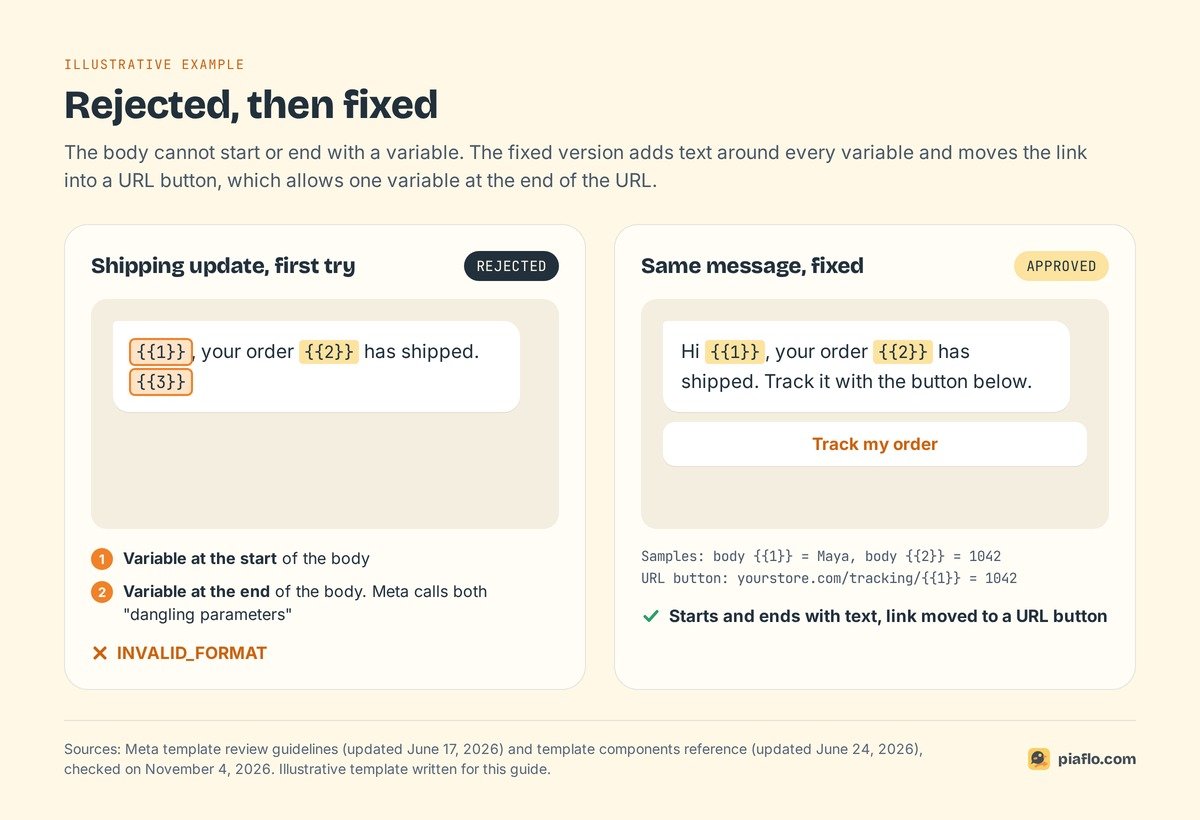
- A variable at the very start or end of the body. Meta calls these "dangling parameters" and does not allow them.
Here is a shipping update that fails, and the same message fixed:
Rejected (INVALID_FORMAT)
Body: {{1}}, your order {{2}} has shipped. {{3}}

Approved
Body: Hi {{1}}, your order {{2}} has shipped. Track it with the button below.
Button (URL): Track my order | https://yourstore.com/tracking/{{1}}
Samples: body {{1}} = Maya, body {{2}} = 1042, URL {{1}} = 1042
The fix starts and ends with text and moves the link into a URL button, which allows one variable at the end of the URL.
Missing sample values
If a template has variables, Meta requires a sample value for each one, and an appeal must include samples too. They let the reviewer read the message as a customer will. For a media header, the sample is the file itself.
Duplicates of a template you already have
A template with the same body and footer wording as an existing one is rejected as a duplicate (authentication templates are exempt), and Business Support Home names the original. Change the wording, or reuse the one you have.
Length and emojis
Meta's components reference sets the hard limits: 60 characters for a text header, 1,024 for the body, 60 for the footer, 25 for a button label. The review page adds that the body limit can vary "depending on the format and tag of the template" and that emojis "may also be limited", without a number. Precise caps on emojis circulate online; Meta's developer pages do not publish them.
Wrong category: utility, marketing and recategorization
Category disputes cost money: on Meta's rate card effective October 1, 2026, marketing costs more than utility in every market, $0.0859 against $0.03 per message to France.
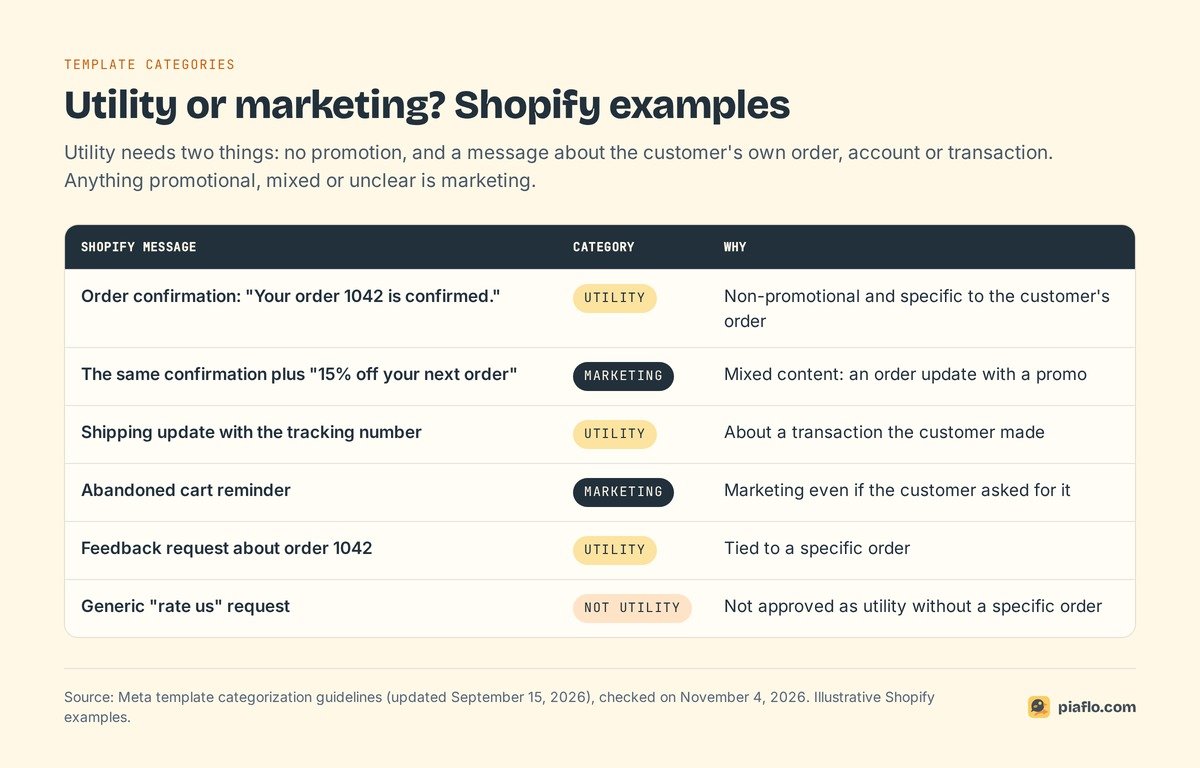
Meta's categorization guidelines (updated September 15, 2026) set two conditions for utility. The message is non-promotional, and it is specific to the customer (their order, account or transaction) or essential to them. Anything promotional is marketing, and so is a template with mixed content, such as "an order update with a promo", or with unclear content, such as "{{1}}" or "Congratulations!".
Rejected for INCORRECT_CATEGORY or TAG_CONTENT_MISMATCH
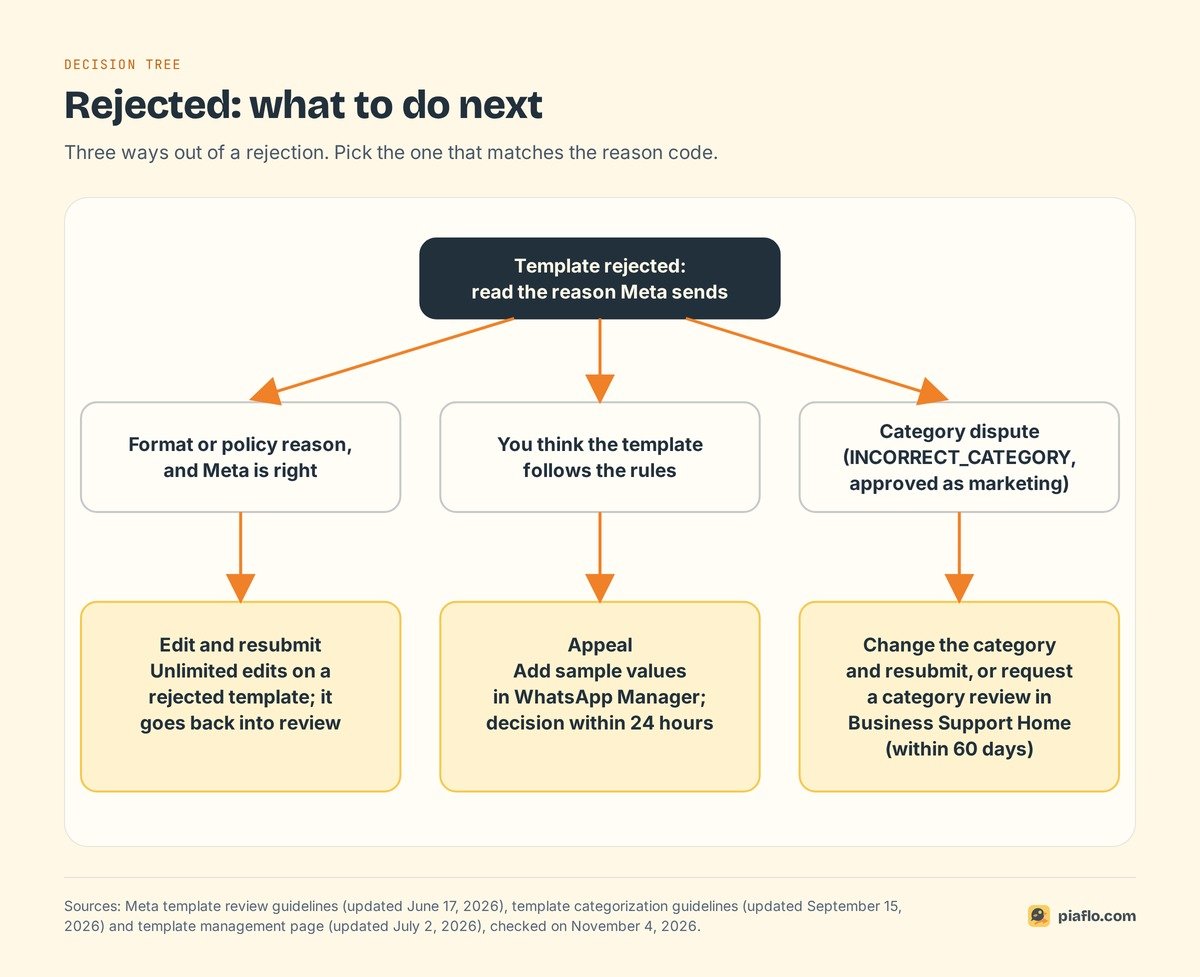
Both codes mean the content does not match the category you picked. You can create a new template, edit the category and resubmit, or request a category review.
For a store, the usual cause is a sales line in a transactional message. Meta says order management messages "should not promote, recommend, upsell, or cross-sell products; include offers". "Your order {{1}} is confirmed. Add a matching belt for 20% off" is marketing, however useful the belt is. Split it: the confirmation goes as utility, the belt goes in a campaign to customers who opted in.
Submitted as utility, approved as marketing
Since April 9, 2025, when you submit a template as utility and WhatsApp judges it marketing, Meta approves it as marketing. It sends, but each message is billed at the marketing rate, only reaches customers who accept marketing, and no longer reaches US numbers, where Meta still blocks marketing templates (see WhatsApp marketing to US numbers in 2026). You can request a review up to 60 days after the change, if the message truly meets both utility conditions.
Recategorized after approval
WhatsApp also reviews templates already in use. A utility template that should be marketing gets one day's notice by email and webhook, then becomes marketing and keeps sending at the new price. Businesses Meta has warned for misuse get no notice.
Repeated mislabeling brings escalating restrictions, up to every utility template on the account switched to marketing for 7 days (30 for a repeat). A promo line is not worth a week without order confirmations.
Policy rejections
Policy rejections come from the content itself. Meta's review page names three groups:
- Commerce Policy. Every message about goods or services, prices included, is a transaction that must follow the WhatsApp Commerce Policy.
- Sensitive identifiers. Never ask for a full card number, bank account number or national ID number, or for documents that contain them. Partial identifiers pass: "the last 4 digits of the card you paid with".
- Abusive or threatening content. Meta's examples are threatening legal action or public shaming. "Pay for your cash on delivery order or we will report you" is a threat. "Your order is ready to ship. Tap Confirm to receive it" is a request.
Meta's Business Messaging Policy also requires an opt-in before you message anyone. Our guide to WhatsApp marketing consent explains how to collect and prove that opt-in on Shopify.
Edit, appeal or request a category review
Edit and resubmit
Use it for formatting and policy reasons. Meta's template management page (updated July 2, 2026) allows unlimited edits on a rejected template, which goes back into review.
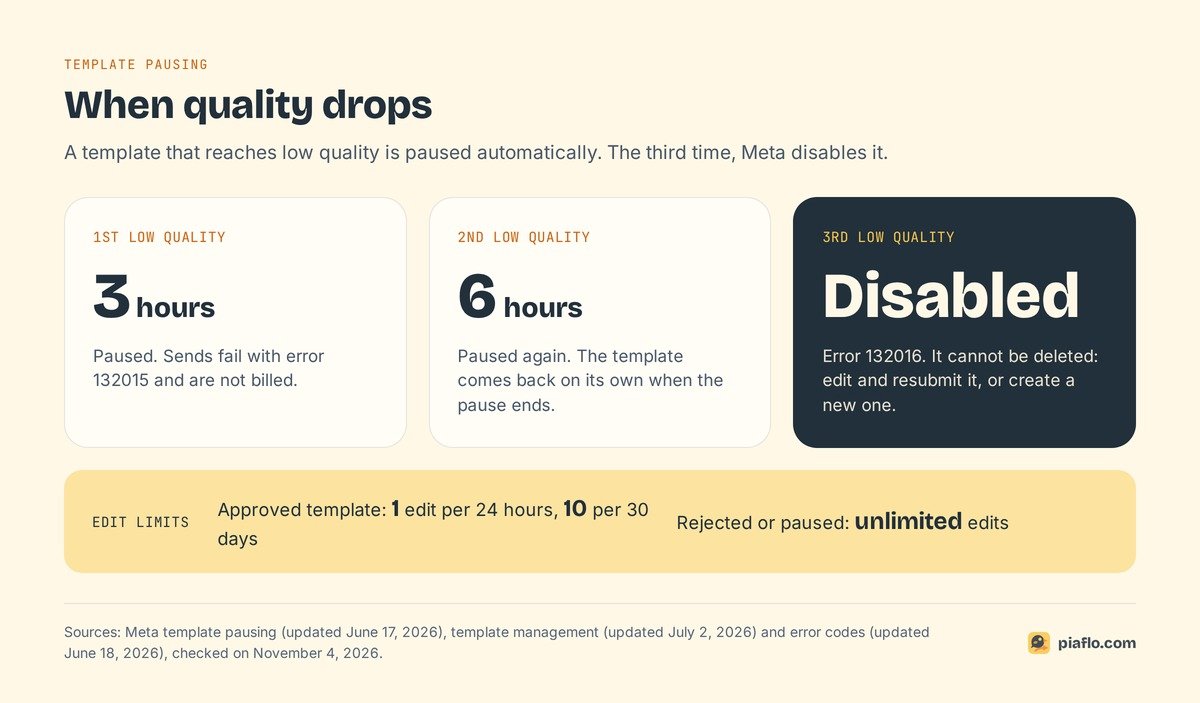
An approved template can be edited once in 24 hours and 10 times in 30 days, and its category cannot be edited. If you delete an approved template, its name is blocked for 30 days, so editing usually beats deleting and recreating.
Appeal the rejection
Appeal when you believe the template follows the rules. In WhatsApp Manager, open the template, add sample values with Add Sample, and submit. Meta decides within 24 hours.
Request a category review
Category decisions go through Business Support Home. In WhatsApp Manager, open Message Templates, click Go to Business Support on the banner, then Template Category Updates, select the templates and click Request Review. It covers a rejected utility or marketing template, or one approved as marketing, within 60 days.
After approval: quality rating, paused and disabled
Quality rating
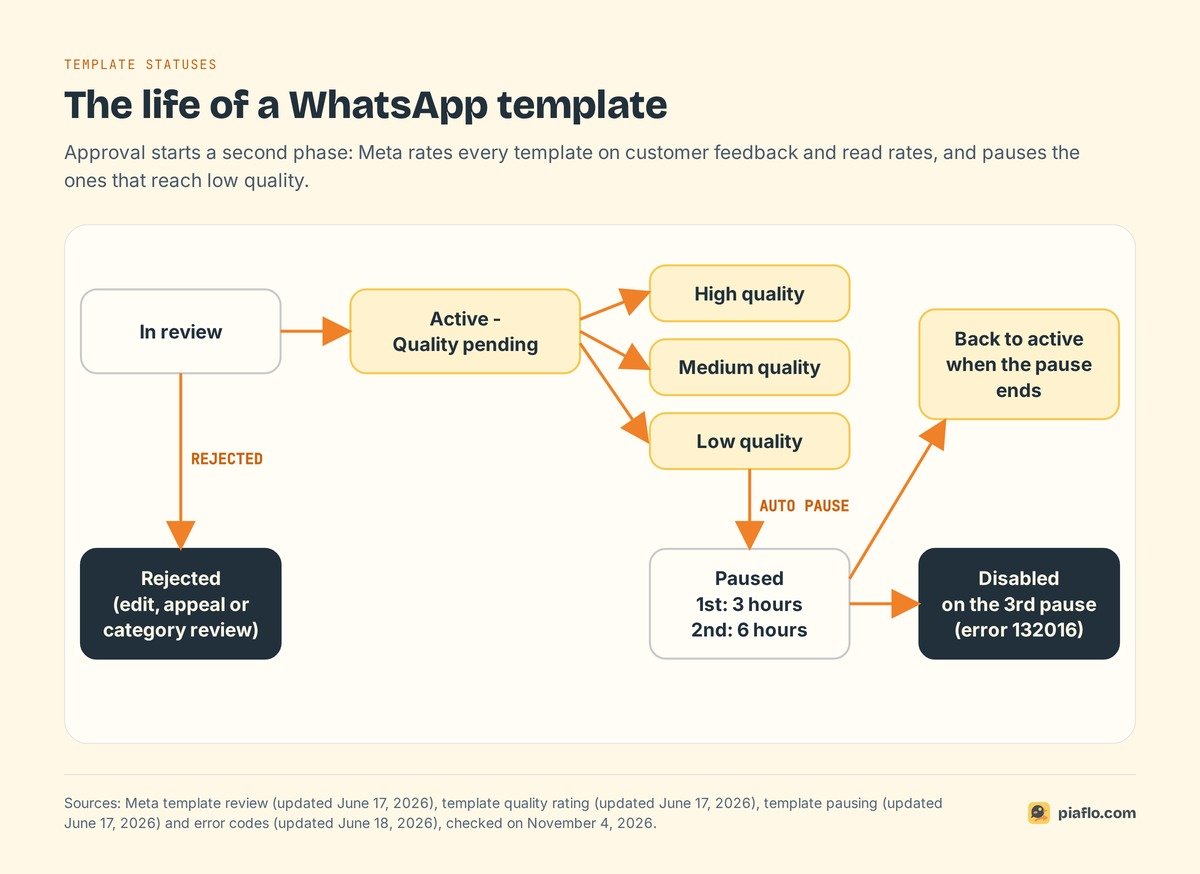
Every template has a quality rating based on usage, customer feedback and engagement, according to Meta's quality rating page (updated June 17, 2026). A new template starts as Active - Quality pending (UNKNOWN in the API), then moves to:
- High quality (
GREEN): little or no negative feedback. - Medium quality (
YELLOW): negative feedback from several users, or low read rates. Still sendable, but it "may soon become paused or disabled". - Low quality (
RED): still sendable, in danger of being paused.
Since the rating rests on feedback and read rates, templates sent to people who expect them, such as an order update or a cart reminder to a subscriber, have the best chance of staying green.
Paused, then disabled
When a template reaches low quality, Meta pauses it automatically, according to its template pausing page (updated June 17, 2026):
- First time: paused for 3 hours.
- Second time: paused for 6 hours.
- Third time: disabled.
A paused template cannot be sent; the attempt is not billed, and the template comes back on its own after the pause. Edit it during the pause and it returns to review. A disabled template cannot be deleted; edit and resubmit it, or create a new one. Meta warns that a business whose templates keep reaching low quality may eventually see its phone number affected.
Error codes you will see when sending
When a send fails because of the template, Meta's error codes page (updated June 18, 2026) names the cause:
- 132000: the number of variable values sent does not match the template.
- 132001: the template does not exist in that language, or is not approved.
- 132007: the template content violates a WhatsApp policy.
- 132012: variable values are formatted incorrectly.
- 132015: the template is paused for low quality.
- 132016: paused too many times and permanently disabled. Meta's advice: create a new template with different content.
On a bilingual store, 132001 can mean the French version is still in review.
A checklist before you submit
It covers every rejection reason Meta documents.
- Category matches content: no offer or upsell in a utility template.
- Variables
{{1}},{{2}},{{3}}in order, no gaps, no special characters. - The body starts and ends with text, with words around each variable.
- One sample value per variable.
- Wording different from your existing templates.
- No request for full card, bank or ID numbers, no threats.
- Every language version approved before a flow uses it.
For ready-made examples, our abandoned cart message templates follow the format Meta reviews, and our guide to WhatsApp order confirmation on Shopify has utility templates for orders and shipping.
Setting it up with Piaflo
Piaflo is a Shopify app that sends WhatsApp messages from your own number. Its recipes (abandoned checkout, cash on delivery confirmation, order and shipping updates and more) come with their templates: Piaflo submits them to Meta in English and French for you, and Meta usually approves a recipe's templates within minutes, always within 24 hours.
You can also write your own template: Piaflo takes the category (utility or marketing), a body within Meta's 1,024-character limit and one sample value per variable, which Meta's review requires. Its template list shows each template's Meta status by language and the flows that use it. Before a flow goes live, Piaflo checks it: a message your store sends first must be an approved template, free-form messages only follow a customer reply, and a utility flow only uses utility templates. Marketing flows only reach subscribed customers.
Meta bills its fees directly to you at its official rates, with no Piaflo markup. The Free plan covers order and shipping updates; Starter at $29 a month adds abandoned checkout and cash on delivery flows.
See the plans or follow the guide to connect your WhatsApp number. You can also install Piaflo from the Shopify App Store.
Frequently asked questions
How long does Meta take to review a WhatsApp template?
Up to 24 hours, according to Meta's template review documentation, and appeals are also decided within 24 hours. The decision appears in WhatsApp Manager, by email and in the status webhook your tool receives.
What does "Active - Quality pending" mean?
Your template is approved and can be sent. "Quality pending" means Meta has not yet collected enough customer feedback and read data to rate it, the normal state of every new template. It then becomes high, medium or low quality.
Can I reuse the name of a rejected or deleted template?
A rejected template can be edited and resubmitted under the same name as many times as you like. If you delete an approved template, Meta blocks its name for 30 days, so pick a new name or wait.
Why was my template approved and then stopped working?
Three documented causes. Customers reacted badly and Meta paused it (error 132015) or disabled it after the third pause (132016). Meta recategorized it from utility to marketing after a one-day notice, so marketing rules now apply. Or one language version is not approved yet (132001).
Does a rejected template affect my WhatsApp number?
A rejection concerns that one template, and you can fix and resubmit it. Meta's documentation ties the risk to your number to quality over time: a business whose templates keep reaching low quality may eventually see its phone number affected, and repeated utility mislabeling leads to account restrictions.