Shopify WISMO: Cut "Where Is My Order?" Messages With WhatsApp Shipping Updates
WISMO means "where is my order?". What Shopify already emails after shipping, where a WhatsApp shipping update fits, what it costs per country and how to answer the questions that still come in.
On this page 7
WISMO stands for "where is my order?", the message customers send when they have paid and have seen no news about their parcel. On Shopify, you cut it by telling customers where the parcel is before they ask: a shipping update with the carrier and the tracking link, sent where they will read it, then a short word when something goes wrong.
Shopify already sends shipping, out for delivery and delivered notifications by email or SMS. A WhatsApp shipping update puts the key one in the chat app, where the customer can reply in one tap. It is a utility message in Meta's rules, so it still reaches US phone numbers, and it costs $0.0034 per delivered message in North America on Meta's October 2026 rate card.
What WISMO means for a Shopify store
A WISMO ticket is any email, chat, call or DM where a customer asks about an order they already paid for. "Has it shipped?", "tracking hasn't moved", "it says delivered but I have nothing": same question, different words.
Gorgias, a customer support helpdesk for ecommerce stores, reported in 2023 that WISMO accounts for 18% of incoming requests on average, according to its own data. Every one of those answers already sits in your Shopify admin. Your team just copies it into a reply.
Why customers ask after they have paid
The usual triggers:
- The status says fulfilled, and nothing has arrived. In Shopify, "fulfilled" means you shipped the order. Some customers read it as "delivered".
- The shipping email was never seen. It landed in a promotions tab, in spam, or in an inbox the customer checks once a week.
- Tracking shows nothing yet. The carrier has the label but has not scanned the parcel. Shopify itself notes that tracking event timing varies by carrier.
- The parcel is late and nobody said so. The customer finds out by checking, and asks you.
- The tracking link is hard to find. It sits in an email from three days ago, and the customer remembers your WhatsApp number better than their order number.
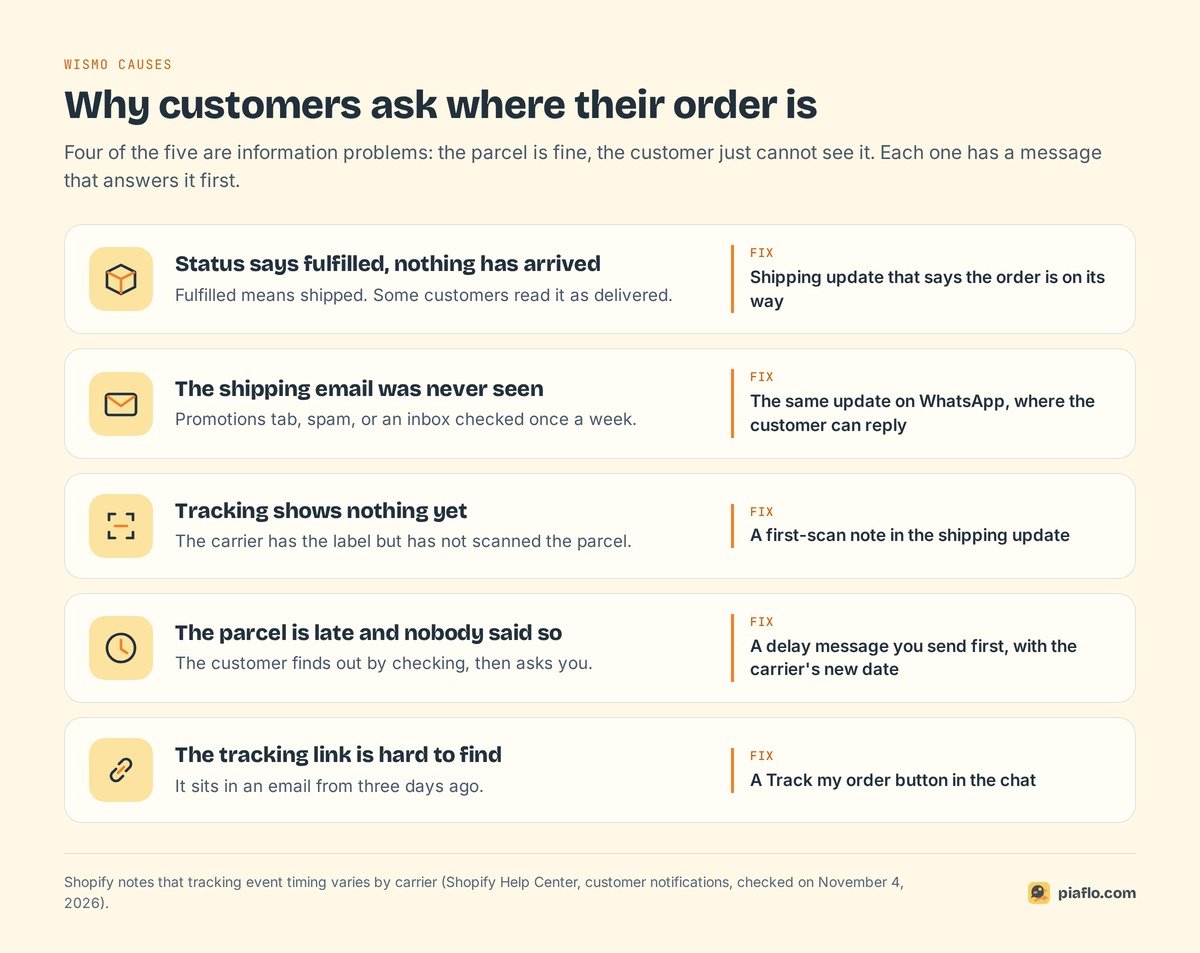
Four of the five are information problems: the parcel is fine, the customer just cannot see it.
Measure it before you change anything
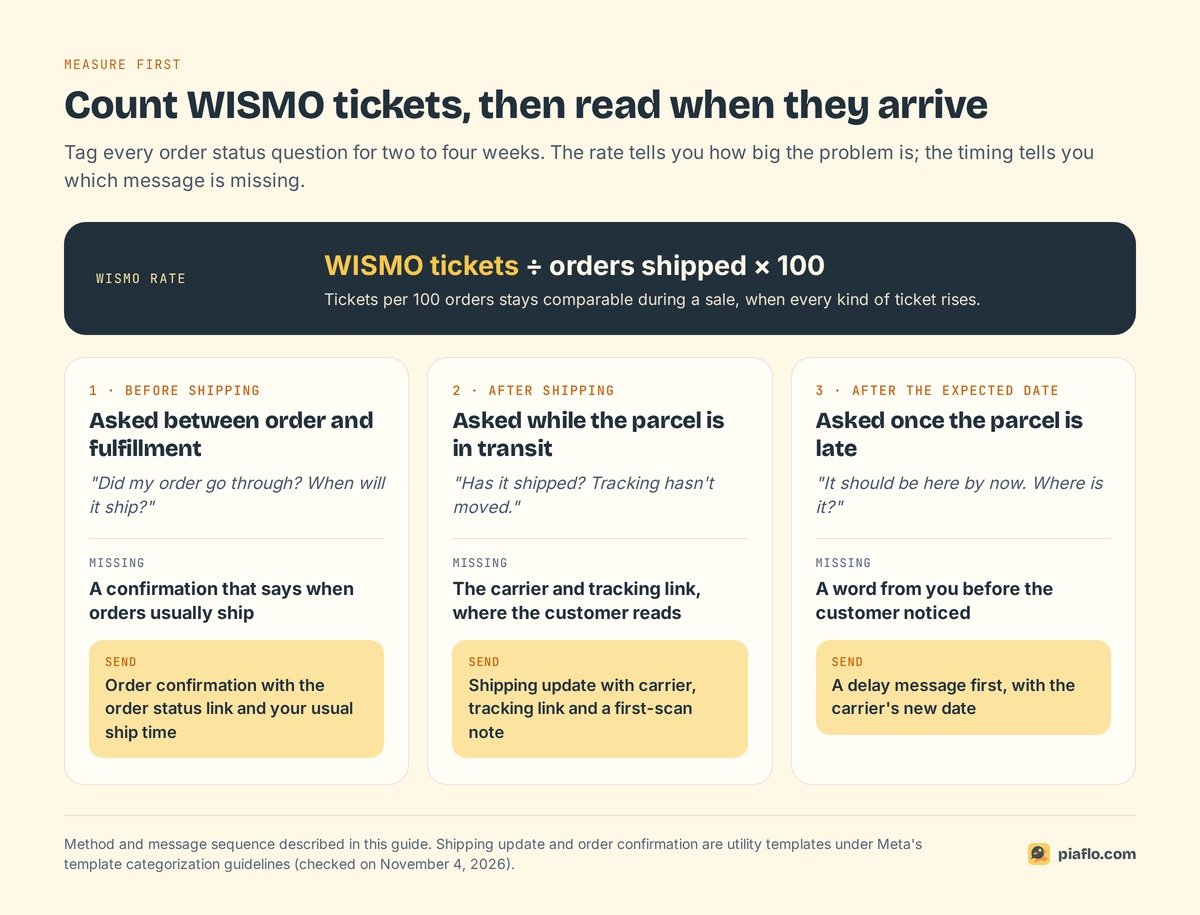
For two to four weeks, tag every order status question (a "wismo" tag is enough), then divide by the orders shipped in the same period:
WISMO tickets per 100 orders = WISMO tickets ÷ orders shipped × 100
Per 100 orders stays fair during a sale, when every kind of ticket rises. Note also when each question arrives, because the timing tells you which message is missing:
- Before shipping: the order confirmation does not say when orders usually ship.
- After shipping: the customer has not seen the carrier and the tracking link.
- After the expected delivery date: the parcel is late and nobody told them first.
What Shopify already sends after an order ships
Shopify has four shipping notifications in Settings > Notifications > Customer notifications, listed in its customer notifications guide. Shopify sends its customer notifications as emails and SMS messages.
| Notification | When Shopify sends it | Worth knowing |
|---|---|---|
| Shipping confirmation | When you fulfill the order | Carries the tracking link if you added a tracking number |
| Shipping update | When tracking information is updated | Also sent if you add tracking after fulfilling |
| Out for delivery | When the carrier or fulfillment app reports that status | Timing and accuracy vary by carrier; not available for local delivery |
| Delivered | When the carrier or fulfillment app reports delivery | Not available for local delivery orders |
The order status page also tracks the shipment for supported carriers.
Two gaps remain. None of these notices goes out on WhatsApp, and an email can sit unread in a promotions tab for days. And Shopify only knows what the carrier reports: if your carrier is not recognized, pick "Other" at fulfillment and paste the full tracking URL, or every notice goes out without a working link.
Shopify covers the timeline. WhatsApp can cover the channel.
Where WhatsApp shipping updates fit
The first message after shipping answers the question before it forms: "your order is on its way, here is the carrier, here is the link". Send that one on WhatsApp and keep Shopify's emails for the later steps.
Shipping updates are utility messages
Every message a business sends first on WhatsApp is a template approved by Meta, and its category sets the price and who may receive it. Meta's template categorization guidelines define utility templates by two conditions: non-promotional, and specific to the customer's order or transaction.
Meta's own examples cover the delivery journey:
- On its way: "Your package from order {{order_number}} is on its way. Your tracking number is {{tracking_ID}} and expected delivery date is {{date}}."
- Delayed: "Unfortunately, one item from your order {{number}} is backordered. We will follow up with an estimated ship date."
- Delivered: "We have delivered your order {{order_number}}! Please let us know if there was any issue by reaching out below."
The same page says these messages should not promote, upsell or cross-sell products, or include offers. Add "10% off your next order" and the template becomes marketing. Meta still requires the customer's opt-in to receive messages from your business; our WhatsApp order confirmation guide shows how to collect it at checkout, with copy-ready order templates.
They still reach US numbers
Since April 1, 2025, Meta does not deliver marketing templates to WhatsApp users with a US phone number, and its documentation still said so on November 4, 2026. The pause covers marketing only: utility templates, shipping updates included, reach +1 US numbers as usual.
For a US store, the shipping update is one of the few proactive WhatsApp messages that still works. The full picture is in our guide to WhatsApp marketing messages to US numbers.
What they cost
Meta charges per delivered message, at the rate of the customer's country code. Utility rates effective October 1, 2026, from the rate card on Meta's pricing page: $0.0034 in North America, $0.0014 in India, $0.0157 in the United Arab Emirates, $0.022 in the United Kingdom, $0.03 in France and $0.055 in Germany.
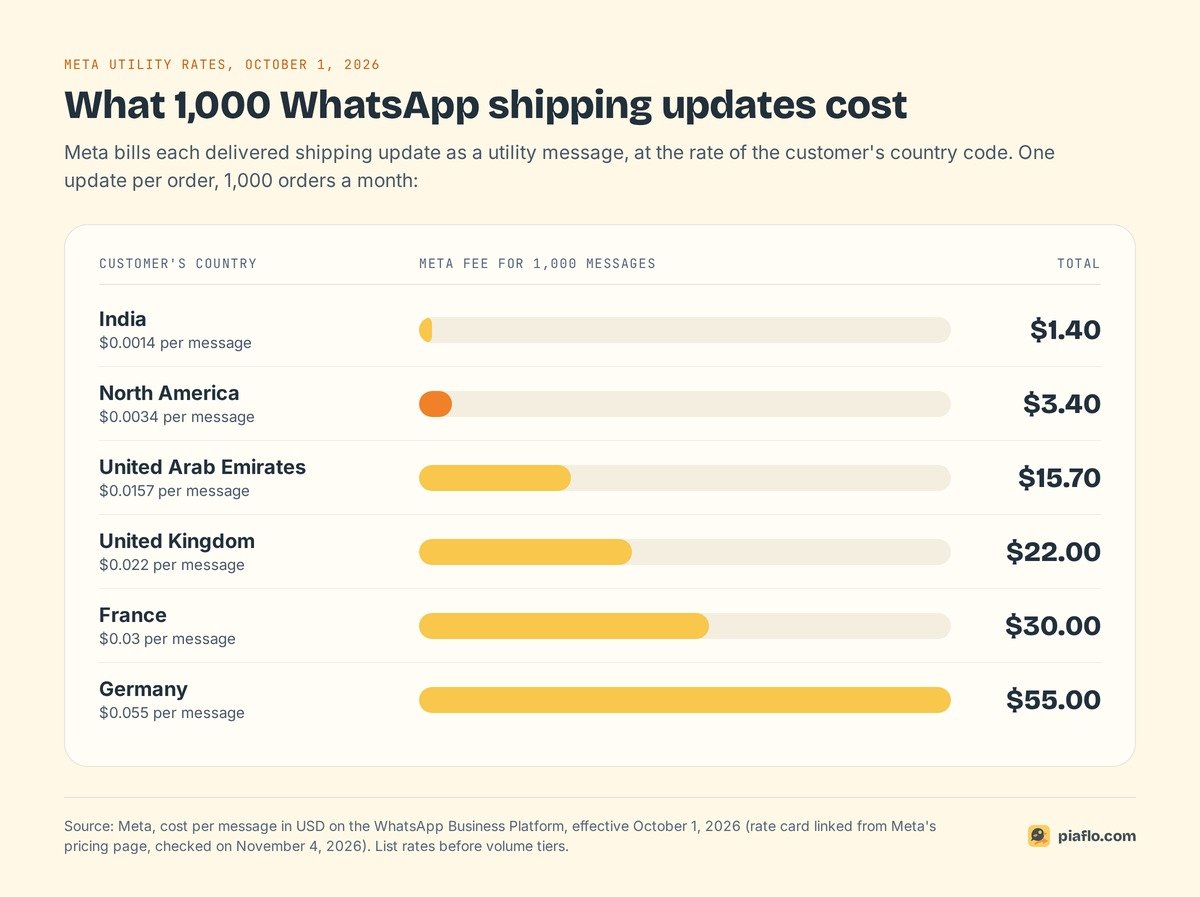
A US store shipping 1,000 orders a month pays $3.40 in Meta fees for one shipping update per order. Rates by country and volume tiers are in our WhatsApp Business API pricing guide.
A post-purchase sequence that heads off the question
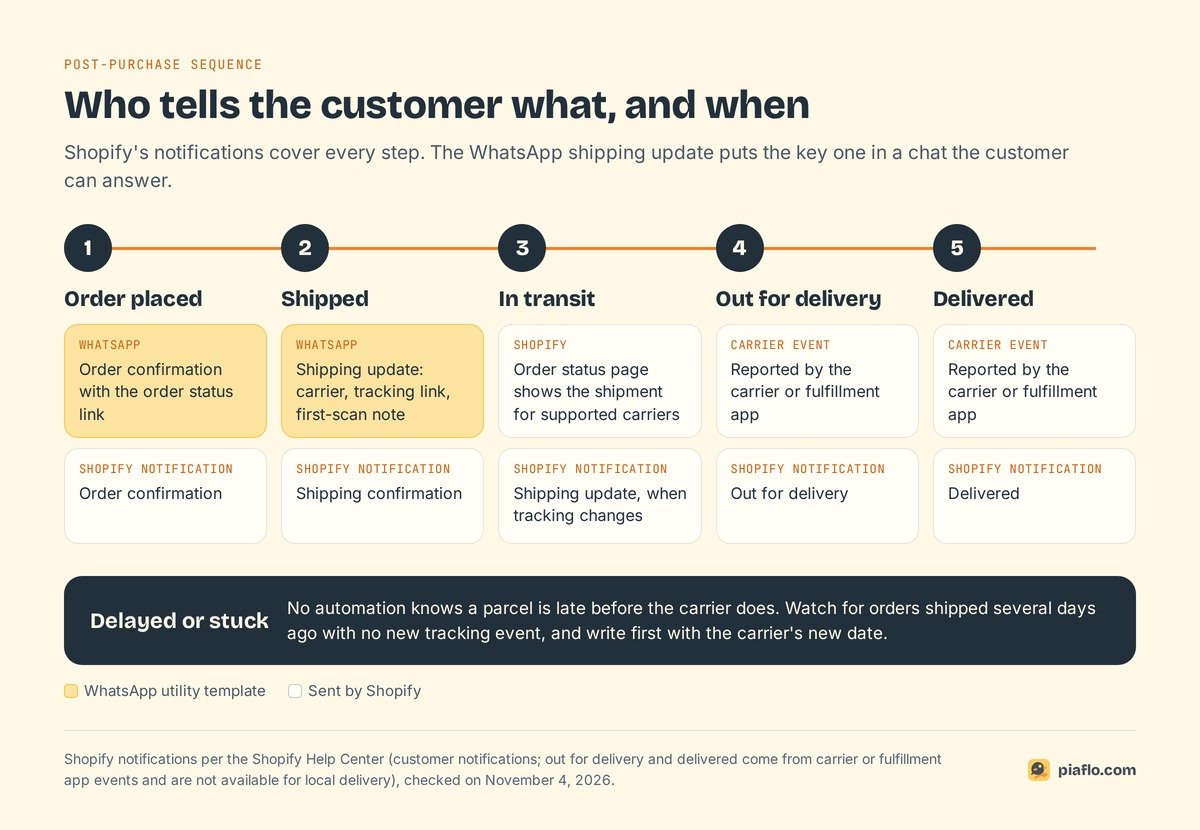
Customers ask at predictable moments, so speak first at those moments. Here is who sends what when Shopify's emails and WhatsApp work together.
Order placed
The order confirmation repeats the order number and links to the order status page. It answers "did my order go through?". Say when orders usually ship ("we pack orders within two business days"), so nobody writes on day one. Cash on delivery stores add a confirmation with Confirm and Cancel buttons before shipping, covered in our guide to COD order confirmation on WhatsApp.
Shipped, with carrier and tracking link
It goes out when you fulfill the order, so add the tracking number at that moment. Name the carrier, give the tracking link and say the parcel may take a little time to show its first scan. Without that last line, a customer who taps the link on day one sees "label created" and writes to you.
Delayed or stuck
Watch for orders shipped several days ago with no new tracking event, and write first: "Your order #1042 is taking longer than planned. The carrier now expects it on Friday. Reply here if you have any question." An apology sent before the customer notices costs less than the ticket that follows silence.
Delivered
Shopify's Delivered email goes out when the carrier reports delivery. If the customer has nothing, you want to know fast, while the carrier can still investigate: Meta's delivered example ends with an invitation to report an issue for that reason. A review request belongs in a separate message a few days later (see review requests on WhatsApp).
What to put in a shipping update
A shipping update should answer the next question before it is asked:
Good news {{1}}! Your order {{2}} has shipped with {{3}}. Track it here: {{4}} Tracking can take a little time to show the first scan. Questions about your delivery? Just reply to this message.
It needs four variables: first name (with "there" as the fallback), then order number, carrier and tracking link from the fulfillment. A "Track my order" button keeps the text short when your tool supports buttons.
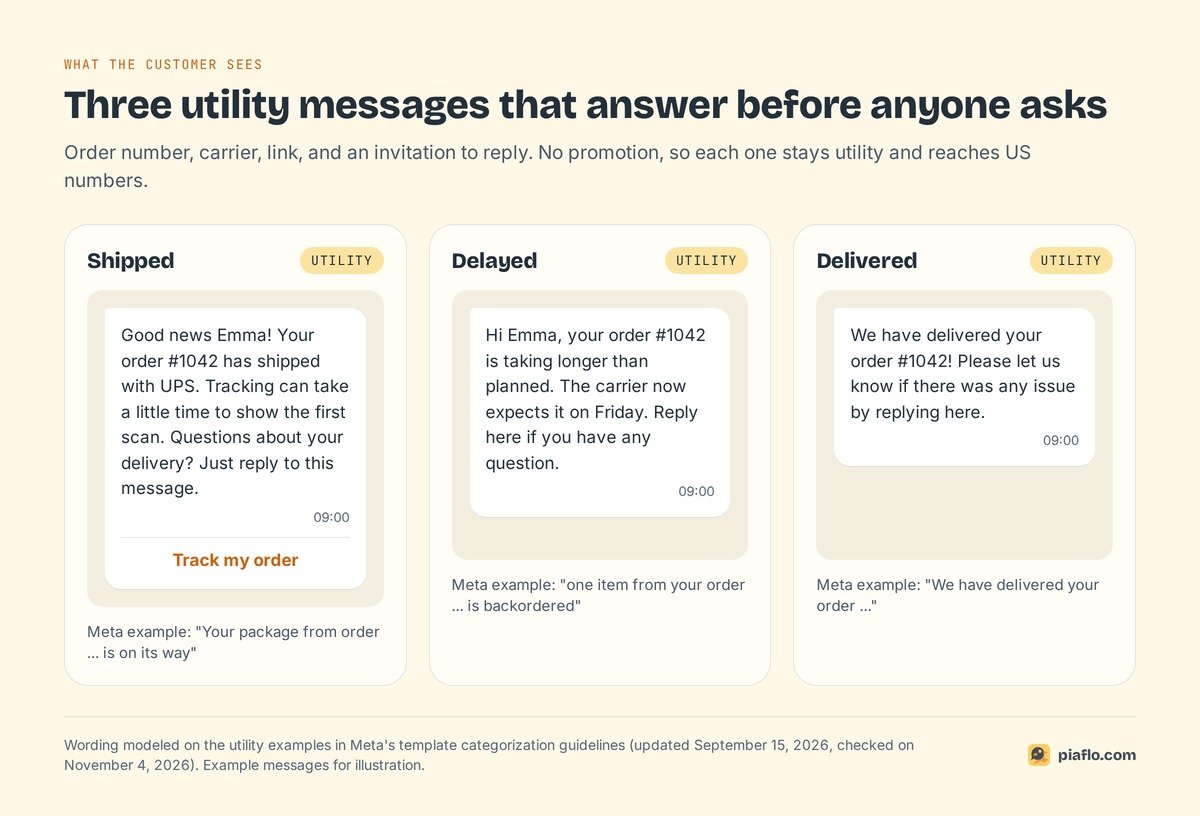
Each element closes a door:
- Order number: the customer does not have to dig for it when they write back.
- Carrier name: they know which van to expect and which website to check.
- Tracking link: the answer to "where is it?", one tap away.
- First-scan note: prevents the "tracking doesn't work" message on day one.
- Reply invitation: keeps the question in the chat that already holds the order details.
Leave out discount codes, product suggestions and "shop the new collection": each one makes the template marketing, which raises the price and stops it reaching US numbers. Write the template in every language your customers use.
When customers write in anyway
Some will: a parcel stalls, a neighbor signs for it, a customer wants to change the address. They now write in the chat that already holds the order number and tracking link, so one message answers them.
Reply inside the 24-hour window
When a customer writes to you, Meta opens a 24-hour customer service window, reset by each new message from them. Inside it you reply with normal messages, no template needed.
Meta gives every business phone number 1,000 free service messages per month and charges from the 1,001st, at $0.0034 in North America. A store that sends 300 replies a month pays nothing for them. Since October 1, 2026, a utility template sent inside an open window is charged at the utility rate (it had been free since July 2025).
Match the reply to the order status
The answer depends on what Shopify shows for the order.
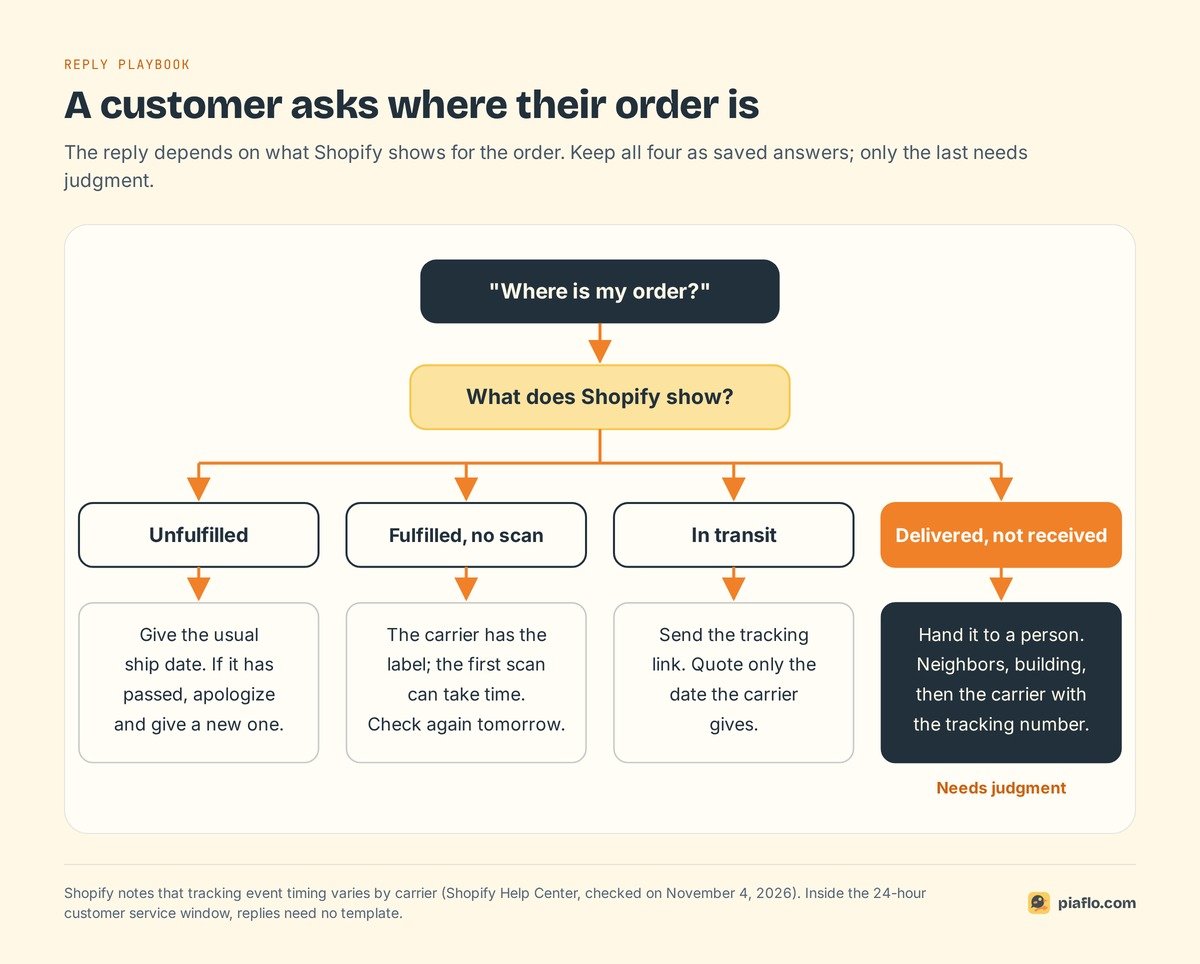
- Unfulfilled: give the usual ship date. If it has passed, apologize and give a new one.
- Fulfilled, no scan yet: the carrier has the label and the first scan can take time. Check again the next day.
- In transit: send the tracking link and quote only the date the carrier gives.
- Delivered but not received: hand it to a person. Ask the customer to check with neighbors and the building, then contact the carrier with the tracking number.
Keep these four replies as saved answers. Only the fourth needs judgment.
Setting it up with Piaflo
Piaflo is a Shopify app that sends WhatsApp messages from your own number, connected through Meta's sign-up window in 10 to 15 minutes. Its Shipping update recipe runs when an order is fulfilled and tells the customer the order has shipped, with the carrier and the tracking link taken from the fulfillment. It is a utility flow, so the US marketing pause does not block it. The Order confirmation recipe sends the order status link when the order is placed. Piaflo submits the templates to Meta in English and French.
Order flows reach customers who have not subscribed to WhatsApp marketing once you enable transactional consent in Piaflo's settings, and only for utility flows such as this one. Piaflo sends the update at shipping; out for delivery and delivered stay on Shopify's emails.
Replies land in Piaflo's shared inbox, next to the customer's Shopify orders and tags. When a teammate answers, the automated flow for that customer pauses.
Order and shipping updates are included in the Free plan, with a one-seat inbox and a WhatsApp chat button. Meta bills its fees directly to your WhatsApp Business account at its official rates, with no Piaflo markup, and messages are unlimited on Piaflo's side. Starter, at $29 a month, adds abandoned checkout and cash on delivery flows; Growth, at $79, has five inbox seats. The Free plan has no time limit, so you can test before you upgrade.
See the plans and follow the guide to connect your WhatsApp number. You can also install Piaflo from the Shopify App Store.
Frequently asked questions
What does WISMO stand for?
WISMO stands for "where is my order?". It covers every customer question about the status of an order after payment: whether it shipped, where it is, when it will arrive and why tracking has not moved. A WISMO ticket is any email, chat or call driven by that question.
Does Shopify send shipping notifications on WhatsApp?
No. Shopify sends shipping confirmation, shipping update, out for delivery and delivered notifications by email or SMS, the last two when the carrier or fulfillment app reports that status. To send shipping updates on WhatsApp, you need a WhatsApp Business Platform number and an app that listens to Shopify fulfillment events.
Can I send WhatsApp shipping updates to customers in the US?
Yes. Shipping updates are utility templates, and Meta's pause on WhatsApp messages to US numbers only covers marketing templates. Keep the update free of promotions: a discount code turns it into marketing, and marketing templates are not delivered to +1 US numbers.
How much does a WhatsApp shipping update cost?
Meta bills it as a utility message at the rate of the customer's country. On the rate card effective October 1, 2026, that is $0.0034 in North America, $0.0014 in India, $0.022 in the United Kingdom and $0.055 in Germany. Meta only charges delivered messages.
Can I add a discount code to a shipping update?
You can, but Meta then classifies the template as marketing, because an order update with a promotion is mixed content. It costs more, only reaches customers who opted in to marketing and is not delivered to US numbers. Send the offer as a separate marketing message.