WhatsApp Broadcast for Shopify: Limits, Costs and How to Reach 10,000 Customers
How to send a WhatsApp broadcast from Shopify: the 256-contact app list, Meta's daily limits up to 10,000 customers, what a campaign costs by country and why some messages fail.
On this page 9
- Broadcast lists in the app vs campaigns on the API
- Who can receive a WhatsApp broadcast
- How many customers you can reach in a day
- What a WhatsApp broadcast costs
- How to send a WhatsApp broadcast from Shopify, step by step
- Shopify segments that work for WhatsApp campaigns
- Why some customers did not receive your broadcast
- Keep your number in good standing
- Setting it up with Piaflo
To send a WhatsApp broadcast to more than a few hundred Shopify customers, you need the WhatsApp Business Platform, through a Shopify app. You pick a customer segment, keep only the customers who opted in to WhatsApp marketing, and send them a marketing template approved by Meta. A broadcast list in the WhatsApp apps on your phone holds at most 256 contacts, and only people who saved your number receive it.
On the Platform, Meta caps how many customers you reach in 24 hours: 250 for a new business, 2,000 once you verify it and Meta approves your message quality, then 10,000, 100,000 and unlimited as volume and quality grow. Each delivered message is billed at the rate of the customer's country: on Meta's October 2026 rate card, 10,000 marketing messages cost $635 to the United Kingdom and $118 to India. Marketing messages to US phone numbers are not delivered at all.
Broadcast lists in the app vs campaigns on the API
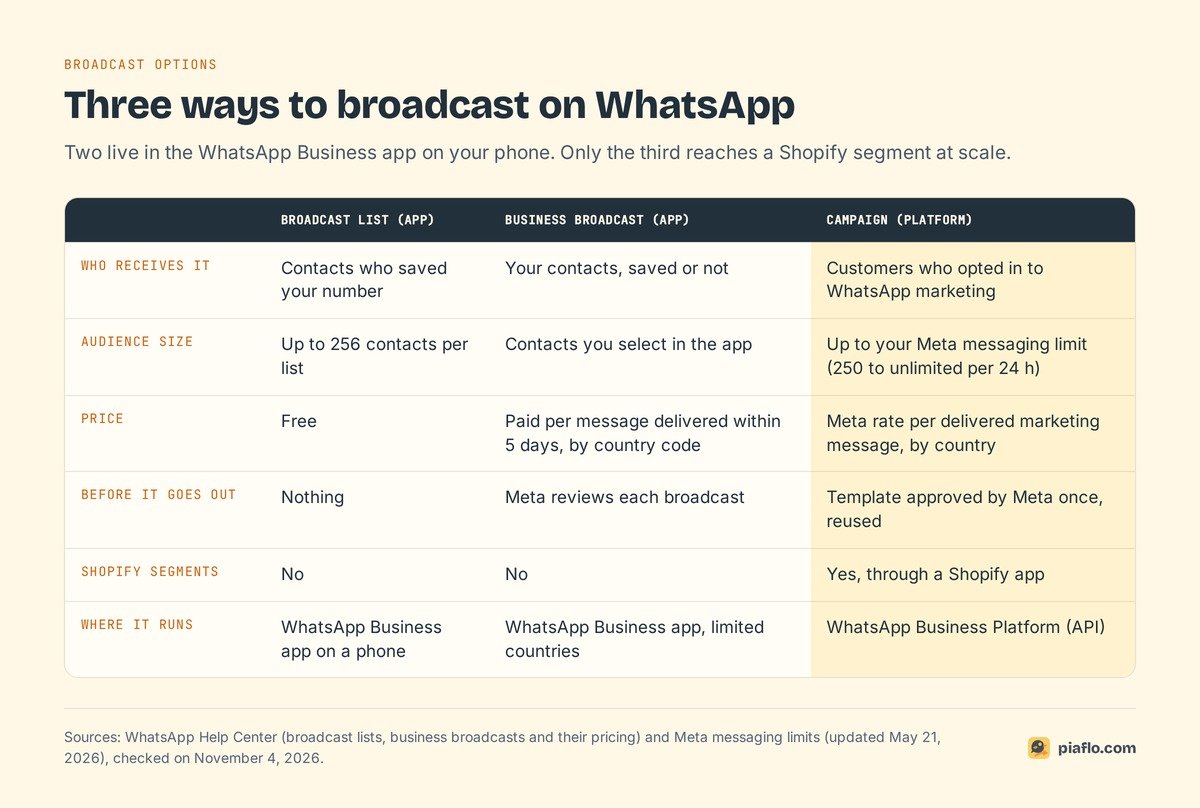
"Broadcast" covers three things on WhatsApp today. Two live in the WhatsApp Business app on your phone. The third is a campaign sent through the WhatsApp Business Platform, the API that Shopify apps connect to.
Broadcast lists in the app: 256 contacts per list
A broadcast list is a saved list of contacts you message in one go. According to WhatsApp's Help Center page on broadcast lists, a list holds up to 256 contacts, you can create as many lists as you like, and every contact must have saved your number in their address book. The WhatsApp Business app page sets the same saved-number rule. Each recipient gets a one-to-one chat, and their reply comes back only to you.
That suits a shop with a few hundred loyal customers. Once your list lives in Shopify, it stops scaling: the app has no link to your orders or segments, and every list is built by hand on a phone (lists do not work on WhatsApp Web, Windows or Mac).
Business broadcasts in the app are paid
The WhatsApp Business app now offers business broadcasts, which also reach contacts who did not save your number. WhatsApp's Help Center sets the terms:
- You pay for each message delivered within five days of sending, priced by the recipient's country code.
- Meta reviews each broadcast before it goes out.
- If many people report or block you, you get a warning, then business broadcasts are suspended for three days, with no appeal.
- It is available in limited countries, and the WhatsApp Business Platform does not support it.
That is why some merchants see the app "asking for payment" for a broadcast. A cap of 35 broadcasts a month comes from the regular WhatsApp app: WhatsApp is rolling out a monthly limit of 35 free broadcast messages in some countries, and points businesses to the WhatsApp Business app.
Campaigns on the WhatsApp Business Platform
On the Platform, there is no list size and no address book. A campaign goes to every opted-in customer in your chosen audience, up to your messaging limit. A Shopify app reads your segments, fills an approved template with each customer's details and tracks delivery, reads and clicks.
Already on the app? Coexistence connects the same number to the Platform while you keep replying from your phone, but your app broadcast lists become read-only and campaigns move to the API tool. Our comparison of the WhatsApp Business app and API covers coexistence and the switch.
Who can receive a WhatsApp broadcast
Customers who opted in to WhatsApp marketing
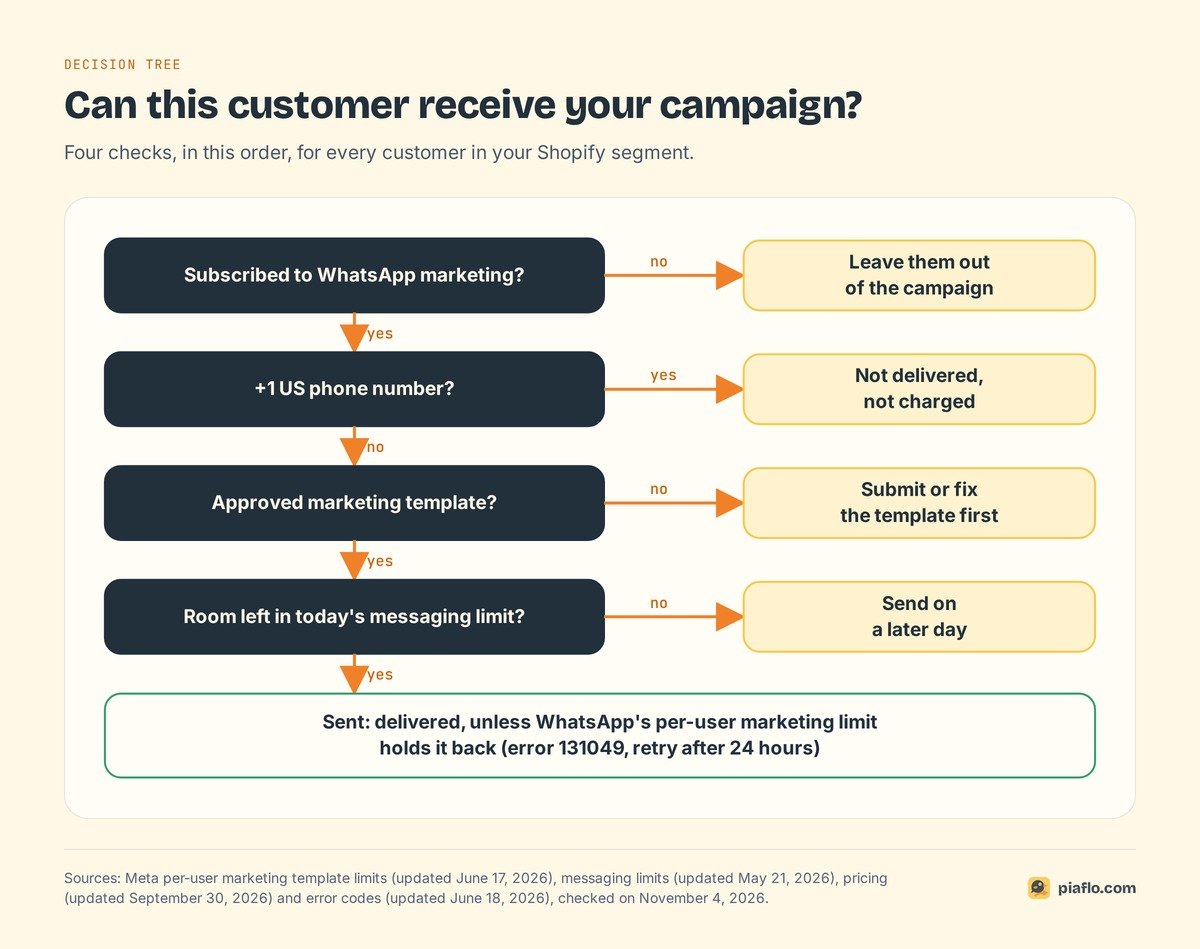
Meta requires an opt-in before a business messages anyone on WhatsApp, and a promotion needs consent to marketing. A phone number on a Shopify order does not count, and neither does an email subscription. Collect WhatsApp consent with an unchecked box on your store, keep the proof (date, text, page) and honor STOP immediately. Our guide to WhatsApp marketing consent covers the wording and the GDPR side.
An approved marketing template
A campaign starts a conversation, so it must be a template: a pre-written message with variables (first name, product, link) that Meta has approved, in the marketing category. A promotion submitted as utility gets recategorized, and repeated mislabeling restricts your account. If Meta refuses a template, our guide to rejected WhatsApp templates explains each reason.
Not US phone numbers
Meta's documentation states that WhatsApp does not currently deliver marketing templates to people with a US phone number (+1 and a US area code). The message fails and is not charged. Canadian numbers fall outside the rule. If part of your list is in the United States, read what still works for US numbers.
How many customers you can reach in a day
Whether you can send 10,000 WhatsApp messages depends on a number Meta sets for your business.
Meta's messaging limit, from 250 to unlimited
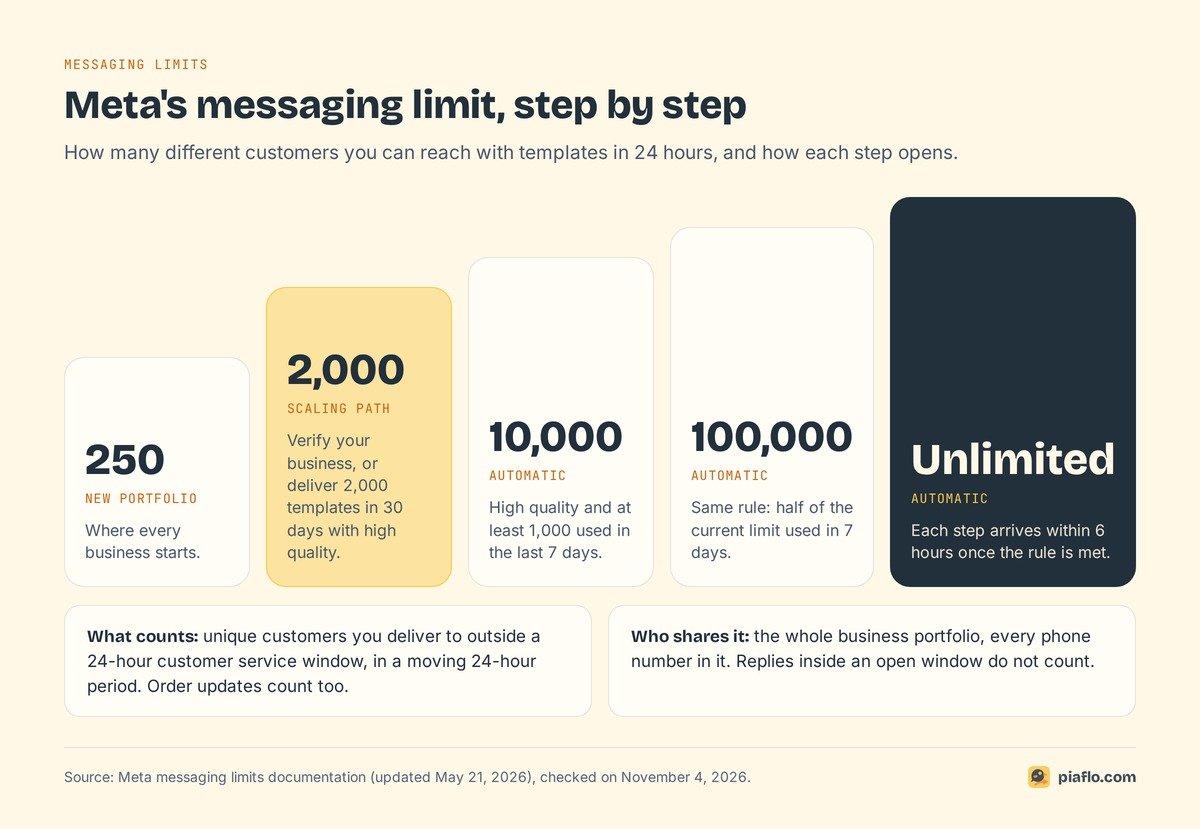
Meta's messaging limits documentation defines the limit as the maximum number of unique customers your business can deliver messages to outside a customer service window, in a moving 24-hour period. Three details matter for a campaign:
- It counts customers: two templates to the same customer in a day use one slot.
- It applies to the business portfolio, and every phone number in it shares the same limit.
- Replies inside an open 24-hour window, after a customer wrote to you, do not count.
A new business portfolio starts at 250. To reach 2,000, you verify your business with Meta, or deliver 2,000 template messages to unique customers within 30 days with high-quality templates. Meta then reviews your message quality and approves or denies the increase. The next steps are 10,000, 100,000 and unlimited. Your current limit shows in WhatsApp Manager, under Account tools.
Getting to 10,000
Above 2,000, Meta raises the limit on its own, one step at a time, when two conditions hold: your messages keep a high quality rating, and in the last 7 days you used at least half of your current limit. The next step then arrives within 6 hours.
A store with 10,000 subscribers therefore verifies its business to reach 2,000, once Meta approves, then uses at least 1,000 of those slots within a week, with good quality, before 10,000 opens. Order messages count toward that use.
Customers beyond your limit on the day are not reached. Send to the segment that matters most first, the rest on a later day.
Order messages share the same limit
Order confirmations and shipping updates are templates too, usually sent when no window is open, so they draw on the same daily limit. At 2,000, a day with 400 order updates leaves room for at most 1,600 other customers. Plan big campaigns around that, especially during a sale.
How long 10,000 messages take to send
Meta's throughput page sets 80 messages per second per phone number by default, upgraded automatically to 1,000 for eligible numbers. At 80 per second, 10,000 messages leave in about two minutes. A coexistence number, shared with the WhatsApp Business app, is fixed at 20 per second: about eight minutes.
What a WhatsApp broadcast costs
Meta charges per delivered message, at a rate set by the message category and the customer's country calling code, according to its pricing page. A campaign is a marketing message, and failed messages are not billed.
One campaign to 10,000 subscribers, at the marketing rates of the rate card effective October 1, 2026:
| Customers in | Marketing rate per message | 10,000 delivered messages |
|---|---|---|
| United Kingdom | $0.0635 | $635 |
| France | $0.0859 | $859 |
| Germany | $0.1365 | $1,365 |
| Spain | $0.0707 | $707 |
| India | $0.0118 | $118 |
| United Arab Emirates | $0.0576 | $576 |
| Saudi Arabia | $0.0576 | $576 |
| Morocco | $0.0414 | $414 |
| Mexico | $0.0397 | $397 |
| Canada | $0.025 | $250 |
| United States | not delivered | $0 |
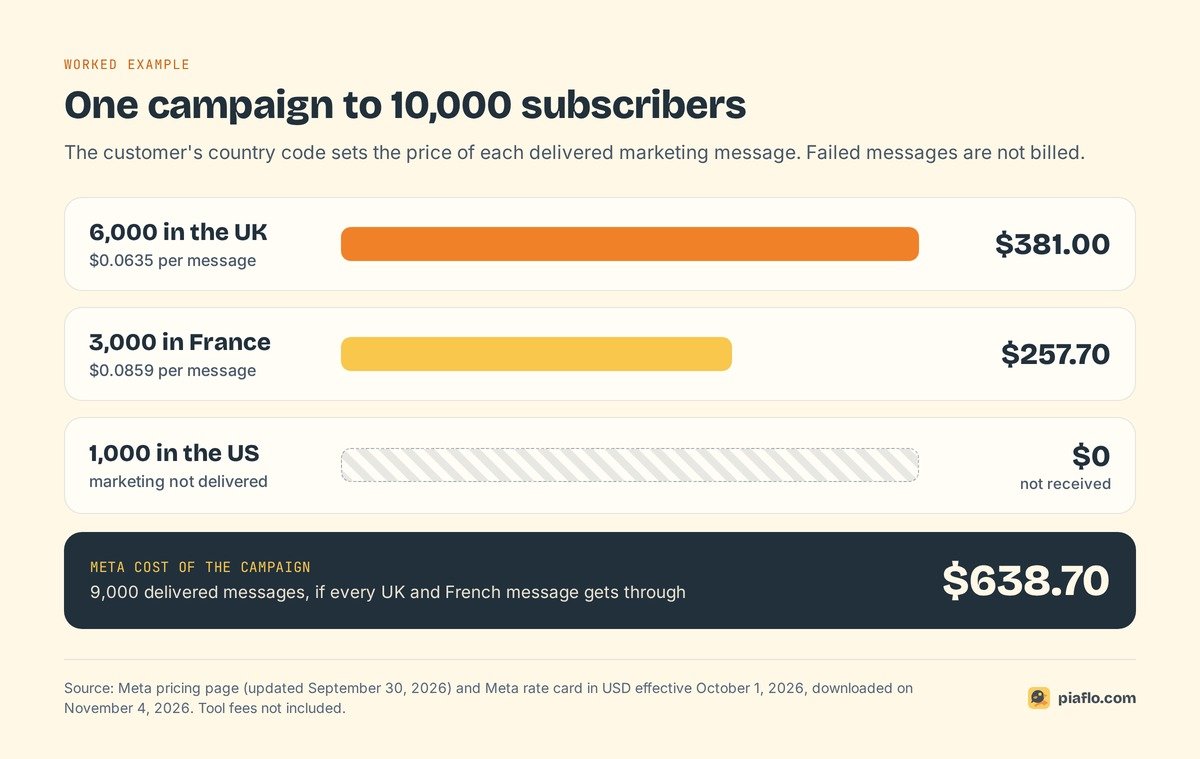
The country of the phone number sets the price, wherever your store is. A list of 10,000 subscribers with 6,000 in the UK, 3,000 in France and 1,000 in the US costs $381 plus $257.70, or $638.70, and the 1,000 US customers receive nothing. Meta can change its prices only on the first day of a quarter, so these rates hold until at least January 1, 2027.
The tool comes on top, and some providers add their own margin to each message.
How to send a WhatsApp broadcast from Shopify, step by step
The path from a Shopify segment to a sent campaign is the same whatever app you use; only the screens differ.
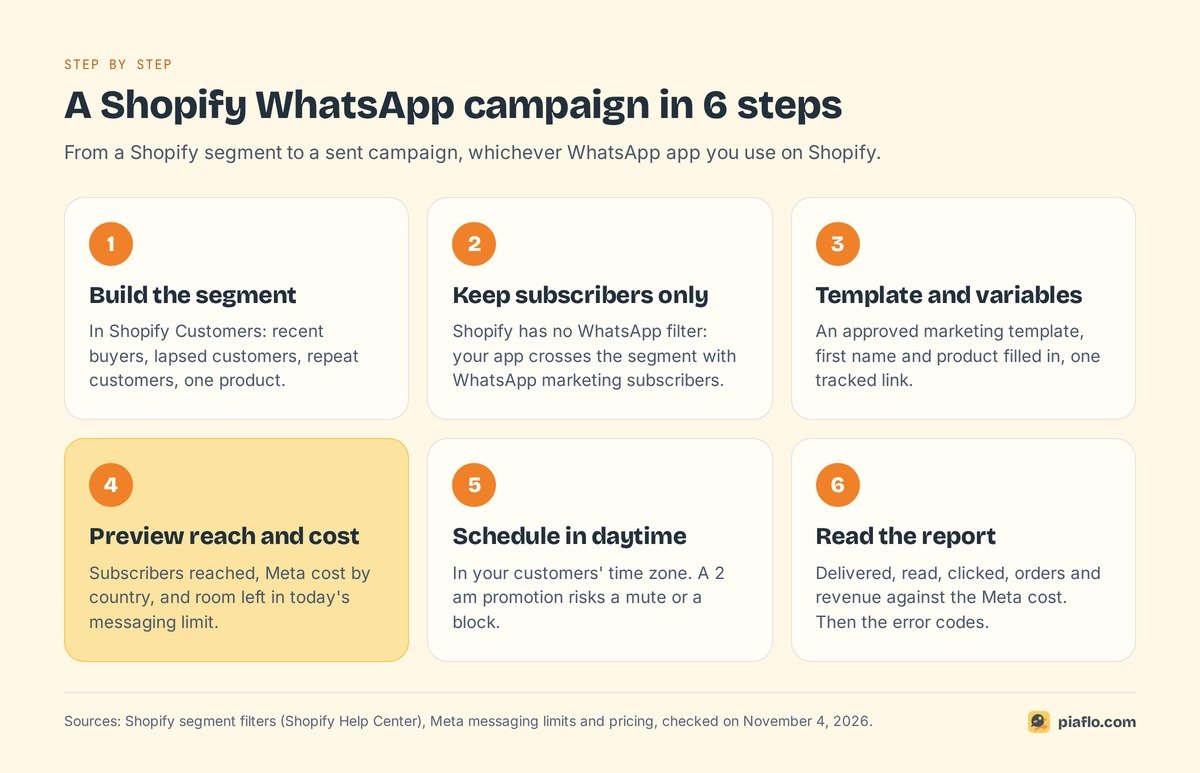
1. Build the segment in Shopify
Start in Shopify, under Customers, with a segment that has a reason to hear from you: buyers of a product back in stock, customers who have not ordered in three months, your best customers before a sale.
2. Keep WhatsApp subscribers only
Shopify's segment filters cover email and SMS subscription status, with none for WhatsApp. Your WhatsApp app crosses the segment with its WhatsApp marketing subscribers, leaves everyone else out and should tell you how many and why.
3. Choose the template and fill the variables
Map each variable of an approved marketing template to customer data: first name, product, link. Use a tracked link so clicks and orders are tied to the campaign. Keep one call to action and an easy way to opt out.
4. Preview the reach and the cost
Before sending, check three numbers: how many subscribers the campaign reaches, the estimated Meta cost for their countries, and how that reach compares with your messaging limit minus the day's order messages.
5. Schedule it for your customers' daytime
Send when your customers are awake, in their time zone. A promotion that lands at 2 am risks a mute or a block, and that feedback counts against your quality.
6. Send, then read the delivery report
Compare delivered, read, clicked, orders and revenue with the Meta cost. The error codes of failed messages tell you what to fix next time.
Shopify segments that work for WhatsApp campaigns
Shopify's segment filters let you write each audience as one line. These five fit WhatsApp, because each gives the customer a reason to welcome the message:
| Audience | Shopify segment filter | Campaign idea |
|---|---|---|
| Bought in the last 30 days | last_order_date >= -30d |
How to use or care for the product |
| No order in 90 days | last_order_date < -90d |
Win-back with the new collection |
| Repeat customers | number_of_orders >= 2 |
Early access to a sale |
| Bought one product | products_purchased MATCHES (id = 2012162031638) |
Refill, restock or matching item |
| Customers drifting away | rfm_group = 'AT_RISK' |
One reason to come back, sent once |
Replace the product ID with your own. Filters combine with AND: number_of_orders >= 2 AND customer_countries CONTAINS 'FR' gives repeat customers with an address in France. customer_countries reads the address, so a customer living in Canada can still have a US number.
Why some customers did not receive your broadcast
On a large campaign, some messages fail. Meta's error codes tell you why, and each calls for a different response:
| Error or cause | What it means | What to do |
|---|---|---|
| US phone number | Marketing templates are not delivered to +1 US numbers | Expected; leave them out of WhatsApp campaigns |
| 131049 | Meta held the message back to protect engagement, for example under the per-user marketing limit | Wait at least 24 hours before trying that customer again |
| 131050 | The customer stopped marketing messages from your business in WhatsApp | Do not retry; treat it as an opt-out |
| 131026 | The number cannot receive it: not on WhatsApp, old app version or terms not accepted | Fix or remove the number |
| 131048 | Your number is restricted because too many messages were blocked or reported | Check quality in WhatsApp Manager and slow down |
| 132015 | The template is paused for low quality | Edit the template or use another one |
The per-user limit is the one you cannot see coming. WhatsApp may cap how many marketing templates a person receives from all businesses combined, based on how much they read marketing messages and how busy their inbox is. If a customer replies to your campaign, a 24-hour window opens, and marketing messages inside it do not count toward their limit. Retrying within 24 hours only produces more errors.
Keep your number in good standing
Meta rates your messages on how customers received them over the past seven days, recent days weighted more, from blocks, reports, mutes, archives and the reasons people give when they block you. Low quality pauses templates, stops your messaging limit from growing and can restrict your number. One annoying campaign costs more than its own results.
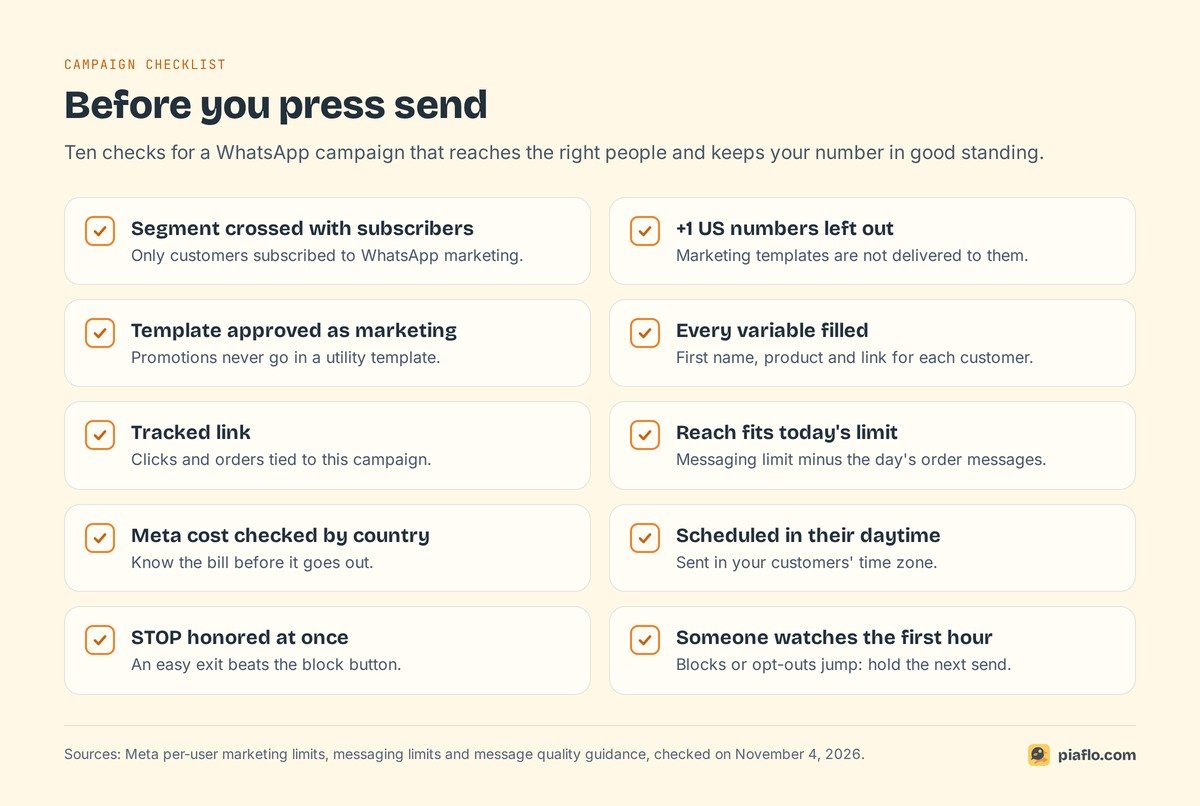
Meta's guidance boils down to five habits:
- Message only people who opted in, about what they signed up for.
- Personalize. A first name and a product they bought beat a generic blast.
- Do not send too many messages per day. Your order messages already reach customers often.
- Make leaving easy. A customer who can reply STOP does not need the block button.
- Watch the first hour. If blocks or opt-outs jump, hold the next send and fix the segment or the message.
Setting it up with Piaflo
Piaflo is a Shopify app that sends WhatsApp messages from your own number, connected to the Platform through Meta's sign-up window in 10 to 15 minutes. Campaigns run on your Shopify data:
- Audience: any customer segment you already use in Shopify, or all subscribers, with segments to exclude. Only customers subscribed to WhatsApp marketing receive it. Consent is written to the customer's native WhatsApp consent in Shopify, with the date, text and page, and STOP unsubscribes at once.
- Message: an approved template, each variable filled from customer data such as
{{ customer.first_name }}, and a destination link tracked for clicks. - Before sending: how many subscribers the campaign reaches, who is excluded and why, and the estimated Meta cost.
- After sending: recipients, delivered, read, clicked, orders and revenue for each campaign.
Campaigns come with Starter, at $29 a month, with 2,500 subscribed contacts. A list of 10,000 subscribers fits in Growth, at $79 a month with 15,000 contacts, and Pro at $199 has no contact limit. Messages are unlimited on Piaflo's side on every plan, and Meta bills its fees directly to your Meta account at its official rates, with no Piaflo margin.
See the plans, including the Free plan, or follow the guide to connect your WhatsApp number. You can also install Piaflo from the Shopify App Store.
Frequently asked questions
How many contacts can I add to a WhatsApp broadcast?
In the WhatsApp apps, a broadcast list holds up to 256 contacts, and only those who saved your number receive it. On the WhatsApp Business Platform, there is no list size: a campaign reaches as many opted-in customers as your messaging limit allows, from 250 per 24 hours for a new business to unlimited.
Is a WhatsApp broadcast free?
Broadcast lists in the WhatsApp Business app are free. Business broadcasts in the app are paid per delivered message, and campaigns on the WhatsApp Business Platform are billed by Meta per delivered marketing message, at a rate set by the customer's country, such as $0.0635 in the United Kingdom or $0.0118 in India.
Can I send a broadcast to customers who have not saved my number?
Not with a broadcast list in the app, which only reaches contacts who saved your number. Business broadcasts in the app and campaigns on the WhatsApp Business Platform reach customers who did not save it, as long as they opted in to receive your messages.
Why does WhatsApp say I can send only 35 broadcasts a month?
WhatsApp is rolling out a monthly limit of 35 free broadcast messages on its regular app in some countries. Businesses are pointed to the WhatsApp Business app, where business broadcasts are paid, or can use the WhatsApp Business Platform for larger campaigns.
Can broadcast recipients see each other?
No. Each recipient receives the broadcast as a one-to-one message from your business, and a reply goes only to you. Campaigns on the WhatsApp Business Platform work the same way: every customer gets an individual message.