Campaign report
Read a campaign's results: status, revenue, recipients, read and click rates, replies, return on Meta cost, the funnel and the failed messages.
On this page 7
Every campaign has its own page, which is also its report. Open it from Campaigns by clicking the campaign's name. While a campaign is scheduled or sending, the page refreshes on its own every few seconds.
The campaigns list
The Campaigns page starts with four tiles for all campaigns over the last 30 days, each compared with the 30 days before: Campaign revenue (30 d), Orders (30 d), Messages sent (30 d) and Read rate. Below, each campaign has its status, date, recipients, read rate, click rate, orders, revenue and ROI.
Status
| Status | What it means |
|---|---|
| Draft | Saved, nothing sent. Launch it from its page |
| Awaiting Meta approval | Scheduled, the message you wrote is still in review with Meta. The campaign starts on its own once it is approved |
| Scheduled | Waiting for its date and time |
| Sending | Messages are going out |
| Paused | Stopped by you with Pause: messages not sent yet are on hold. Piaflo also sets this status in the cases below |
| Sent | Every message has been processed |
| Cancelled | Stopped for good. Messages not sent yet were cancelled |
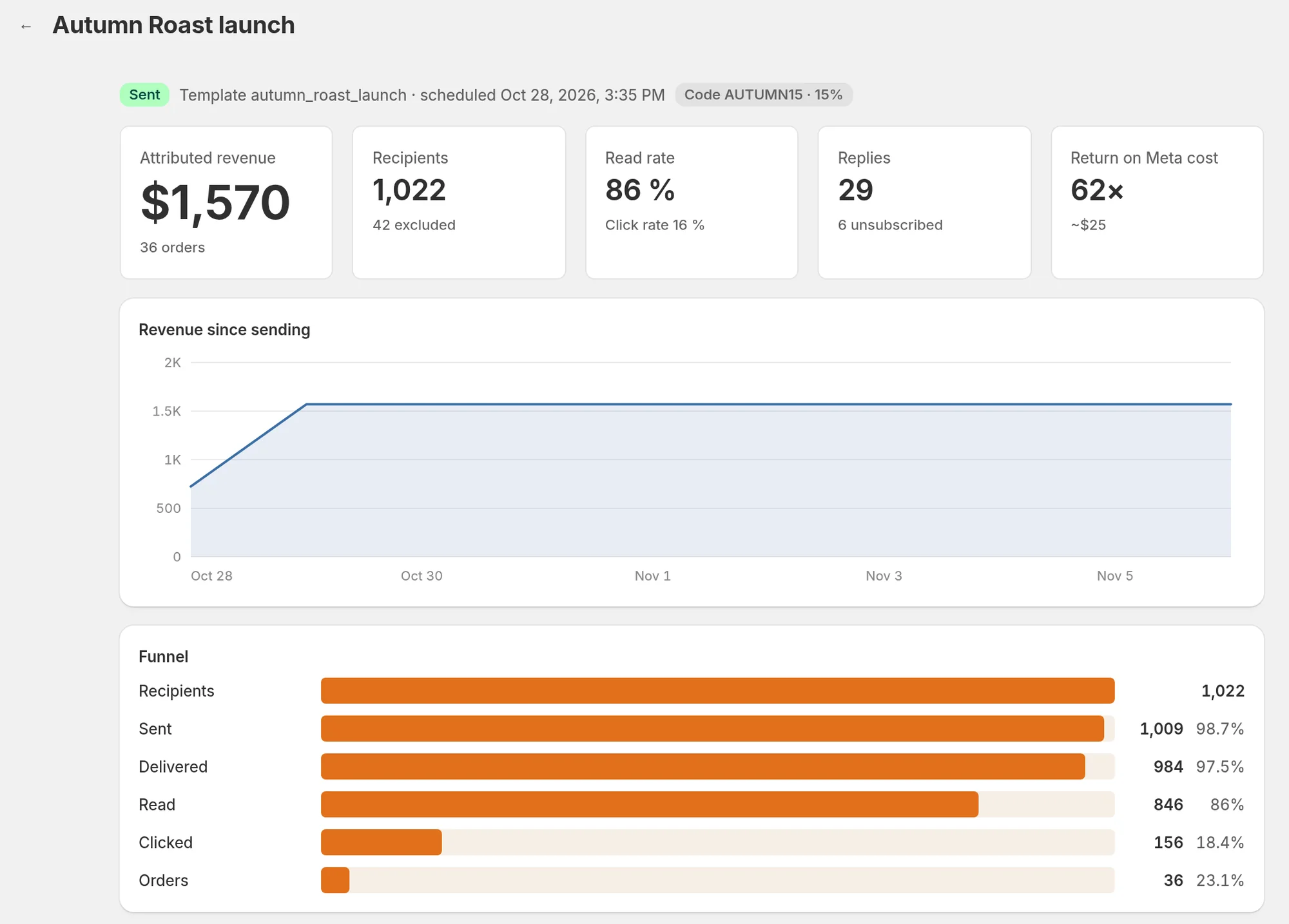
The line under the title also shows the template used, the scheduled date, the discount code if there is one, and how many messages are still in the sending queue.
Buttons on the page depend on the status: Pause while sending, Resume when paused, Cancel campaign while scheduled, sending or paused.
When Piaflo pauses a campaign
- Meta rejected the message. The page shows "Meta rejected the message" with Meta's reason. Nothing was sent. Click New campaign to write it again. See Rejected or paused templates.
- Your number's quality dropped. When Meta lowers your number's quality rating to its lowest level, Piaflo sets every campaign that is sending to Paused. Messages already queued are not held back: click Cancel campaign to stop them. See Protect your number's quality.
- The campaign could not start, for example because your WhatsApp number was disconnected.
After a quality drop, click Resume once the cause is fixed. Resume does not restart a campaign that could not start: create a new campaign once the cause is fixed.
The tiles
| Tile | What it counts |
|---|---|
| Attributed revenue | The total of the orders credited to this campaign, with the number of orders |
| Recipients | Customers the campaign was sent to, with the number left out when it started |
| Read rate | Messages read divided by messages delivered. The click rate underneath is clicks divided by messages delivered |
| Replies | Customers who replied within 72 hours of the campaign message, and underneath, those who replied STOP within 7 days |
| Return on Meta cost | Attributed revenue divided by the estimated Meta cost of the campaign, with that cost in US dollars |
A click is counted once per customer, the first time they open their tracked link.
How an order is credited to the campaign
When a customer places an order, Piaflo looks for the last tracked link they clicked within the attribution window: 5 days by default, from 1 to 30 days with Attribution window (days) in Settings > Sending rules. If they clicked a link from this campaign, the order is credited to it. If they clicked no link, the order goes to the last message they read in the 24 hours before ordering. Each order is credited only once. More in Attribution and Meta cost.
Revenue since sending
The chart shows the revenue credited to the campaign, adding up over time. During the first 72 hours after the campaign started it is drawn hour by hour, then day by day for up to 30 days.
Funnel
The funnel follows the customers from one step to the next: Recipients, Sent, Delivered, Read, Clicked, Orders. It shows where most customers drop off.
- If many messages are sent but not delivered, check the failed messages below.
- If many customers read the message but few click, compare the wording and the offer with your other campaigns.
Failed messages
When messages fail, the box Failed messages lists the most frequent errors with their code and how many messages each concerns. Numbers that are not on WhatsApp are marked in Contacts and left out of later campaigns. For the other errors, see Message not delivered.
Send yourself a test
On a draft, scheduled or paused campaign whose message Meta has approved, the page has a Send yourself a test box. Enter Your WhatsApp number and click Send test. The test is sent with sample values, and a discount code shows as WA-TEST until the real code exists.
 Still stuck? Write to us with the flow name or the order number involved.