Cash on delivery confirmation
The recipe that asks every cash on delivery customer to confirm their order. Confirmed orders are tagged, cancelled ones are cancelled and restocked, silent ones are flagged after 24 hours.
On this page 7
Cash on delivery orders that nobody confirms cost you a shipment for nothing. This recipe asks the customer to confirm on WhatsApp, then updates the order in Shopify according to the answer. It is an order update flow, available from the Starter plan.
The message
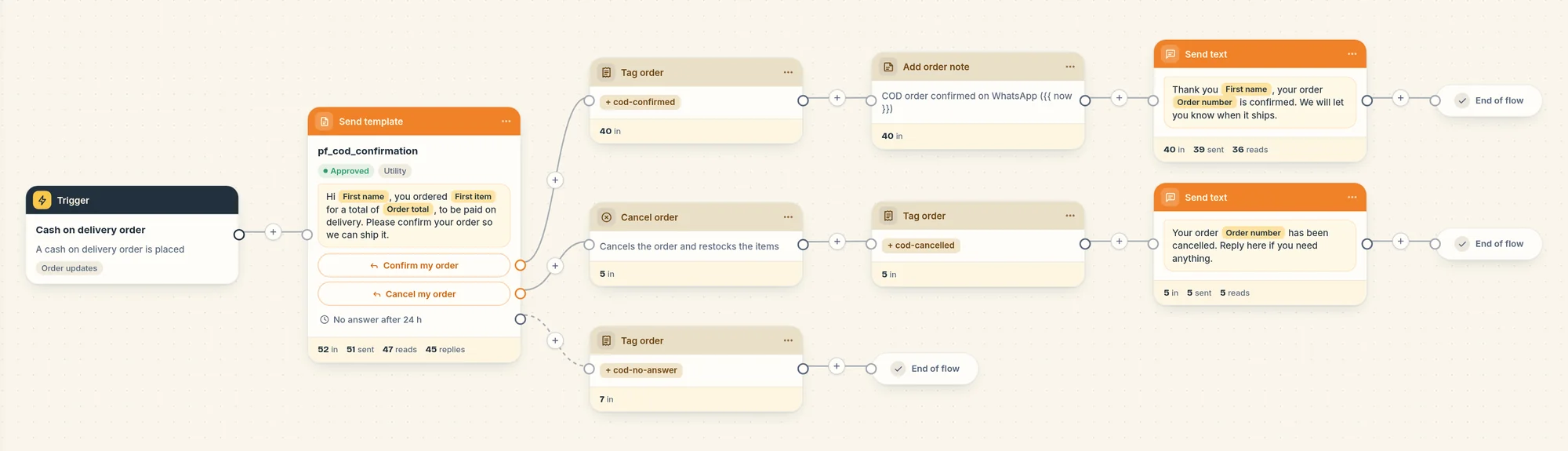
The flow starts on the Cash on delivery order trigger and sends this message right away:
"Hi Marie, you ordered Linen shirt for a total of €49.90, to be paid on delivery. Please confirm your order so we can ship it."
It has two buttons: Confirm my order and Cancel my order. When the order has several products, the first one is followed by "+1", "+2" and so on. The total is formatted in your store's currency.
What happens next
Piaflo waits up to 24 hours for an answer.
| The customer | Piaflo does |
|---|---|
| Taps Confirm my order | Adds the tag cod-confirmed to the order, writes "COD order confirmed on WhatsApp" with the date and time in the order timeline, and replies "Thank you Marie, your order #1042 is confirmed. We will let you know when it ships." |
| Taps Cancel my order | Cancels the order in Shopify and restocks the items, adds the tag cod-cancelled, and replies "Your order #1042 has been cancelled. Reply here if you need anything." |
| Does not answer within 24 hours | Adds the tag cod-no-answer, so your team can call the customer or hold the parcel |
The cancellation in Shopify carries the staff note "Cancelled by the customer on WhatsApp (Piaflo)".
Which orders count as cash on delivery
Piaflo looks at the payment method of each new order. The order is cash on delivery when the payment method:
- matches one of the names in Settings > Order messages and consent > Cash on delivery payment methods (letter case does not matter), or
- contains "cash on delivery" or "livraison".
By default the list holds "Cash on Delivery (COD)", "Paiement à la livraison" and "COD". If your COD app uses another name, add it there, separated by commas.
These orders start the Cash on delivery order trigger instead of Order created, so they do not receive your order confirmation flow.
Who receives it
Like every order update, it goes to customers subscribed to your WhatsApp messages, or to every customer with a phone number if you turn on I inform customers at checkout that order updates are sent on WhatsApp in Settings > Order messages and consent. For COD stores, turn it on: most of your customers will not have subscribed before their first order.
Turn it on
- Connect your WhatsApp number: Connect your WhatsApp number.
- Check the payment method names in Settings > Order messages and consent.
- Go to Flows and click Activate on Cash on delivery confirmation.
Good to know
- Typed answers: a customer who types "Confirm my order" or "Cancel my order" instead of tapping follows the same path. Any other text does not move the flow.
- The word "cancel" alone: Piaflo treats a message that is only an unsubscribe word, such as "cancel", "stop", "end" or "quit", as an unsubscribe request. That customer is unsubscribed and stays on the waiting step until the 24 hours are over, then gets the
cod-no-answertag. - Two COD orders in a row: while a customer is waiting to confirm their first order, a second COD order does not start the flow again. It shows as "Customer already in this flow" on the flow page.
- If Shopify refuses an action (tag, note or cancellation), the flow carries on with the next step.
Change it
Open the flow from Your flows, edit it, then click Publish.
- The waiting time: Wait for an answer (hours) in the message step.
- The tags: in each Tag order step. Keep
cod-confirmedandcod-cancelledif you use the Shopify Flow triggers. - Restocking: untick Restock items in the Cancel order step.
- The first name: the two replies use the first name with no fallback. If many of your customers have no first name in Shopify, open the step, click the First name variable and set If empty, use.
 Still stuck? Write to us with the flow name or the order number involved.