Signup popup
A popup on your store where visitors leave their WhatsApp number and tick a consent box. Each signup is a subscriber your marketing flows and campaigns can reach, with proof of consent stored.
On this page 6
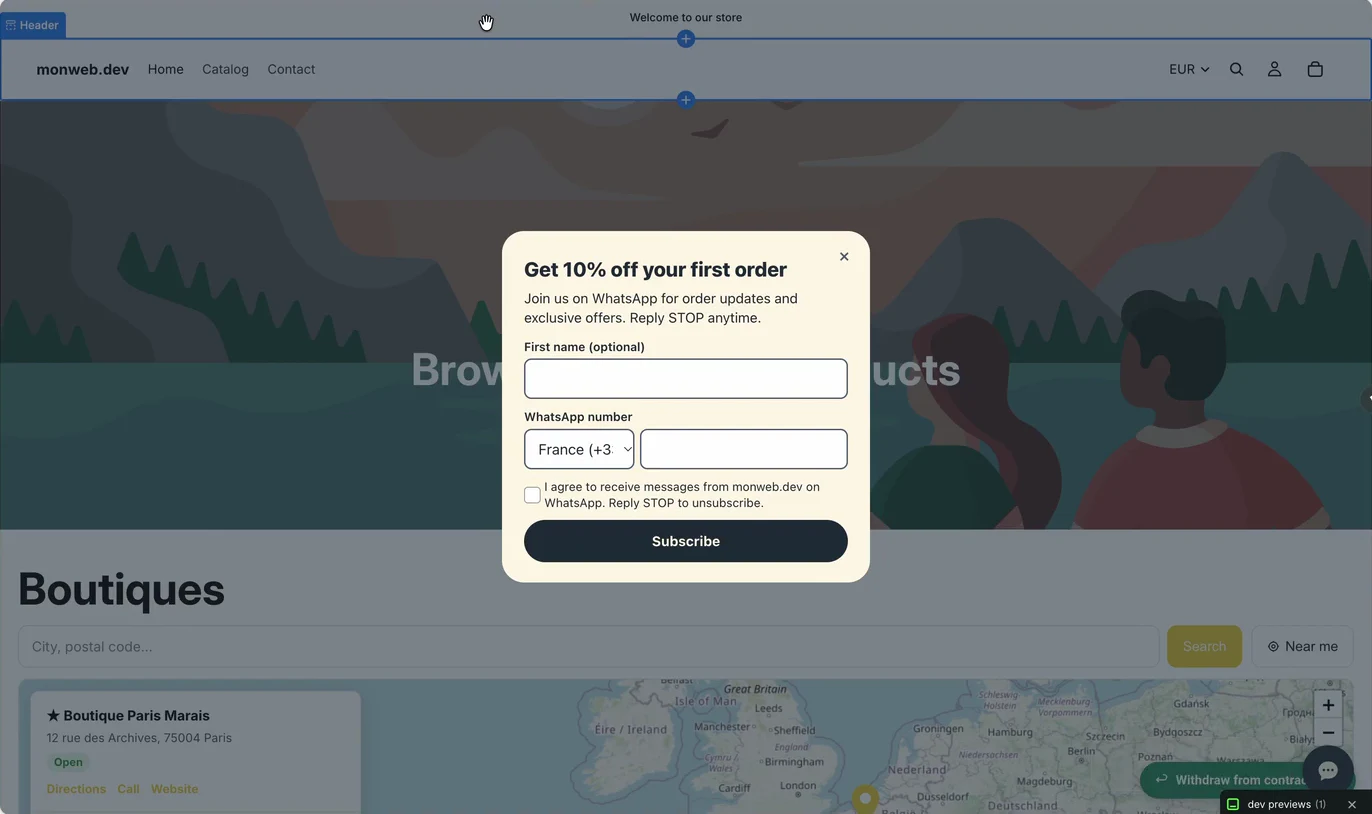
Marketing messages on WhatsApp, such as cart reminders, campaigns and welcome messages, can only go to customers who agreed to receive them. The signup popup collects that agreement on your store: the visitor types their WhatsApp number, ticks a consent box and clicks Subscribe.
The popup is included from the Starter plan. On the Free plan the setting is visible but the popup does not show on your store. Like the chat button, it needs a connected WhatsApp number and the Piaflo app embed turned on in your theme: see Chat button.
Turn it on
- Go to Opt-in tools, section Opt-in popup.
- Tick Show the opt-in popup.
- Set the fields below and check the Preview.
- Click Save.
| Setting | What it does | Default |
|---|---|---|
| Delay before showing (seconds) | How long after the page loads the popup opens, from 0 to 120 | 8 |
| Title | Main line, up to 80 characters | "Get 10% off your first order" |
| Text | A sentence under the title, up to 300 characters | "Join us on WhatsApp for order updates and exclusive offers. Reply STOP anytime." |
| Incentive | Optional highlighted line, up to 80 characters, for example "10% off with code WELCOME10" | Empty |
The popup also has a switch in your theme editor, Show the opt-in popup, in the Piaflo chat & opt-in app embed. It is on by default. Both must be on for the popup to show.
What visitors fill in
- First name (optional).
- WhatsApp number, with a country code list set to the visitor's country.
- A consent box, unticked, with this text: "I agree to receive messages from (your store) on WhatsApp. Reply STOP to unsubscribe."
The consent text is fixed. It shows in French on the French version of your store and in English on every other version. The visitor has to tick the box: without it, the popup shows Please tick the box to agree to receive messages. and nothing is saved.
After Subscribe, the popup thanks them: "Thank you! You will receive a WhatsApp message shortly." Make that true with a welcome flow (see below).
What Piaflo records
For each signup, Piaflo:
- Subscribes the contact to your WhatsApp marketing messages, with "Storefront popup" as the source.
- Stores the proof of consent: the consent text shown, the date, the page where they signed up, a hashed form of their IP address, and their browser's user agent.
- Marks the customer as subscribed to WhatsApp in Shopify, and creates the Shopify customer if there is none for that number.
- Starts your flows with the Customer opted in trigger.
To limit abuse, the same IP address can submit at most 5 times per minute.
When the popup shows and hides
- It opens once the delay has passed, on any page.
- Closing it (the ×, the Escape key or a click outside) hides it for 30 days on that browser.
- After a visitor subscribes, it no longer shows on that browser.
- In the theme editor it opens after half a second every time, so you can check your changes.
Welcome new subscribers
In Flows, under Recipes, click Activate on Welcome new subscribers (Starter plan). Its message template goes to Meta for approval; once approved, the flow sends each new subscriber a message right after they sign up: "Welcome Marie! Thank you for joining Maison Lune on WhatsApp. You will receive your order updates and our best offers here."
The recipe does not include a discount code. If your Incentive promises one, add the code to the welcome flow, for example with a template of your own that contains it. The Incentive field only displays the text: Piaflo does not create or send the code for you.
See the results
Opt-in tools > Results shows Subscribed from the popup, next to your total of subscribed contacts. See Opt-in results.
 Still stuck? Write to us with the flow name or the order number involved.