Order messages without opt-in
By default, order updates only reach customers subscribed to WhatsApp. One setting sends them to every customer with a phone number, when your checkout tells customers about it.
On this page 6
Order updates (order confirmation, shipping, cancellation, cash on delivery confirmation) are messages a customer expects after buying. By default, Piaflo still only sends them to customers subscribed to WhatsApp. If your checkout tells customers that order updates come on WhatsApp, you can send them to every customer who left a phone number.
Turn it on
- Make sure your checkout tells customers that order updates are sent on WhatsApp, for example in the text next to the phone field.
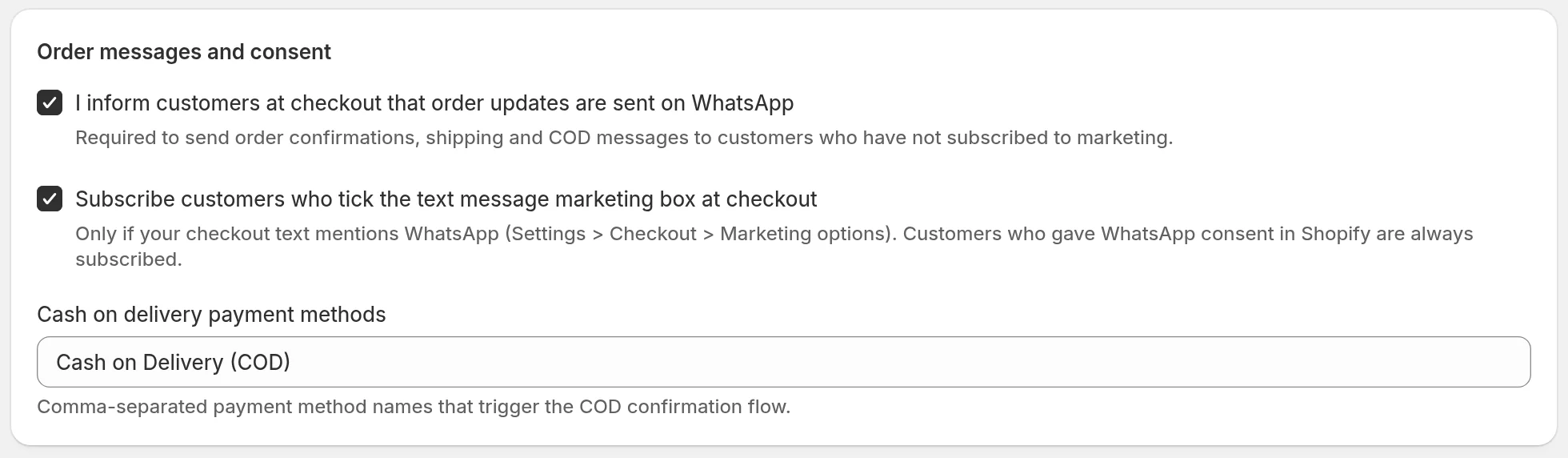
- In Piaflo, go to Settings > Order messages and consent.
- Tick I inform customers at checkout that order updates are sent on WhatsApp.
- Click Save.
What changes
| Setting off (default) | Setting on | |
|---|---|---|
| Order update flows | Subscribed customers only | Every customer with a phone number, subscribed or not |
| Marketing flows and campaigns | Subscribed customers only | Subscribed customers only |
| Customers who replied STOP | Nothing | Nothing |
The setting covers every flow in the order updates category: the order confirmation, order confirmation with opt-in, shipping update, order cancelled and cash on delivery recipes, and your own flows set as order updates. It has no effect on marketing: abandoned checkout, welcome and review request flows, and campaigns, keep requiring a subscription.
Customers who unsubscribed with STOP receive no order update either, setting on or off.
With the setting off, customers who are not subscribed are counted on each order update flow under Customers who did not enter this flow (30 days), with the reason "Customer not subscribed, and order messages are not enabled in Settings". See Why a customer did not enter a flow.
How order updates are sent
Order updates are sent right away, day or night: quiet hours do not apply to them, and they do not count toward the weekly marketing limit. Their templates are in the Utility category, which Meta bills at a lower rate than marketing.
Turn order updates into subscriptions
Order updates are a good moment to ask for consent. The Order confirmation with opt-in recipe confirms the order and asks the customer if they want to receive updates on WhatsApp. A "Yes" subscribes them, and they can then receive your marketing flows and campaigns. With the setting above on, this recipe reaches every customer who orders with a phone number. See Order confirmation with opt-in.
The text message box at checkout
The same section has a second setting: Subscribe customers who tick the text message marketing box at checkout. It turns Shopify's text message marketing checkbox into a WhatsApp marketing subscription.
Only turn it on if the text of that box mentions WhatsApp. You edit it in your Shopify admin, under Settings > Checkout > Marketing options. Customers who gave WhatsApp consent in Shopify are always subscribed, with or without this setting.
Common questions
Is this setting needed on the Free plan? It works the same on every plan. The Free plan runs the order confirmation and shipping update recipes, so turning it on is what lets them reach customers who have not subscribed.
Does the setting subscribe customers? No. It only lets order updates reach them. Their consent stays Not subscribed until they subscribe.
 Still stuck? Write to us with the flow name or the order number involved.