Sending rules, emergency stop and number health
Quiet hours, the weekly marketing limit, the attribution window and the emergency stop are set in Settings. The WhatsApp account card shows how Meta rates your number.
Settings holds the rules that apply to every message Piaflo sends, and shows the health of your WhatsApp number as Meta reports it.
Changes to the rules are saved with Save at the bottom of the page, or with the save bar Shopify shows at the top once you change something.
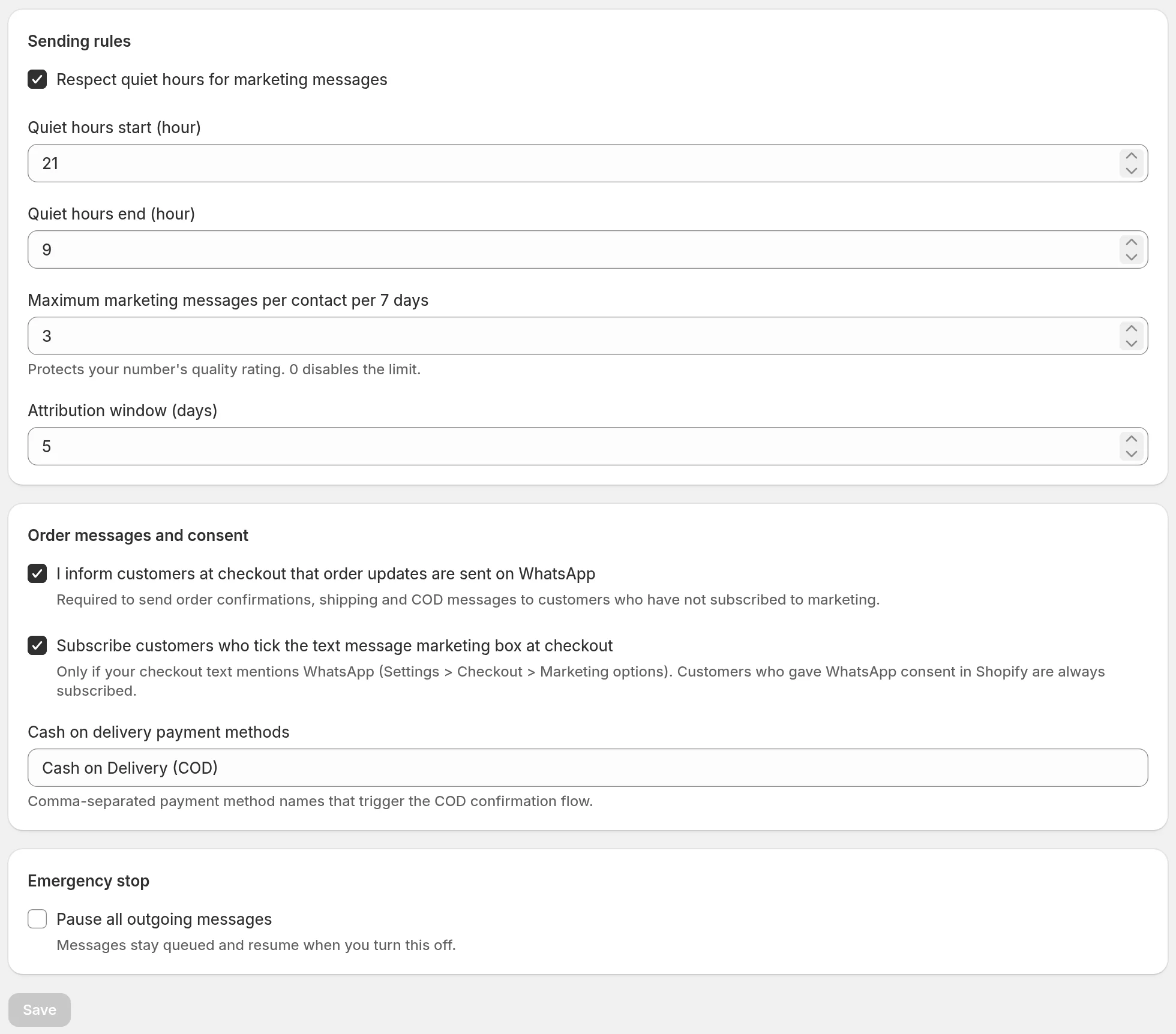
Sending rules
Quiet hours
Respect quiet hours for marketing messages is on by default, from 21:00 to 9:00 in your store's time zone. Set the hours with Quiet hours start (hour) and Quiet hours end (hour), as whole hours from 0 to 23.
- A marketing flow message due during quiet hours is held and goes out in the first hour after they end, at a slightly different minute for each customer.
- Order updates (confirmation, shipping, cash on delivery) are never held: customers expect them right away.
- Campaigns follow the time you schedule. If you pick a time inside your quiet hours, the campaign page warns you with During your quiet hours.
Weekly marketing limit
Maximum marketing messages per contact per 7 days is 3 by default, from 0 to 20. Set it to 0 to turn the limit off.
The limit counts the marketing flow messages and campaign messages a customer received over the last 7 days. Order updates do not count.
- In a flow, a marketing message over the limit is skipped and the flow continues with the next step.
- In a campaign, customers who reached the limit are left out of the send.
The limit protects your number's quality rating: customers who get too many messages block or report the number more often.
Attribution window
Attribution window (days) is 5 by default, from 1 to 30. An order is credited to a message when the customer clicked a tracked link from Piaflo within that many days. Without a click, it is credited to a message the customer read within the last 24 hours. Details in Attribution and Meta cost.
Order messages and consent
This section decides who can receive order updates and how checkout consent is counted. It is explained in Order messages without a marketing opt-in and WhatsApp consent.
It also holds Cash on delivery payment methods: the payment method names, separated by commas, that start the cash on delivery confirmation flow. By default: "Cash on Delivery (COD)", "Paiement à la livraison" and "COD". Payment methods whose name contains "cash on delivery" or "livraison" also count.
Emergency stop
Pause all outgoing messages stops every message Piaflo sends: order updates, marketing flows, campaigns, inbox replies and test messages.
- Messages stay queued and go out when you turn the stop off and save. Piaflo checks again every 5 minutes, so they resume within a few minutes.
- Campaign messages are the exception: a campaign message still queued 24 hours after its send time (plus the Spread sending over duration) is dropped.
- Flows keep running: customers still enter them, and their messages wait in the queue.
Number health
Each connected number has a card in Settings > WhatsApp account. Piaflo reads its status from Meta every hour, and updates the quality rating and messaging limit as soon as Meta reports a change. Last checked shows when.
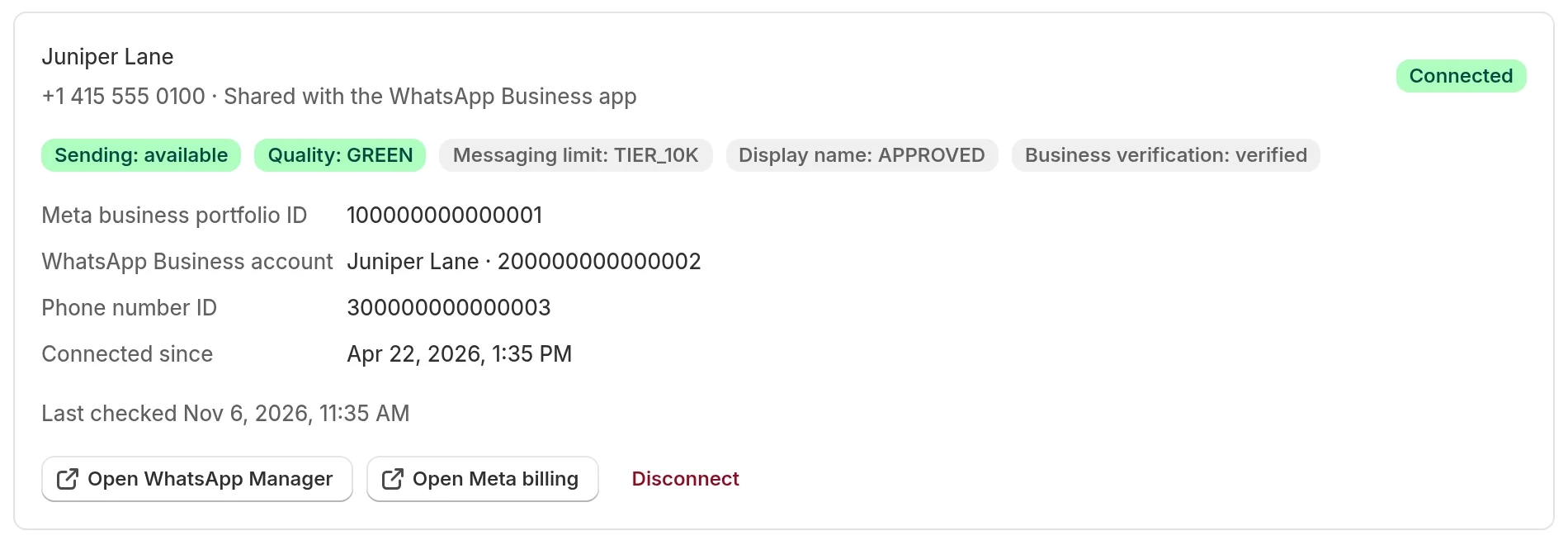
| Badge | What it tells you |
|---|---|
| Sending: available, limited or blocked | Whether Meta lets this number send messages right now |
| Quality | Meta's quality rating of your number, from customer reactions: GREEN is good, YELLOW is a warning, RED is low |
| Messaging limit | How many different customers you can start conversations with per 24 hours, as set by Meta |
| Display name | The review status of your display name |
| Business verification | The status of your business verification at Meta |
Home shows the same quality and limit in the WhatsApp health box.
When Meta reports a limitation, the card shows a banner: Meta reports a limitation on this number, or Meta is blocking messages from this number when sending is blocked. Each line is Meta's own message with its code. If the problem is a missing payment method, the banner says so and offers Add a payment method: see Meta payment method and display name.
When the quality rating drops to low, Piaflo pauses the campaigns that are sending, to protect the number. Protect your number's quality explains how to avoid it, and Number limited or blocked by Meta what to do when it happens.
Two buttons open Meta directly: Open WhatsApp Manager for your phone numbers and Open Meta billing for payment methods.
 Still stuck? Write to us with the flow name or the order number involved.