Order confirmation with opt-in
The recipe that thanks the customer for their order and asks if they want updates on WhatsApp. A "Yes" subscribes them, so your marketing flows can reach them.
On this page 6
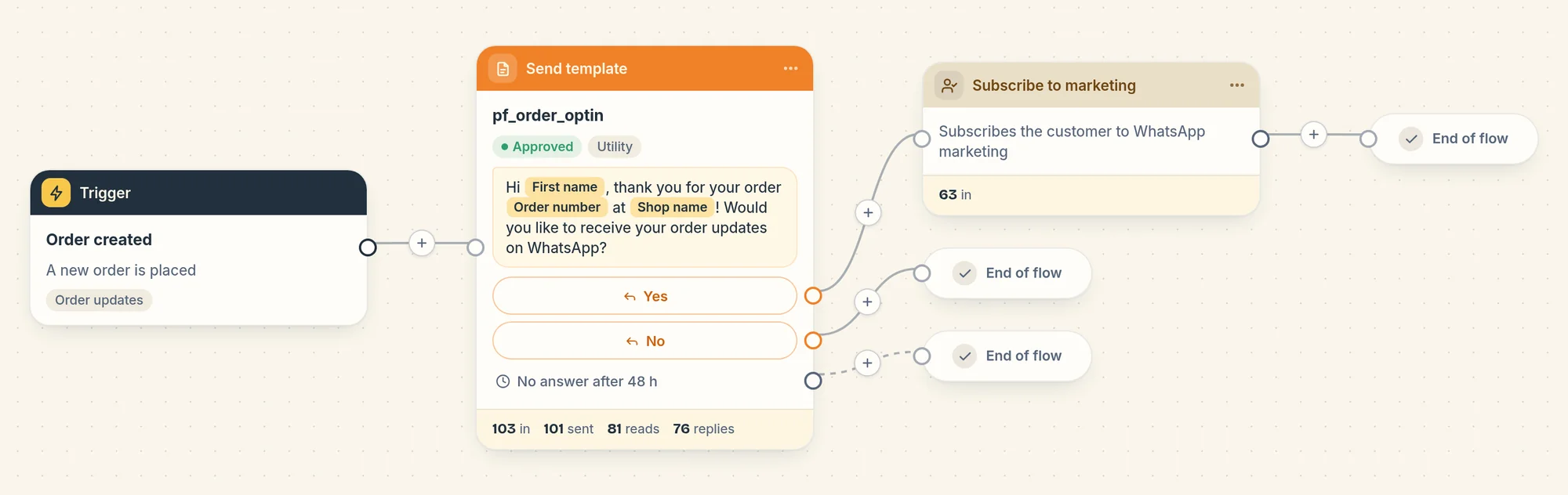
This recipe confirms a new order and asks the customer, in the same message, if they want to receive their order updates on WhatsApp. When they tap Yes, Piaflo subscribes them to your WhatsApp marketing messages. It is an order update flow, included in the Free plan.
The message
"Hi Marie, thank you for your order #1042 at Maison Lune! Would you like to receive your order updates on WhatsApp?"
The message has two buttons, Yes and No, and ends with "Reply STOP to stop receiving messages". When the first name is missing, it says "Hi there".
Then the flow waits up to 48 hours for an answer:
- Yes: the customer is subscribed. The flow ends.
- No: nothing changes. The flow ends.
- No answer after 48 hours: nothing changes. The flow ends.
What a "Yes" does
The Subscribe to marketing step after Yes:
- marks the customer as subscribed in Piaflo, with the flow and their reply saved as proof of consent;
- saves the WhatsApp marketing consent on the customer in Shopify;
- starts your flows that use the Customer opted in trigger, such as Welcome new subscribers.
From then on, your marketing flows and campaigns can reach this customer. A customer who already replied STOP is not subscribed again by this step: only a new START message does that.
The setting this recipe needs
The recipe is meant for customers who have not subscribed yet. Order updates only reach them when you turn on I inform customers at checkout that order updates are sent on WhatsApp in Settings > Order messages and consent.
Turn it on
- Connect your WhatsApp number: Connect your WhatsApp number.
- Turn on I inform customers at checkout that order updates are sent on WhatsApp in Settings > Order messages and consent.
- Go to Flows and click Activate on Order confirmation with opt-in.
Use this recipe instead of Order confirmation: both start when an order is created, so running the two sends two messages per order. On the Free plan, only one of them can be active.
Good to know
- Cash on delivery orders do not start this flow. They go to the Cash on delivery order trigger.
- A second order within 48 hours: if the customer has not answered the first question yet, they are still in the flow, so the second order does not start it again. It shows as "Customer already in this flow" on the flow page.
- The buttons: Piaflo recognises the tap on a button, and also a typed reply that is exactly "Yes" or "No" (or "Oui" or "Non"), in any case.
Change it
Open the flow from Your flows, edit it on the canvas, then click Publish. You can change how long Piaflo waits for an answer in the message step, with Wait for an answer (hours). On paid plans, you can add steps on the Yes path, for example a thank you message.
 Still stuck? Write to us with the flow name or the order number involved.