Why a customer did not enter a flow
A flow is active but a customer got nothing. Find the reason Piaflo gives on the flow page, then the fix for each one.
On this page 4
When the trigger of a flow fires, Piaflo checks a few rules before the customer enters. If one fails, the customer is skipped and counted with the reason, so you can see what happened.
Find the reason
- Go to Flows and open the flow.
- Look for the box Customers who did not enter this flow (30 days). It lists each reason with the number of customers it concerns.
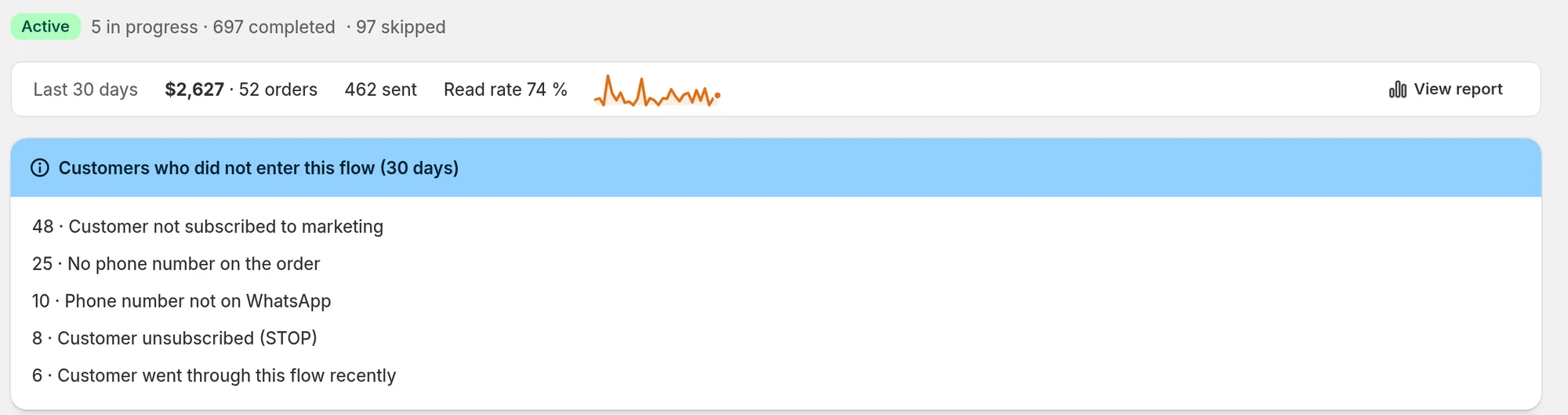
If the box is not there, nobody was skipped: jump to The customer entered but got nothing yet or The trigger never fired.
Each reason and its fix
Marketing flows are not included in your plan
The flow is a marketing flow (abandoned checkout, welcome, review request) and your store is on the Free plan, which only sends order updates. Upgrade to Starter or above: on the Home page, click Plans next to your current plan.
Shopify Flow is not included in your plan
A Shopify Flow workflow tried to start this flow. Starting Piaflo flows from Shopify Flow needs the Growth plan or above.
No phone number on the order
The order or checkout has no phone number, so there is nobody to message. To collect more numbers, make the phone field required or optional in your checkout settings in Shopify, and turn on the opt-in popup in Opt-in tools.
Phone number not on WhatsApp
An earlier message to this number failed because it is not a WhatsApp number, so Piaflo stops trying it. Nothing to fix on your side, unless the customer gives you another number.
Customer unsubscribed (STOP)
The customer replied STOP (or an equivalent such as "unsubscribe" or "arrêter"). Piaflo sends them nothing more. If they reply START, they are subscribed again.
Customer not subscribed to marketing
Marketing flows only reach customers who agreed to receive marketing on WhatsApp. This is a Meta rule, and it is the most common reason by far. To get more subscribers:
- Turn on the Order confirmation with opt-in recipe: it thanks the customer for the order and asks if they want updates on WhatsApp. A "Yes" subscribes them.
- Turn on the chat button and the opt-in popup in Opt-in tools.
- If your checkout has a text message marketing box and its wording mentions WhatsApp, turn on Subscribe customers who tick the text message marketing box at checkout in Settings > Order messages and consent.
Customers who gave WhatsApp consent in Shopify are always subscribed in Piaflo.
Customer not subscribed, and order messages are not enabled in Settings
The flow sends order updates (confirmation, shipping, cash on delivery) and the customer has not subscribed. By default, Piaflo only sends order updates to subscribed customers.
If your checkout tells customers that order updates are sent on WhatsApp, turn on I inform customers at checkout that order updates are sent on WhatsApp in Settings > Order messages and consent. Order updates then go to every customer with a phone number.
Customer already in this flow
The trigger fired again while the customer was still going through this flow, for example a second order placed while the first one's flow is still waiting. A customer can only be in a flow once at a time. Nothing to fix.
Customer went through this flow recently
The flow has a re-entry window and the customer entered less than that long ago. The abandoned checkout recipe uses 72 hours, so a shopper who leaves checkout every day is not reminded every day. You can change it in the flow settings, under Hours before a customer can enter again (0 = never).
The customer entered but got nothing yet
The customer entered the flow, so the message is planned. These cases delay it:
- The template is waiting for Meta's approval. The editor shows "Template awaiting Meta approval" on the step. The message goes out once Meta approves it, usually within minutes, up to 24 hours.
- Quiet hours. Marketing messages due between 21:00 and 9:00 (the default, in your store's time zone) go out after quiet hours. Change them in Settings > Sending rules.
- A wait step. The abandoned checkout recipe waits 30 minutes before the reminder, then up to 23 hours before the discount code.
- The emergency stop is on. Settings > Emergency stop pauses every outgoing message. They stay queued and go out when you turn it off.
And these cases skip messages:
- The weekly marketing limit is reached. By default a customer gets at most 3 marketing messages per 7 days. Above that, Piaflo skips the message and moves to the next step. The limit is in Settings > Sending rules.
- The customer ordered. Flows such as abandoned checkout stop as soon as the customer places an order, and the messages still planned are cancelled.
The trigger never fired
If the customer is neither in the flow nor in the skipped list, the trigger did not fire for them. Check:
- The flow is active. On the Flows page, its status must be Active. A paused flow takes nobody in, and changes saved as a draft are not live until you click Publish.
- Your WhatsApp number is connected. See Connect your WhatsApp number.
- For abandoned checkouts: the shopper must have typed a phone number in checkout, and Piaflo only considers checkouts updated in the last 72 hours.
- For keyword flows: the customer's message must be exactly one of the flow's keywords, on its own. Capital letters do not matter, but "price please" does not match the keyword "price".
 Still stuck? Write to us with the flow name or the order number involved.