Abandoned checkout recovery
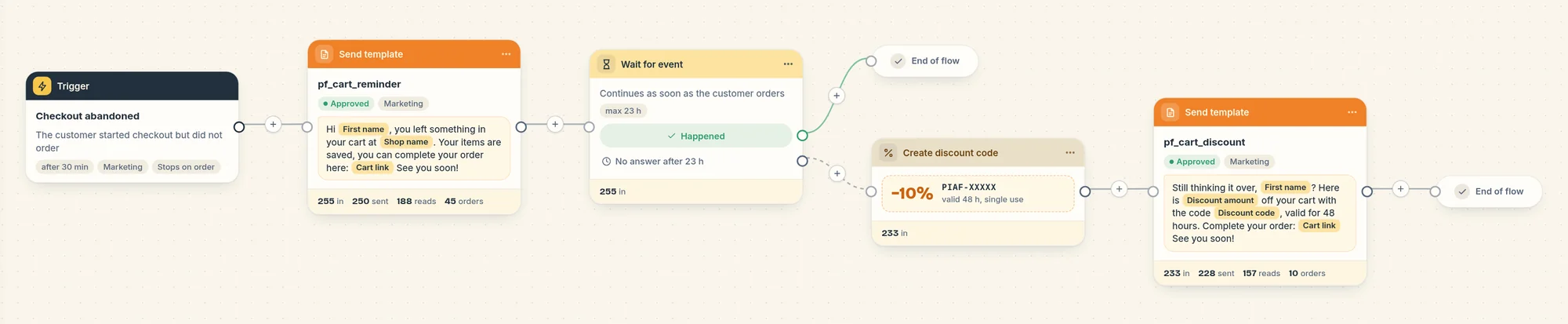
The recipe that messages shoppers who leave checkout: a reminder after 30 minutes, then a one-time 10% code the next day if they still have not ordered.
On this page 6
This recipe messages a shopper who reached checkout, entered a phone number and left without ordering. It is a marketing flow, available from the Starter plan.
The messages
- 30 minutes after they leave checkout: a reminder with a link that brings them back to their checkout, items still in it.
- The flow then waits up to 23 hours. If the shopper orders in the meantime, the flow stops there.
- If they have not ordered: Piaflo creates a unique 10% discount code, valid for 48 hours, and sends it with the same checkout link.
The messages in English (Piaflo submits them in English and French, and each shopper gets their own language when available):
"Hi Marie, you left something in your cart at Maison Lune. Your items are saved, you can complete your order here: (link) See you soon!"
"Still thinking it over, Marie? Here is 10% off your cart with the code PIAF-7KQ2, valid for 48 hours. Complete your order: (link) See you soon!"
Both end with "Reply STOP to unsubscribe". The customer's first name, your store name, the code and the link are filled in for each shopper. When the first name is missing, the message says "Hi there".
Who receives it
A shopper enters the flow when all of these are true:
- They left checkout with a phone number, and checkout was last updated less than 72 hours ago.
- They are subscribed to your WhatsApp marketing messages. Cart reminders are marketing for Meta, so Piaflo never sends them to customers who have not subscribed.
- They have not gone through this flow in the last 72 hours.
Shoppers who do not meet these conditions are counted on the flow page under Customers who did not enter this flow (30 days), with the reason. The most common one is "Customer not subscribed to marketing": see how to get more subscribers.
When the shopper orders
As soon as the shopper places an order, Piaflo stops the flow for them and cancels any message still planned. They will not receive a discount code after buying at full price.
In Analytics, the order is credited to the flow when the shopper clicked the link within the attribution window (5 days by default, adjustable from 1 to 30 days with Attribution window (days) in Settings > Sending rules), or, without a click, read the message in the 24 hours before ordering. See how orders are attributed.
Turn it on
- Connect your WhatsApp number first, if you have not yet: Connect your WhatsApp number.
- Go to Flows and find Abandoned checkout recovery among the recipes.
- Click Activate.
The two message templates are submitted to Meta. Shoppers who leave checkout before Meta approves them get their reminder once approval comes through, if it comes within 24 hours.
Change it
Open the flow from Your flows to edit it on the canvas, then click Publish. What stores change most often:
- The delay before the reminder: Send after (minutes without an order) in the trigger settings. Keep at least 15 minutes, otherwise you may write to shoppers who are still filling in the payment page. Piaflo warns you below that.
- The discount: percentage, validity and code prefix are in the discount code step. You can also remove the step and the second message to send a single reminder.
- The wording: the messages are WhatsApp templates approved by Meta, which cannot be edited once submitted. Create a new template in Templates, wait for approval, then choose it in the message step.
Common questions
Do shoppers with a US phone number receive it? No. Meta does not deliver marketing templates to +1 US numbers, and cart reminders are marketing.
Can I send it to customers who have not subscribed? No. Meta classifies cart reminders as marketing, which requires the customer's consent. Grow your subscribers with the opt-in popup and the subscription request in order confirmations.
Does it work with cash on delivery stores? Yes. The trigger is the abandoned checkout, whatever payment method the shopper would have chosen.
 Still stuck? Write to us with the flow name or the order number involved.