Review request
The recipe that asks customers how their order went five days after shipping. Happy customers get your review link, unhappy ones are handed to your team.
This recipe writes to customers five days after their order ships and asks how they like it. The answer decides what happens next. It is a marketing flow, available from the Starter plan.
The flow
- Order shipped: the customer enters the flow when a fulfillment is created for their order.
- Wait 5 days.
- The question: "Hi Marie, your order #1042 should have arrived. How do you like it?", with the buttons I love it and Not great, and "Reply STOP to unsubscribe" at the end.
- Up to 72 hours for an answer, then:
- I love it: Piaflo replies "Thank you Marie! It would mean a lot if you left us a quick review:" followed by a link.
- Not great: Piaflo replies "We are sorry to hear that. Someone from our team will reply here shortly." and hands the conversation to your team.
- No answer: the flow ends.
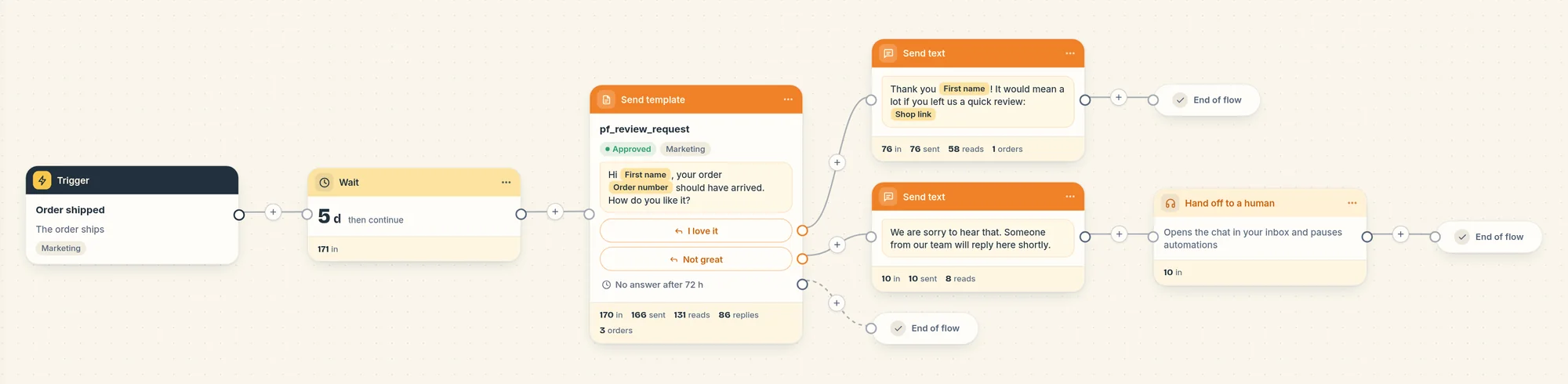
Handing off to your team
On the Not great path, the Hand off to a human step opens the conversation in your Inbox as unread. Automations pause for this customer: their next messages do not move any flow forward until you close the conversation or resume automations. See Automation pause.
Who receives it
Review requests are marketing for Meta, so only customers subscribed to your WhatsApp marketing messages enter the flow. Your rules in Settings > Sending rules apply to the question:
- Quiet hours: a question due between 21:00 and 9:00 (by default) goes out after quiet hours.
- Weekly marketing limit: when the customer has already reached it, Piaflo skips the question and the customer follows the No answer path.
The two replies after a button tap are sent right away, since the customer just wrote to you.
Several parcels
Each fulfillment starts the flow. A customer who is still in the flow (during the 5 days or while Piaflo waits for the answer) is not entered again: the second parcel shows as "Customer already in this flow" on the flow page. A parcel shipped after the first journey has ended starts a new one.
Turn it on
- Connect your WhatsApp number: Connect your WhatsApp number.
- Go to Flows and click Activate on Review request.
- Open the flow, set your review link in the I love it reply, then click Publish.
Change it
- The delay: change the Wait step, in minutes, hours or days. Count your usual delivery time.
- The waiting time for an answer: Wait for an answer (hours) in the question step.
- The first name: the thank you reply uses the first name with no fallback. Click the First name variable and set If empty, use if many customers have none.
- The question: create a new marketing template with two quick reply buttons in Templates. Each button opens its own path when you choose the template in the step.
 Still stuck? Write to us with the flow name or the order number involved.