Shopify Flow
Start a Piaflo flow from any Shopify Flow workflow with the action "Start a Piaflo flow", and react in Shopify Flow to four Piaflo events: subscribed, replied, COD confirmed and COD cancelled.
Shopify Flow is Shopify's automation app. Piaflo connects to it both ways, on the Growth and Pro plans:
- An action, Start a Piaflo flow: any Shopify Flow workflow can put a customer into a Piaflo flow.
- Four triggers: Piaflo tells Shopify Flow when a customer subscribes, replies, confirms or cancels a cash on delivery order, so your workflows can act on it.
You find the integration at the bottom of the Flows page, in the Shopify Flow section, with an Open Shopify Flow button.
Start a Piaflo flow from Shopify Flow
1. Create the Piaflo flow
- On the Flows page, click Create custom flow.
- Choose the trigger Started from Shopify Flow and click Create.
- Build the flow, then click Publish.
- Click the trigger card. Under Piaflo flow ID, click Copy.
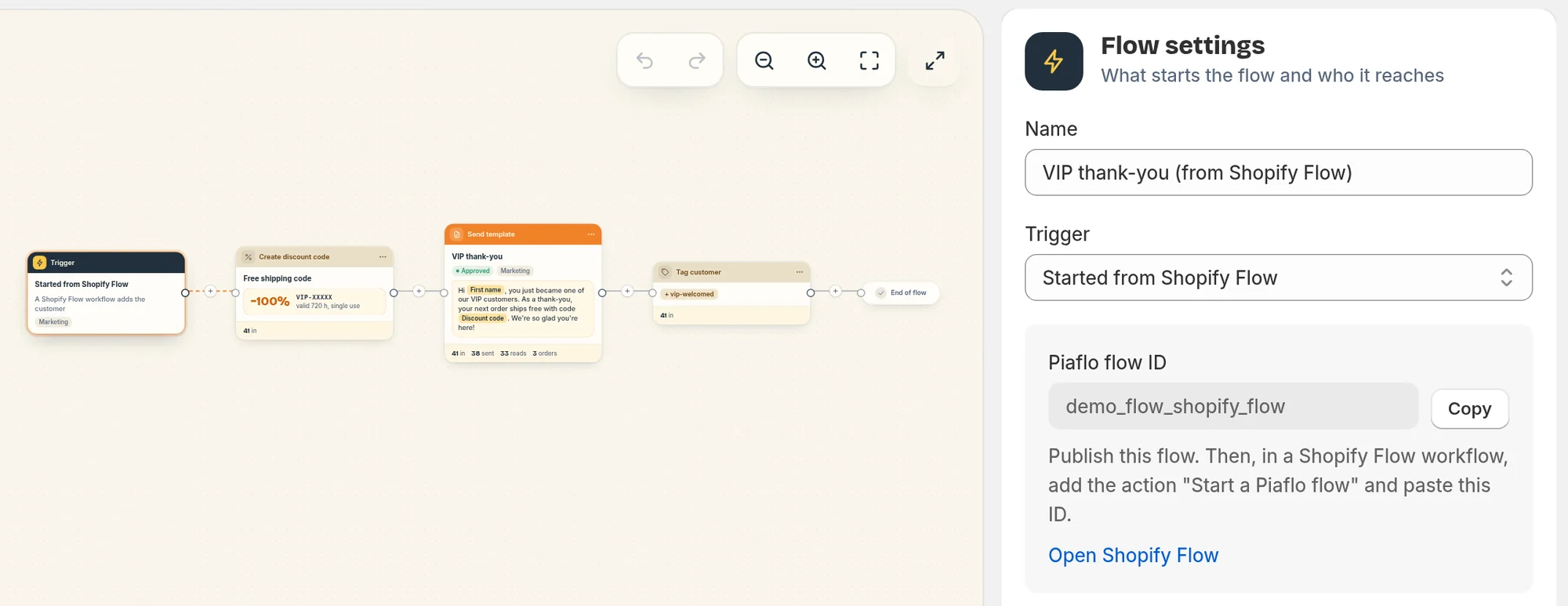
2. Add the action in Shopify Flow
- In Shopify Flow, open or create a workflow whose trigger provides a customer, such as a customer or order event.
- Add the action Start a Piaflo flow.
- Paste the ID in Piaflo flow ID. The customer is filled in from the workflow. If the workflow has an order, you can pass it too.
- Turn the workflow on.
What Piaflo does with it
Each run of the workflow puts the customer into the Piaflo flow once. Piaflo reads the customer's phone number from Shopify, then applies the same rules as for any other trigger:
- Marketing flows only reach subscribed customers.
- Order updates flows reach subscribed customers, or everyone with a phone number when I inform customers at checkout that order updates are sent on WhatsApp is on in Settings > Order messages and consent.
- Re-entry and "already in this flow" work as usual.
When the workflow passes an order, your messages can use the order variables (Order number, Order total, Order status link, First item, Number of items). Steps that need an order, such as Tag order or Add order note, show the warning "This step only runs when your Shopify Flow workflow passes an order."
When nothing happens
- Shopify Flow shows an error on the action: "Enter the Piaflo flow ID. You can copy it from the flow's trigger in Piaflo." or "This workflow does not provide a customer."
- The ID belongs to a flow with another trigger: Piaflo ignores the request. Only flows with Started from Shopify Flow can be started this way.
- The flow page lists skipped customers: "Shopify Flow is not included in your plan" if your store is below Growth, "No phone number on the order" if the customer has no phone number in Shopify, or a consent reason. See Why a customer did not enter a flow.
Piaflo triggers in Shopify Flow
In Shopify Flow, start a workflow from one of these Piaflo triggers:
| Trigger | Fires when | Data |
|---|---|---|
| Customer subscribed to WhatsApp | A customer subscribes to your WhatsApp marketing messages in Piaflo | The customer, Subscription source (for example widget, checkout_sms, keyword_start, flow, shopify) |
| Customer replied on WhatsApp | A customer sends you a WhatsApp message, at most once every 30 minutes per customer | The customer, Message text |
| COD order confirmed on WhatsApp | A flow adds the tag cod-confirmed to an order |
The order |
| COD order cancelled on WhatsApp | A flow adds the tag cod-cancelled to an order |
The order |
Good to know:
- The two COD triggers come with the Cash on delivery confirmation recipe. Any flow whose Tag order step adds one of these tags fires them too.
- Customer replied on WhatsApp does not fire for STOP messages. A burst of messages within 30 minutes counts once.
- Contacts imported from a CSV file do not fire Customer subscribed to WhatsApp.
- Piaflo needs to find the customer in Shopify. It uses the customer linked to the contact, or looks them up by phone number.
Ideas: tag customers who reply so your team follows up, add confirmed COD orders to a fulfillment workflow, or send an internal email when a COD order is cancelled.
Plan
The action and the four triggers need the Growth plan or above. Below Growth, the Started from Shopify Flow trigger is disabled in the trigger list, the triggers are not sent to Shopify Flow, and customers sent by Shopify Flow are skipped until you upgrade.
 Still stuck? Write to us with the flow name or the order number involved.