Automation pause when your team replies
When someone on your team replies from the inbox, Piaflo stops the customer's replies from driving your flows, so a flow does not answer in your place. Here is what it pauses, what keeps running and how to resume.
Some flows wait for the customer to answer: a cash on delivery confirmation with Confirm and Cancel buttons, a question, a keyword. If a team member is already talking to the customer, those answers are meant for the person, and a flow should not react to them.
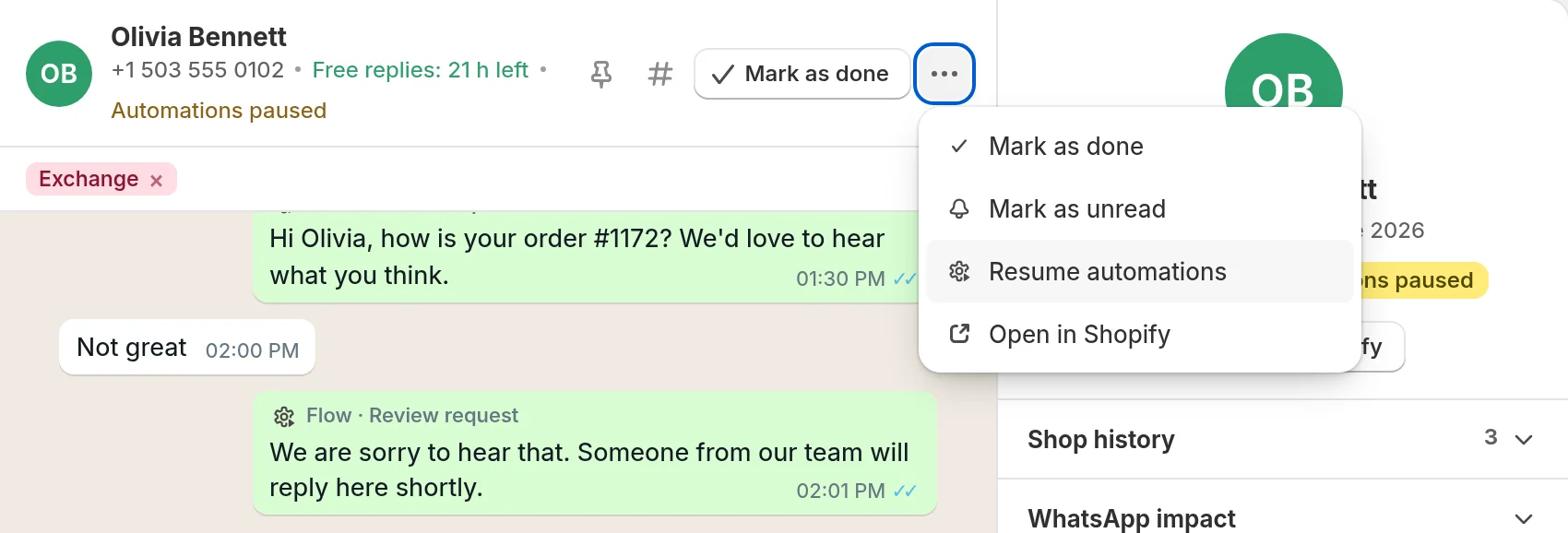
So when a team member replies in Inbox, Piaflo pauses the automations on that conversation. The conversation header and the customer column show Automations paused.
What turns the pause on
- Sending a reply or a template from the inbox.
- A flow reaching a Hand off to a human step. The conversation is marked unread, moves to Ongoing and shows the line "Conversation handed to your team by a flow."
- An AI reply step that cannot answer, when it is set to hand the chat to your team.
Adding an internal note does not pause anything. Neither does a reply sent from the WhatsApp Business app on your phone, even though it shows in the conversation.
What the pause changes
While automations are paused on a conversation, the customer's messages:
- Do not move a flow forward. A flow waiting for a button tap, a list choice, an answer to a question or a reply keeps waiting. When the time limit of that step is up, the flow follows its No answer after 24 h path (or whatever delay the step uses).
- Do not start keyword flows. A message that matches a keyword does not start the flow.
What keeps working
- STOP and START. A customer who replies STOP is unsubscribed, and START subscribes them again, paused or not.
- Steps that do not depend on a reply. If a flow is waiting a set time before its next message, that message still goes out. Check the customer column under Automations to see which flows the customer is in, and click Remove from this flow to stop one.
- New flows from other triggers, such as a new order or a shipped order.
Resume automations
Any of these turns the pause off:
- More actions (three dots in the conversation header) > Resume automations.
- Mark as done, when the conversation is over.
- Reopen on a conversation marked as done.
From then on, the customer's replies drive your flows again. A reply they sent while the pause was on is not processed again.
 Still stuck? Write to us with the flow name or the order number involved.